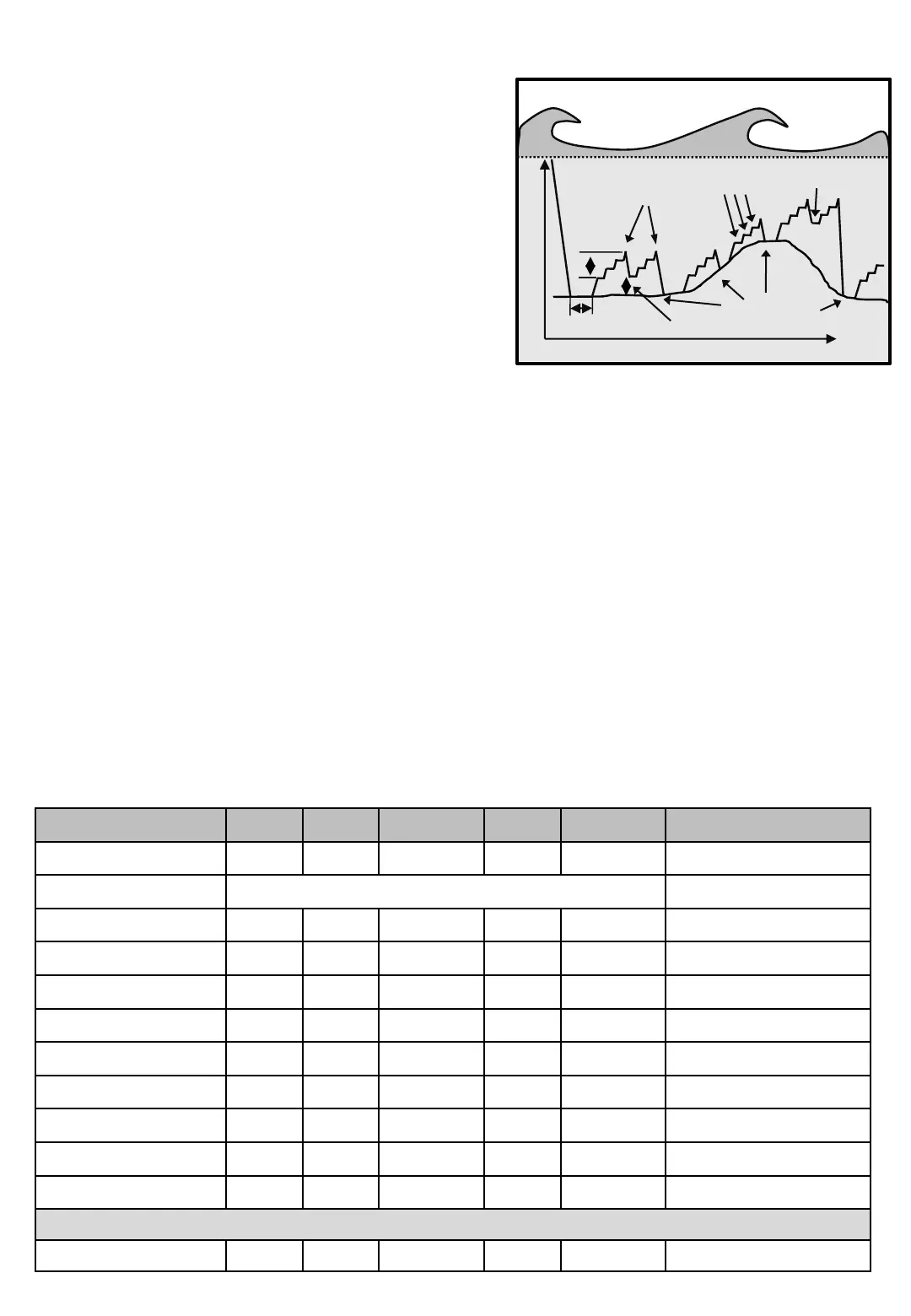
[P]4 Bottom program With Step Jig
Bottom program with Step jig, is a combination between
regular Bottom program [P]2, and Step jig program[P]3.
So details about the screens used here refers to thoose
programs.
Jig length
Diagram 4
Bottom program with Step jig
Time
Bottom paus
No. Of Jig
Bottom detection
Depth paus
Step paus, Step length
Bottom distance
[P]4
Programming Bottom fishing with Step Jig fishing...
• Press [P]rog and check that top row says "Fish program“.
Change with buttons [3] and [6] so that the row 3 shows
"Bottom and Step”.
• Press [P]rog, set Fishing depth.
• Press [P]rog, set Jig Length.
• Press [P]rog, set Bottom Pause (See Bottom fishing [P]3 for details).
• Press [P]rog, set Bottom distance (See Bottom fishing [P]3 for details).
• Press [P]rog, set No Of Jig (See Bottom fishing [P]3 for details).
• Press [P]rog, set Step length (See Step Jig Fishing [P]3 for details).
• Press [P]rog, set Step paus (See Step Jig Fishing [P]3 for details).
• Press [P]rog, set Max depth for the feature to straighten up the line, if desired. (See Bottom fishing
[P]3 for details).
• Press [P]rog, set Haul up percent for the Max depth feature, if used. (See Bottom fishing [P]3 for
details).
• When done, press [P]rog or [E]nter for Main screen
For available Catch detection sensors in this program, see Table 1 on page Machine - 4
Pictures Min Max Factory Step Unit Navigation
Line out 0 999 - 1 M/Fm/Ft Main screen
Fish program Bottom program With Step Jig [P]4
Fishing depth 0 999 20 1 M/Fm/Ft [P]4 [P]
Jig length 1 100 2 1 M/Fm/Ft [P]4 [PP]
Step length 1 100 2 1 M/Fm/Ft [P]4 [PPP]
Step pause 0,5 10,0 2,0 0,1 Second [P]4 [PPP P]
Bottom pause 0,5 999,9 2,0 0,1 Second [P]4 [PPP PP]
Bottom distance 0 20 2 1 M/Fm/Ft [P]4 [PPP PPP]
No of jig 1 25 10 1 St [P]4 [PPP PPP P]
Maximum depth 1 999 999 1 M/Fm/Ft [P]4 [PPP PPP PP]
Huling up 1 100 50 1 M/Fm/Ft [P]4 [PPP PPP PPP]
Menu [E]


 To Next Page