28
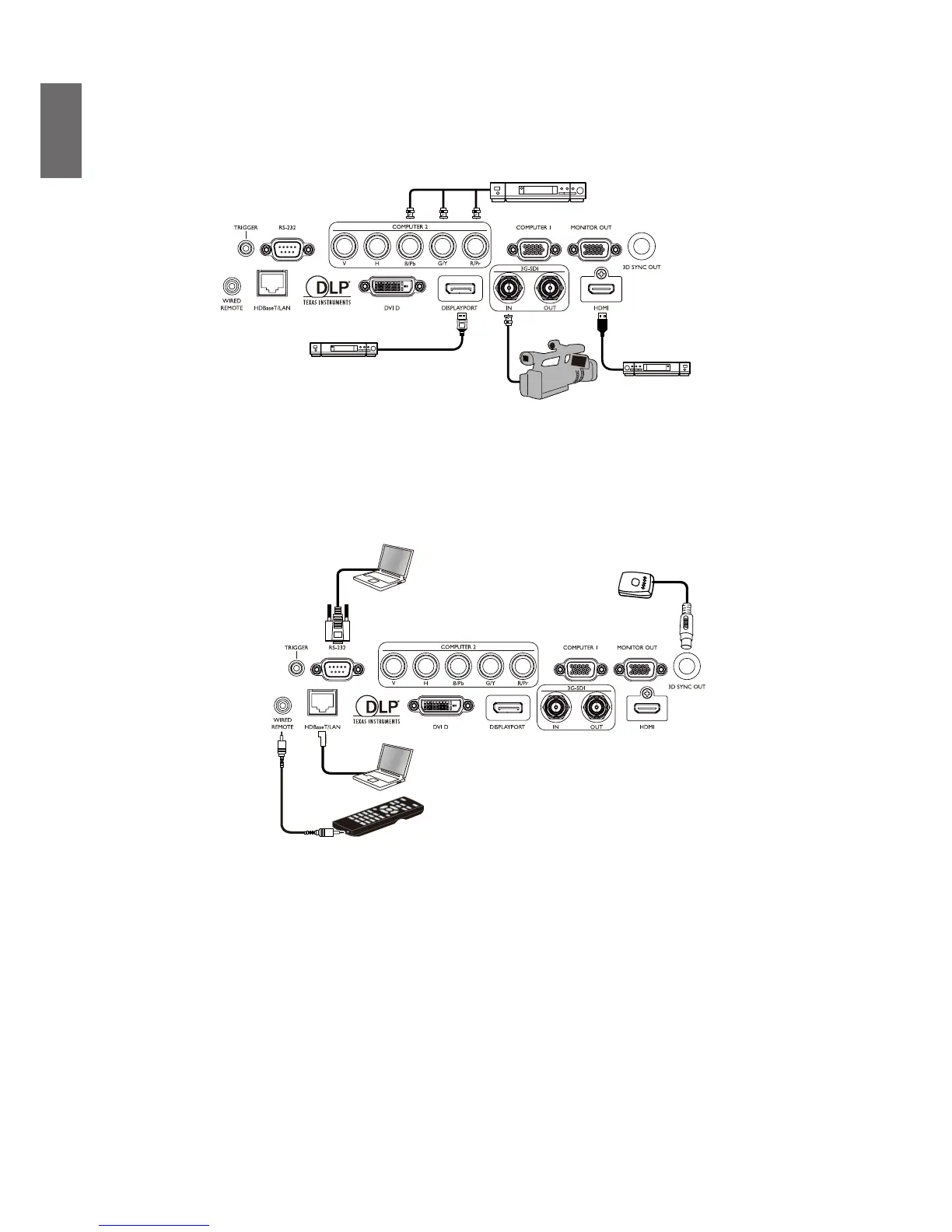
Connect to video equipment
You may connect any video equipment to your projector’s input port with a DVI-D, HDMI,
DisplayPort or YPBPR cable.
Camera
Connect to control port
Your projector features the following control ports:
• HDBaseT/LAN
Your projector supports network control with shared LAN (network control) and HDBaseT.
• RS-232 (RS-232c control)
Your projector supports RS-232c serial control, you may connect the projector to a PC with
standard 9-pin serial cable (straight through wire) for remote control.
• Wired controller
If the remote controller’s IR signal fails to reach your projector because the two are too far
apart or blocked by any obstacle, you may connect the WIRED input port of your projector to
an IR remote controller or an (optional) IR repeater to expand its working area.
• 3D Sync Out
3D IR sync signal transmitter.



 To Next Page