48
This is the terminal to input uncompressed digital video from media device.
HDBaseT
This is the terminal to input uncompressed high-denition video (HD) via RJ-45 cable.
• Aspect Ratio
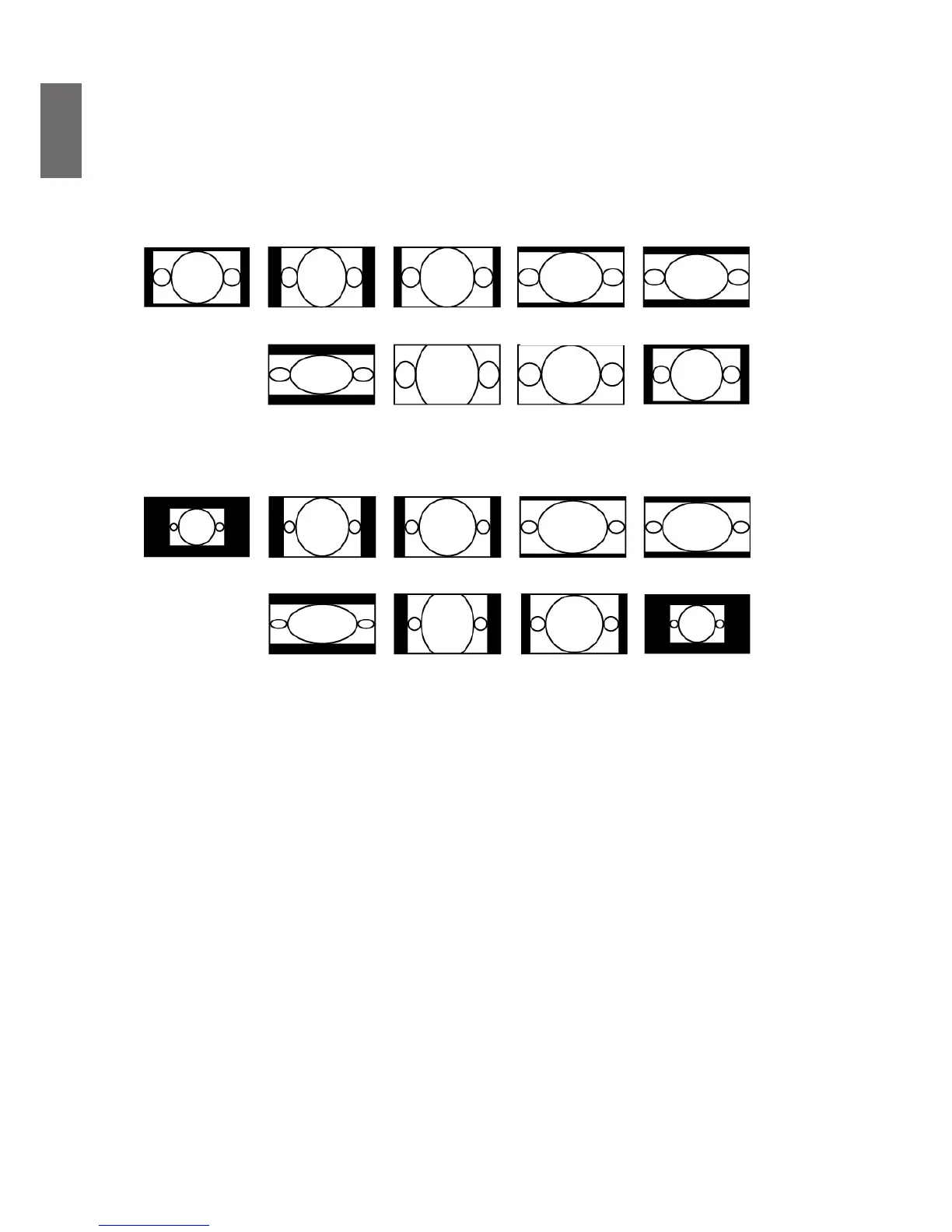
Use this option to adjust aspect ratio.
For normal input of 16:10 the aspect ratio will look like the following images:
Normal output
16:10
Aspect ratio of
output screen
5:4
Aspect ratio of
output screen
2.35:1
Aspect ratio of
output screen
Letter Box
Aspect ratio of
output screen
Auto
Aspect ratio of
output screen
Real
Aspect ratio of
output screen
4:3
Aspect ratio of
output screen
16:9
Aspect ratio of
output screen
1.88
For normal input of ratio 4:3, the aspect ratio will look like the following images:
Normal output
4:3
Aspect ratio of
output screen
5:4
Aspect ratio of
output screen
2.35:1
Aspect ratio of
output screen
Letter Box
Aspect ratio of
output screen
4:3
Aspect ratio of
output screen
16:9
Aspect ratio of
output screen
1.88
Aspect ratio of
output screen
Auto
Aspect ratio of
output screen
Real
• Keystone
Select this function and press
◄►
arrow keys to correct vertical deformation caused by
projection angle.
• Rotation
Press
◄►
button to rotate the image to desirable position.
• Pincushion / Barrel
Press
◄►
button to correct pincushion/barrel distortion.
• Four Corner
Under Four Corner, a grid test pattern can be displayed to make sure the adjust change.
Top Left: Press
◄►
buttons to correct distortion at top left corner
Top Right: Press
◄►
buttons to correct distortion at top right corner
Bottom Left: Press
◄►
buttons to correct distortion at bottom left corner
Bottom Right: Press
◄►
buttons to correct distortion at bottom right corner
• PIP
PIP function enables projector to show two different input sources at the same time in the same
display. Before enabling this function, make sure to set “on” in PIP option.
Source: Press ENTER to set PIP “on”, then press ENTER to select sub source.
Note: The available input source of main and sub sources are shown as follows. Some matrixes cannot
be supported.



 To Next Page