75
Control the projector through network
Set up the projector for networking
Caution:
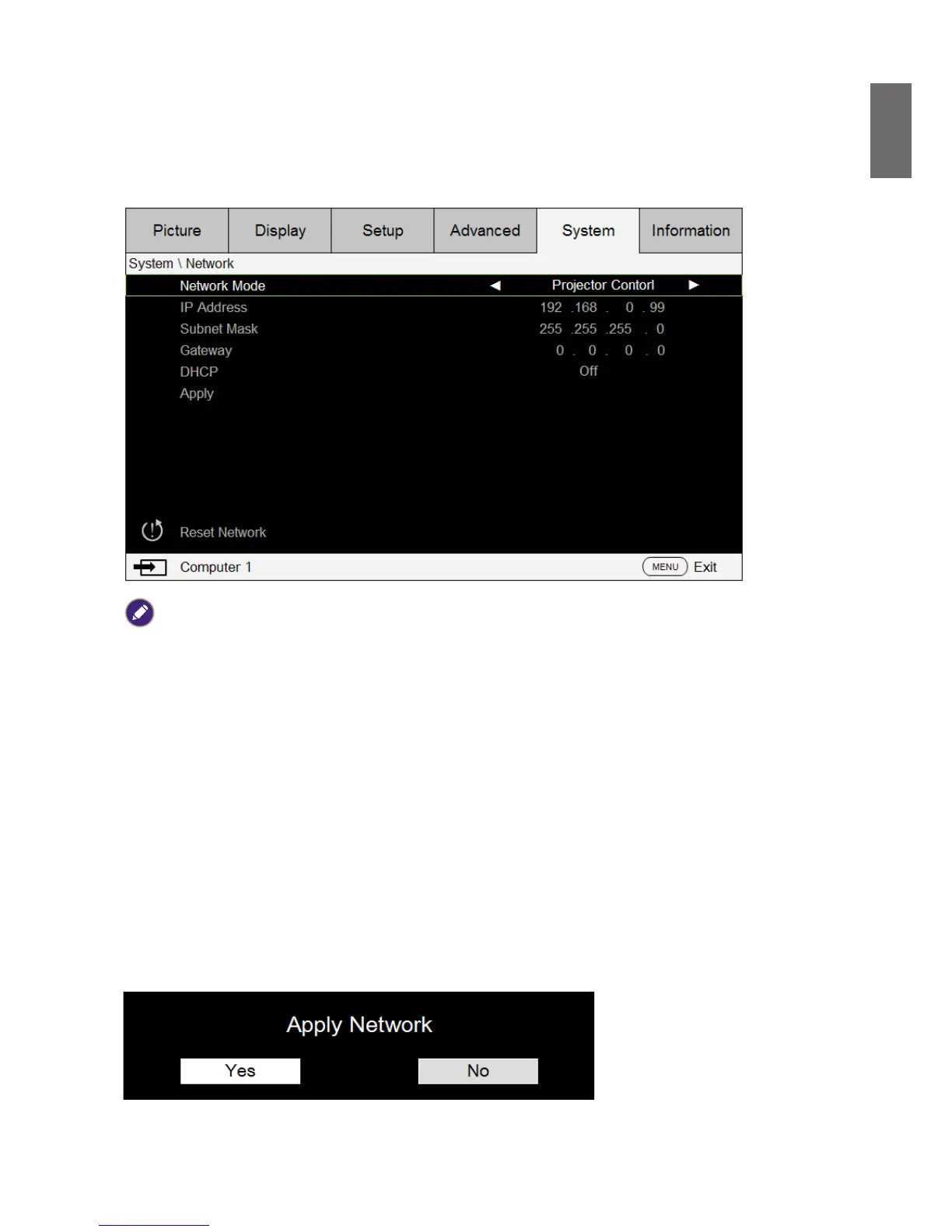
Please set DHCP option to Off and select Apply to activate it. The DHCP service assigns an IP address and settings.
The IP address, Subnet and Gateway options will be dimmed and not available for selection. If the LAN does not
support DHCP service, please press
▲▼
and Enter key to select network and its settings:
IP Address: To specify an IP address, press the Enter button to show the IP address input window.
Use the
◄►
buttons to select the number in the IP address to be changed. Use the
▲▼
buttons
to increase or decrease the number in the IP address.
Subnet Mask: Set up the subnet address in the same way as for the IP Address setup.
Gateway: Set up the gateway address in the same way as for the IP Address setup.
DHCP: Set DHCP to On or Off. If this is set to On, the DHCP server of network domain will
assign an IP address to the projector. That is, the IP address will display in the address window
instead of having to be manually entered. Otherwise, the domain does not or cannot assign an IP
address, and 0. 0. 0. 0 is shown on the IP address window.
Apply: Select this button and press Enter. It takes the projector several seconds to execute the
change in network setting until the following message disappears.
Please contact your network administrator if the network remains disconnected.



 To Next Page