30
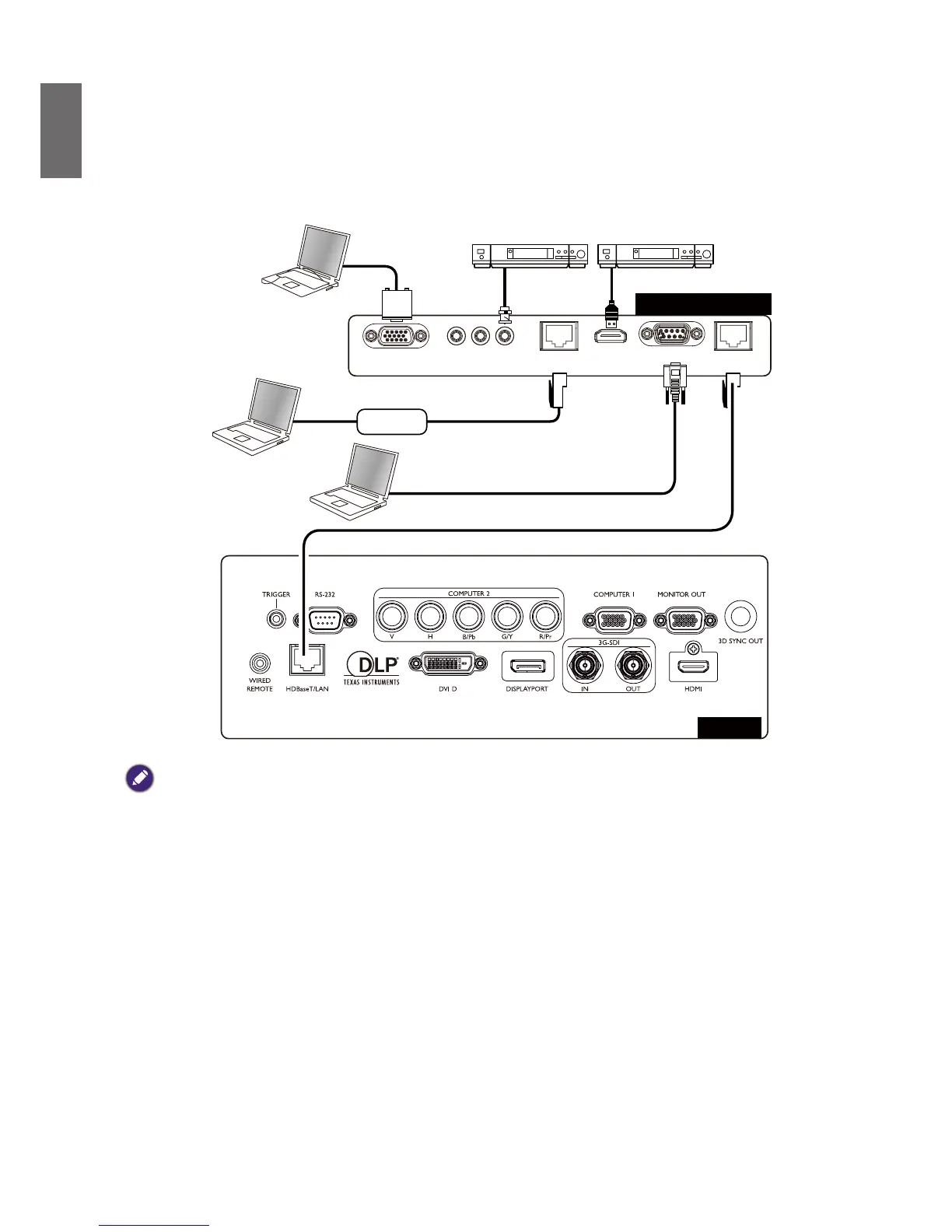
Connect to external digital transmitter
The projector features a built-in HDBaseT for you to work with optional digital transmitter
to send video, RS-232, LAN signal to projector with single RJ-45 cable. If the optional digital
transmitter supports IR remote controller I/O, you may also send IR remote controller signal to
LU9715 projector using the same RJ-45 cable.
VGA IN
RJ45
Lan
HDMI RS232 RJ45
HDBaseT
YPbPr
VGA Cable
DVD Player DVD Player
Hub
RS-232c
RJ-45 Cat5e or above
Control PC
Digital Transmitter
Projector
Caution:
• The HDBaseT of your projector supports to video, RS-232, remote controller, and network control signal
receiving but not Power over Ethernet (PoE) transmission and receiving.
• Effective transmission distance of your digital transmitter is 100 meters. Transmission over 100 meters may lead
to projection screen interruption, interference, or control signal failure.
• Please use Cat.5e RJ-45 cable or better and prevent the cable from becoming twisted. Otherwise the cable may
be damaged and signal transmission quality poor, reducing transmission distance and image quality.



 To Next Page