92 Setup-Program
Setup
The Setup Program allows you to personalize
the touch screen to suit your own
requirements and preferences. For example,
you can adjust the maximum sewing and
embroidery speed.
After setting the sewing computer to your
personal requirements all changes made in
the Setup Program will be saved, even when
the sewing computer is turned off («0»).
The sewing computer can be reset and
returned to the factory settings at any time.
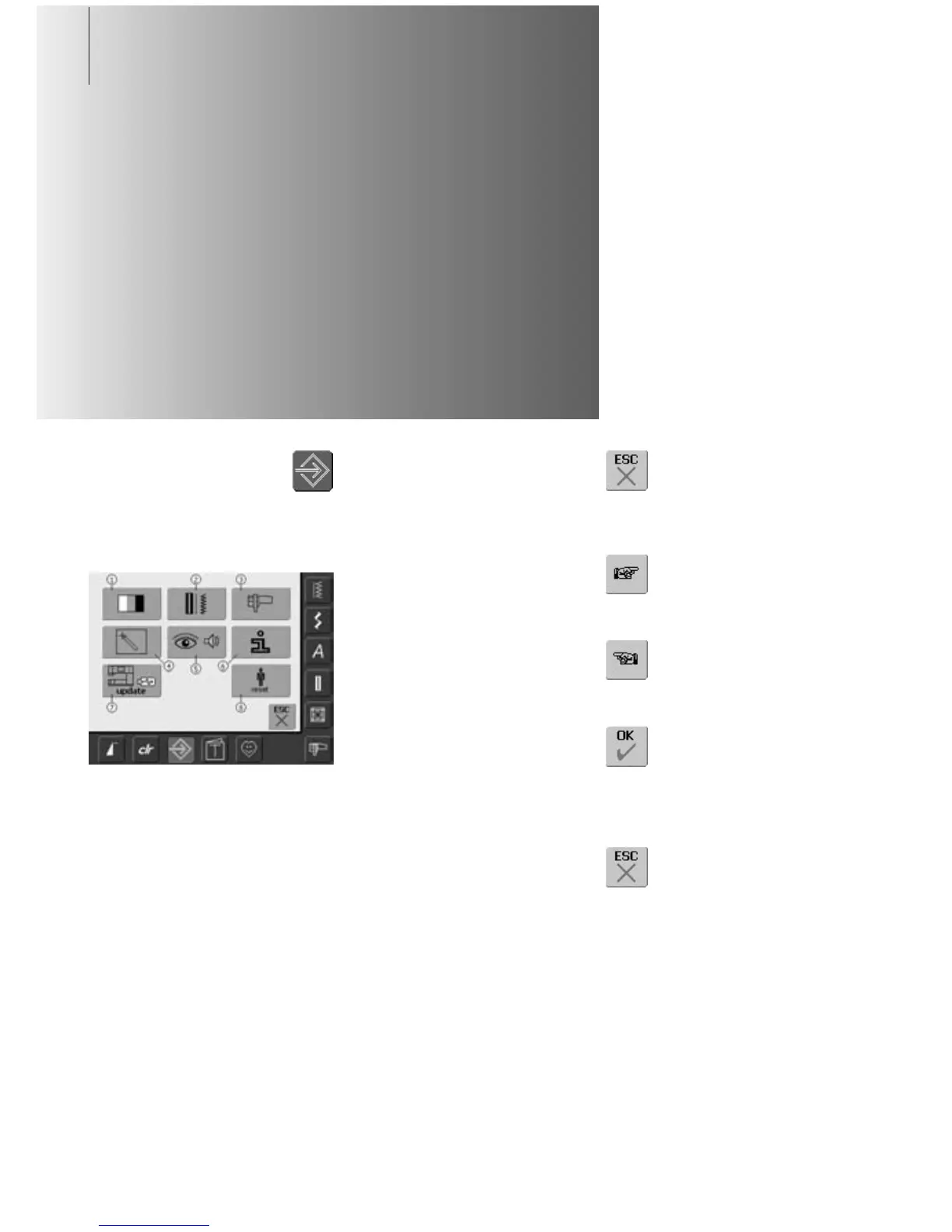
Menu
• the menu lists all features in the sewing
computer which can be altered to suit your
requirements:
1 Display (screen) Settings
2 Sewing Settings
3 Embroidery Settings
4 Display (screen) Calibration
5 Display Messages and Sounds
6 Information
7 Update the sewing computer
8 Reset to Factory
• the customized alterations remain saved
even when the sewing computer is turned
off («0»)
• the alterations can be reprogrammed at
any time
Opening Setup Program
•press the Setup button
• menu with Setup options
appears
Leaving Setup Program
• touch «ESC»
• the Setup Program closes
•returns to previous screen
To Next Page
• touch «To Next Page»
• the next screen appears
To Previous Page
• touch «To Previous Page»
• the previous screen appears
Saving and Closing
• touch «OK»
• changes are saved, the screen
closes and the selection menu
appears
Closing Screen
• touch «ESC»
• the screen display closes, the
original settings remain saved
and the selection menu
appears



 To Next Page