134
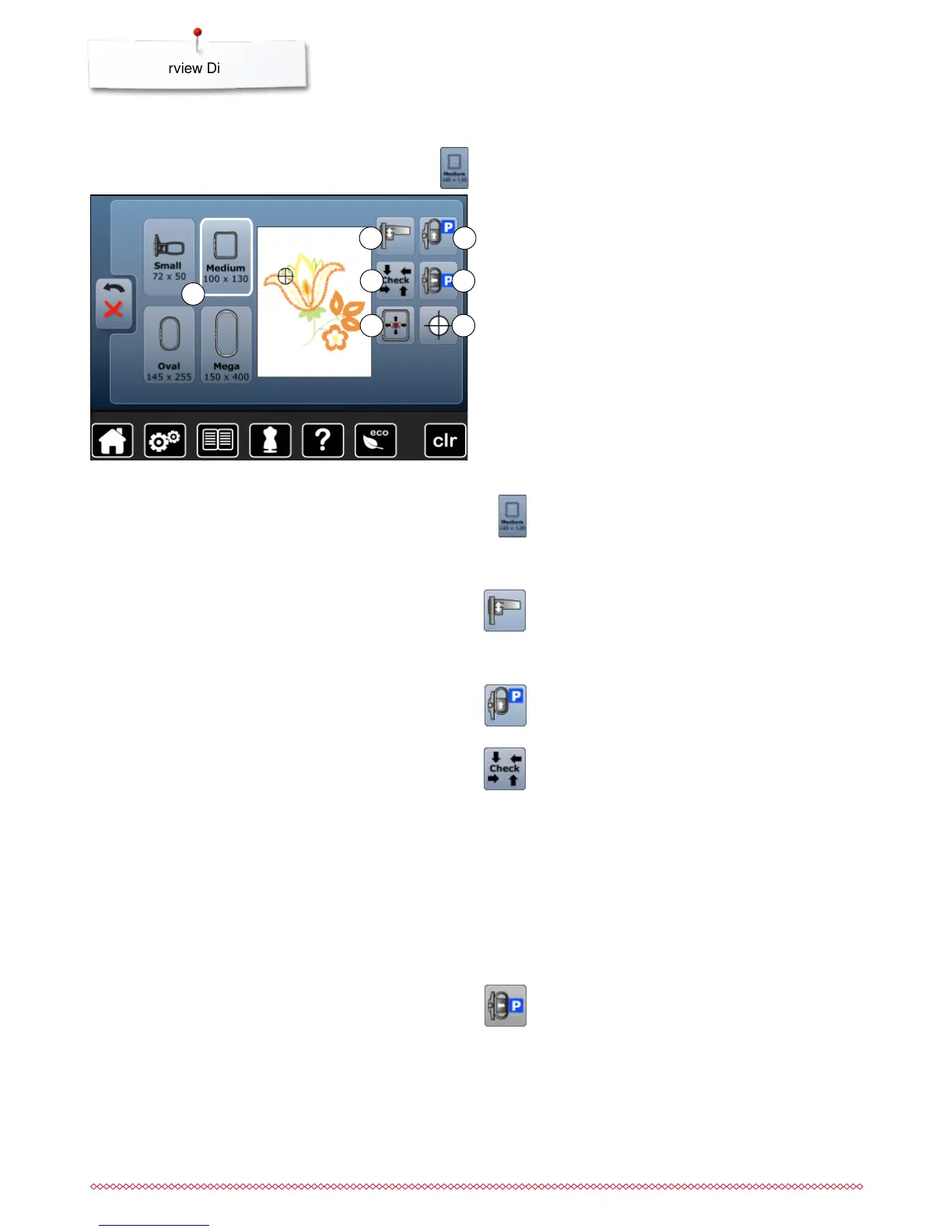
Overview Display
3
5
7
2
4
6
1
⦁
touch «Hoop size»-icon
Functions
1 Select Hoop Menu
2 Calibrating the embroidery module
3 Move hoop to back
4 Check hoop and motif size
5 Parking the module
6 Virtual positioning
7 Motif center
Select hoop menu
►
the optimal hoop for the motif selected is displayed
⦁
touch the button
►
the Display with the Select Hoop and further
functions appear
Move hoop to back
►
the hoop moves vertically to the far back
Better access for changing the bobbin.
Parking the embroidery module
⦁
remove embroidery hoop
►
the embroidery arm travels horizontally to the left to
the park position
⦁
change to the sewing mode
Sewing is possible even with the embroidery module
attached.
Calibrating the embroidery module
⦁
touch icon
►
the embroidery module is calibrated (moves to the
reference points)
The embroidery hoop mustn't be attached.
Check hoop and motif size
►
the embroidery hoop moves vertically (in
longitudinal direction) to read the attached
embroidery hoop
►
the size of the motif is read and traveled by the 4
arrow icons
⦁
press «Back» icon 2x
►
the «Edit»-display appears
►
the attached embroidery hoop is shown in the
display as well as in the icon «Embroidery hoop
Selection»
►
an error message appears when no embroidery
hoop has been attached or the attached embroidery
hoop is too small



 To Next Page