32
Monogram Embroidery
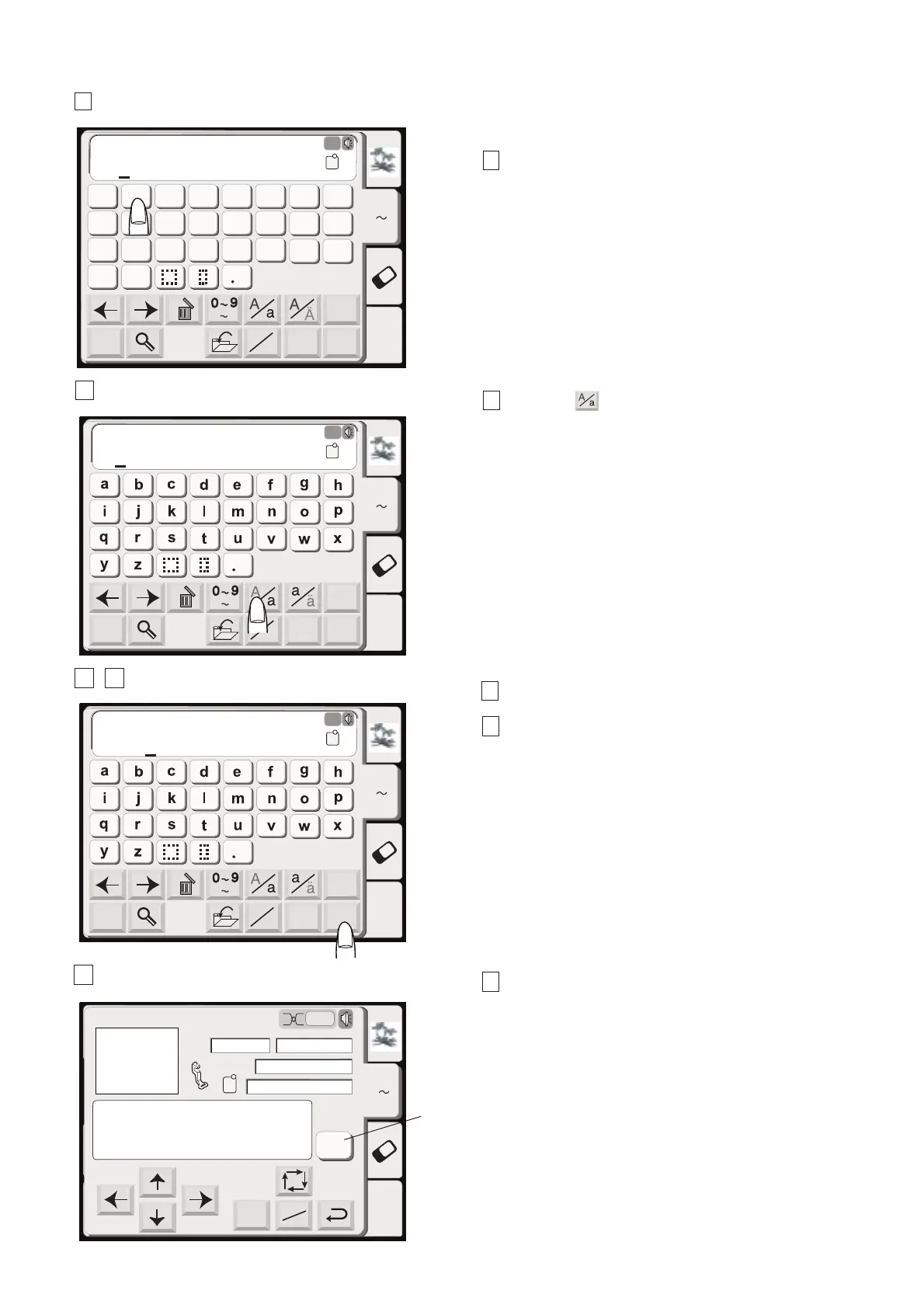
1 Press the font key and select the Gothic style
letters. Select “B”.
2 Press the key to select lowercase letters.
3 Select “e”, “a” and “r”.
4 Press the OK key.
5 The display will change to the embroidery screen.
You can sew a multi-color monogram by changing the
thread color of each letter if you press the color change
key before sewing.
The machine will stop automatically when each letter
has been sewn. Change the thread and start sewing
again.
(1) Color Change key
Edit
Font
AZ
AB
OK
M
L
S
AB
Mode
G
H
IJKL
M
N
OP
Q
R ST
U
V
W
X
YZ
A
B
C
DEF
Gothic
AB
A(F)
AZ
B
Edit
Font
AZ
AB
OK
M
L
S
AB
Mode
Gothic
AB
A(F)
AZ
B
Edit
Font
AZ
AB
OK
M
L
S
AB
Mode
Gothic
AB
A(F)
AZ
B
ear
Edit
Mode
Ready to Sew
AZ
Size
2
P
A(F): 126x110mm
52x19mm
1Color
3min
Jog
ST
Color
Change
Bear
Bear
1
2
34
5
(1)




 To Next Page