23
Deco 330
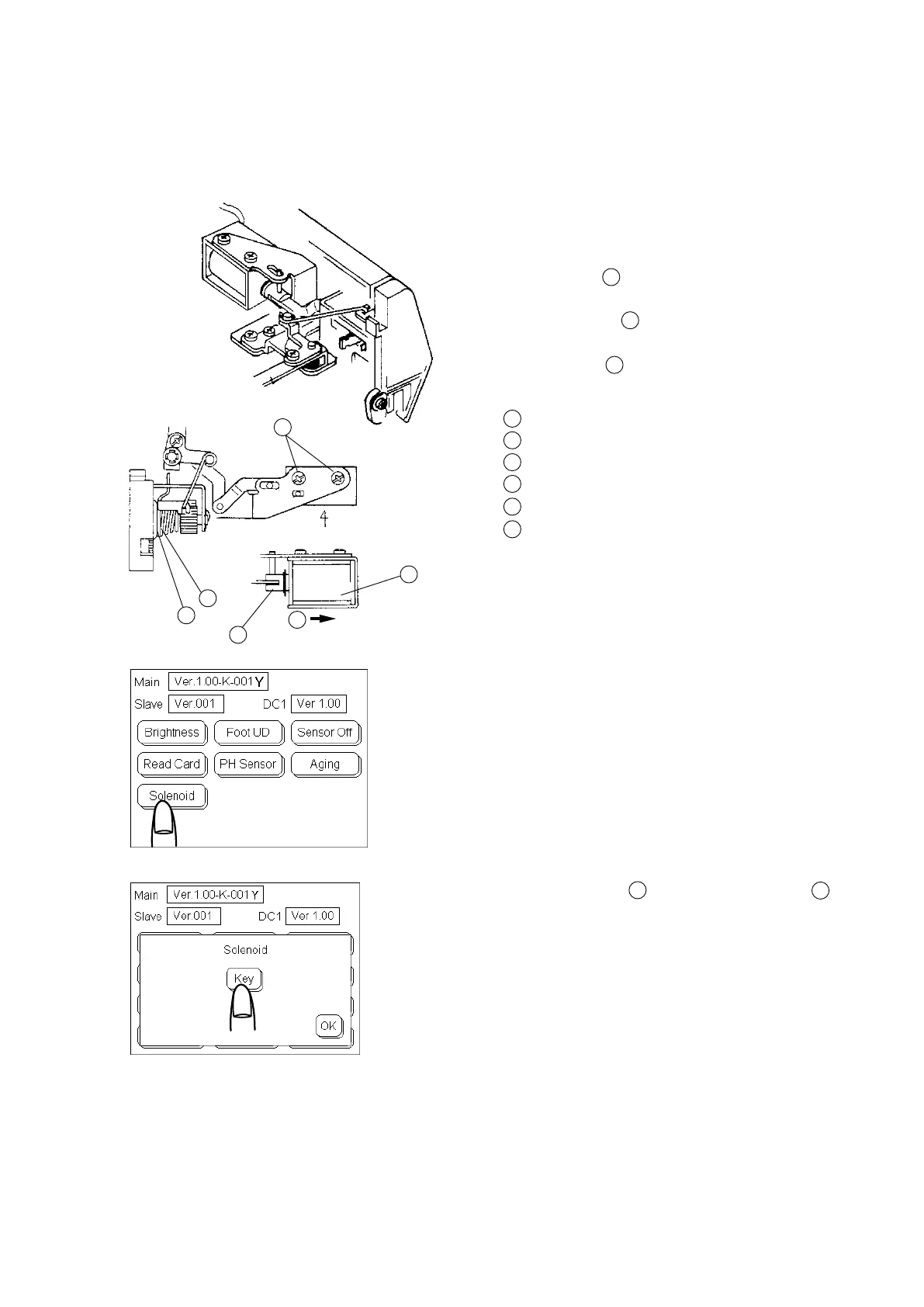
Adjusting Solenoid
1. Remove the front cover. (See page 6)
2. Loosen Screws (2 pieces).
3. Slide the Solenoid to the right most position.
4TightenScrews .
5 Tochecktensionreleasefunction
a.Turnthepower switch “ON” while pressing the
Start/Stop button. Touch panel indicates the Self
Checkfunctionkeys as shown.
c. Press the “Solenoid” keyonthetouchpanelandit
will indicate Solenoid “Key”.
d. Press the Solenoid “Key” several times to checkif
the Tension disc and Tension disc holder
4
open when the solenoid is activated.
e. Press “OK” key.
f. Attach the front cover.
Note: Do not touchtheSelfCheckfunctionkeys
other than the “Solenoid”.
1
3
Screw (A)
Solenoid
Tension disc
Tension disc holder
Plunger
Slide to the right.
6
1
2
4
2
1
1
2
3
4
5
6
5
3









 To Next Page