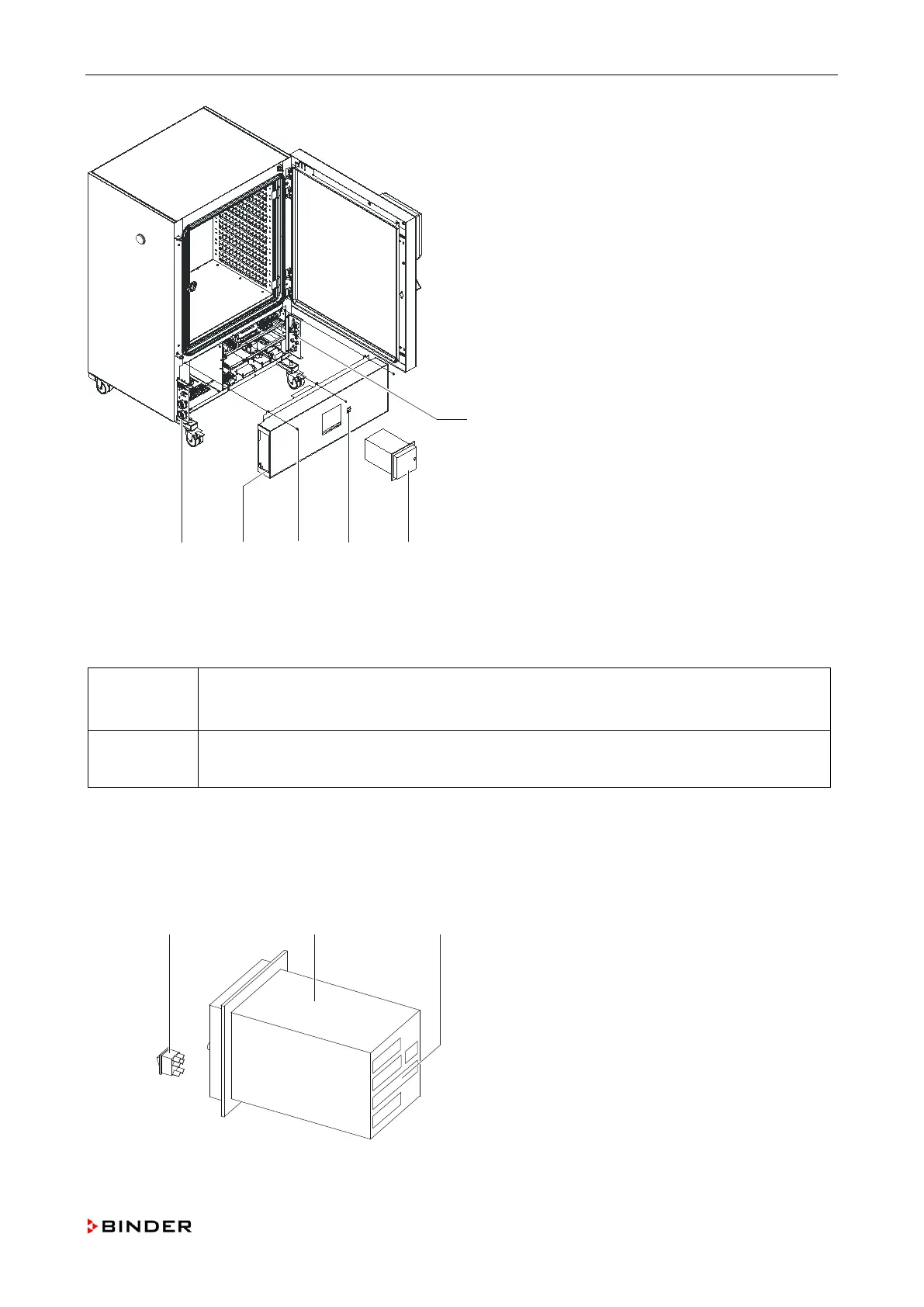
Repair work at the housing
A
Lateral control panel right
B
Chart recorder (-14P1)
C
Switch of chart recorder (-14S1)
D
Screws
E
Housing cover
F
Lateral control panel left
Figure 1: Replacing the housing cover at the lower front
5.2 Replacing the pen recorder (-14P1)
Spare parts:
• 2-channel pen recorder 500d (order no. 5016-0003)
• Rocker switch (2W) 230V AC (order no. 5019-0010)
tools:
• Crosstip screwdriver, size 2
1. Disconnect the unit from the mains.
2. Remove the lower housing cover at the front (chap. 5.1, page 34).
3. Remove the electrical connections of the pen recorder (C) and of the rocker switch (A).
4. Remove the holding devices and pull the pen recorder towards the front out of the housing cover.
5. Mount the pen recorder by following steps 1 to 4 in reverse order.
A Rocker switch
B Pen writer
C Electrical connections
Figure 2: Replacing the pen recorder
Service Manual KBF (E5.2) 04-2015 35



 To Next Page