MK / MKT (E5) 03/2019 page 55/158
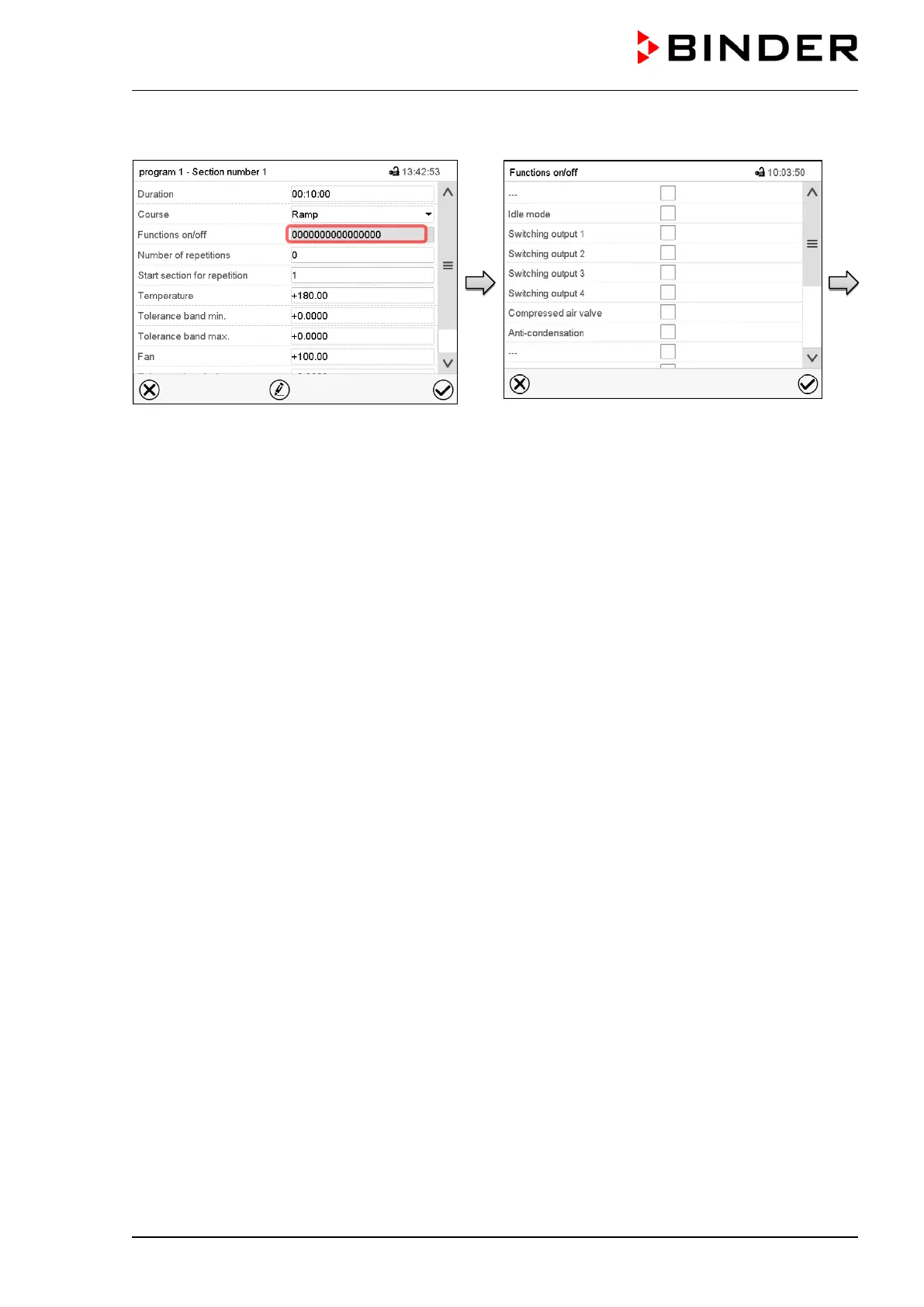
Use the Section editor to configure the operation lines.
Section view.
Select the field “Functions on/off”.
“Functions on/off” entry menu.
Mark / unmark the checkbox of the desired
function to activate / deactivate it and press
the Confirm icon.
The controller returns to the section view.
Activated operation line: switching status “1” (On)
Deactivated operation line: switching status “0” (Off)
The operation lines count from right to left.
Example:
Activated operation line “Switching output 3” = 0000000000000
100
Deactivated operation line “Switching output 3” = 0000000000000
000
9.7.4 Setpoint entry
• Select the field “Temperature” and enter the desired temperature setpoint.
Setting range: MK -50 °C / -58°F up to 180 °C / 356 °F, MKT: -80 °C / -112 °F up to 180 °C / 356 °F:
Confirm entry with Confirm icon. The controller returns to the section view.
• MK 56: Select the field “Fan” and enter the desired fan speed setpoint.
Setting range: 30% up to 100% fan speed.
Confirm entry with Confirm icon. The controller returns to the section view.



 To Next Page