Chapter 6 Statistics
Evia HF / HF-T Technical Manual
PAGE 72
6.3 Arrhythmia Statistics
6.3.1 Atrial Burden
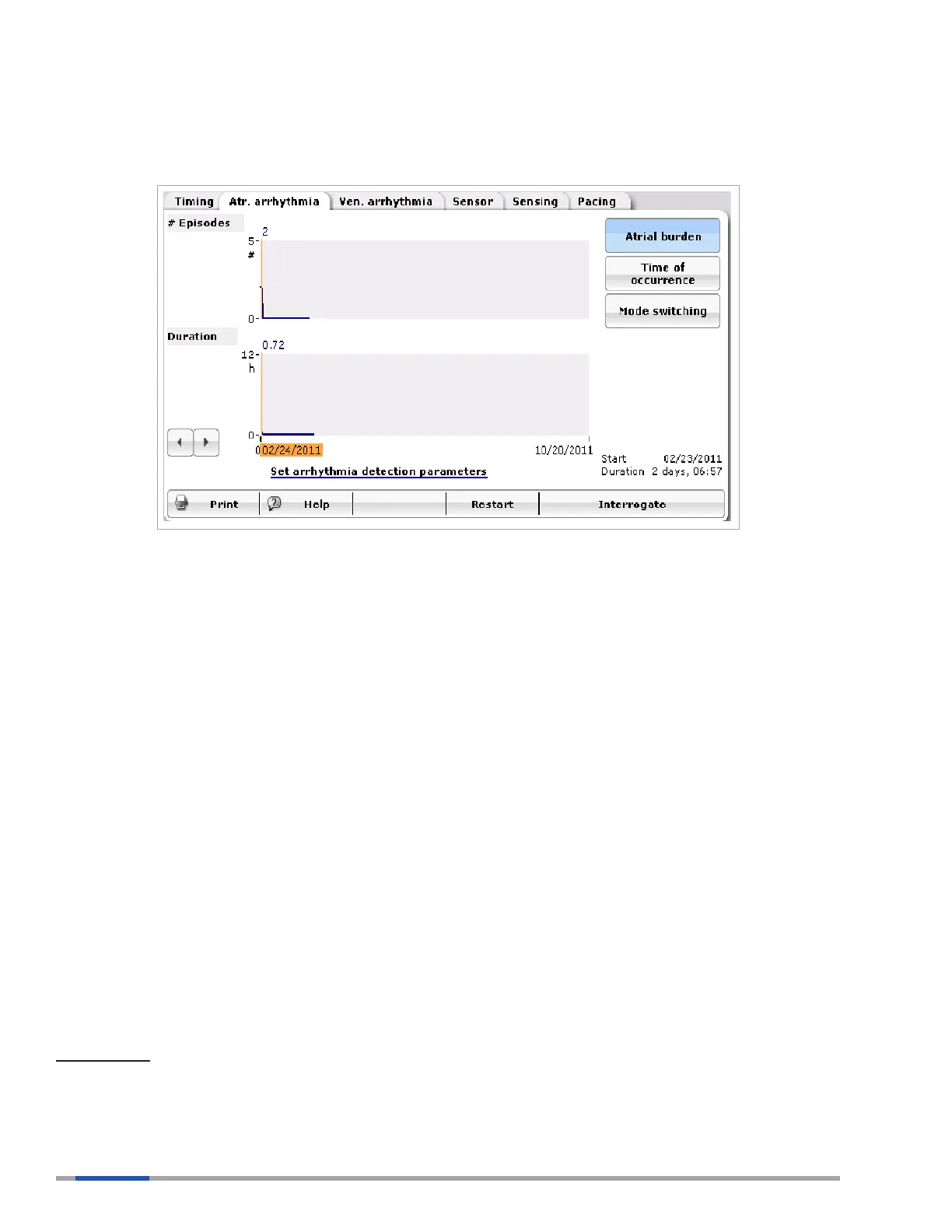
Figure 40: Atrial Burden
Atrial burden is the percentage of time the patient is in an atrial tachycardia during a given day. The
atrial-burden statistic, Figure 40, displays the number of atrial tachycardia events per day and the
duration of these events. The scalar will automatically adjust based on the number and duration of the
events. The device will store data for the last 240 days. After 240 days, the device will overwrite the
oldest information to make room for current information.
The Atrial burden statistics require the parameter High Atrial Rate (HAR) trigger to be turned ON.
The rate that is programmed in the HAR limit becomes the low-rate cut-off value. Atrial burden is not
recorded until the 36/48 event above the programmed high atrial-rate criteria is met. Recording is
stopped when the termination count of 24/36 is met.
Mode Switch events that do not meet the HAR criteria of 36/48 will not be counted toward atrial burden
or time of occurrence.
The Mode Switch count and the time of occurrence count for AT events may not match for the
following reasons:
• Mode Switch events are too short to meet the AT count of 36/48 beats for atrial rate
detection criteria
• The patient has SVTs slower than the High Atrial Rate (default 200 bpm).
The Atrial burden statistic has a link at the bottom of the page, the “Set Arrhythmia detection
parameters” link. This takes the user to the Holter trigger set-up page. Holter trigger set-up is
described in Chapter 2.
Key Points:
The Atrial Burden diagnostic gives information on atrial arrhythmias throughout the duration of the
statistics.
All data is based only on atrial rates above the AT/AF rate (nominally 200 bpm but programmable under
the diagnostics parameters).



 To Next Page