Chapter 6 Statistics
Evia HF / HF-T Technical Manual
PAGE 68
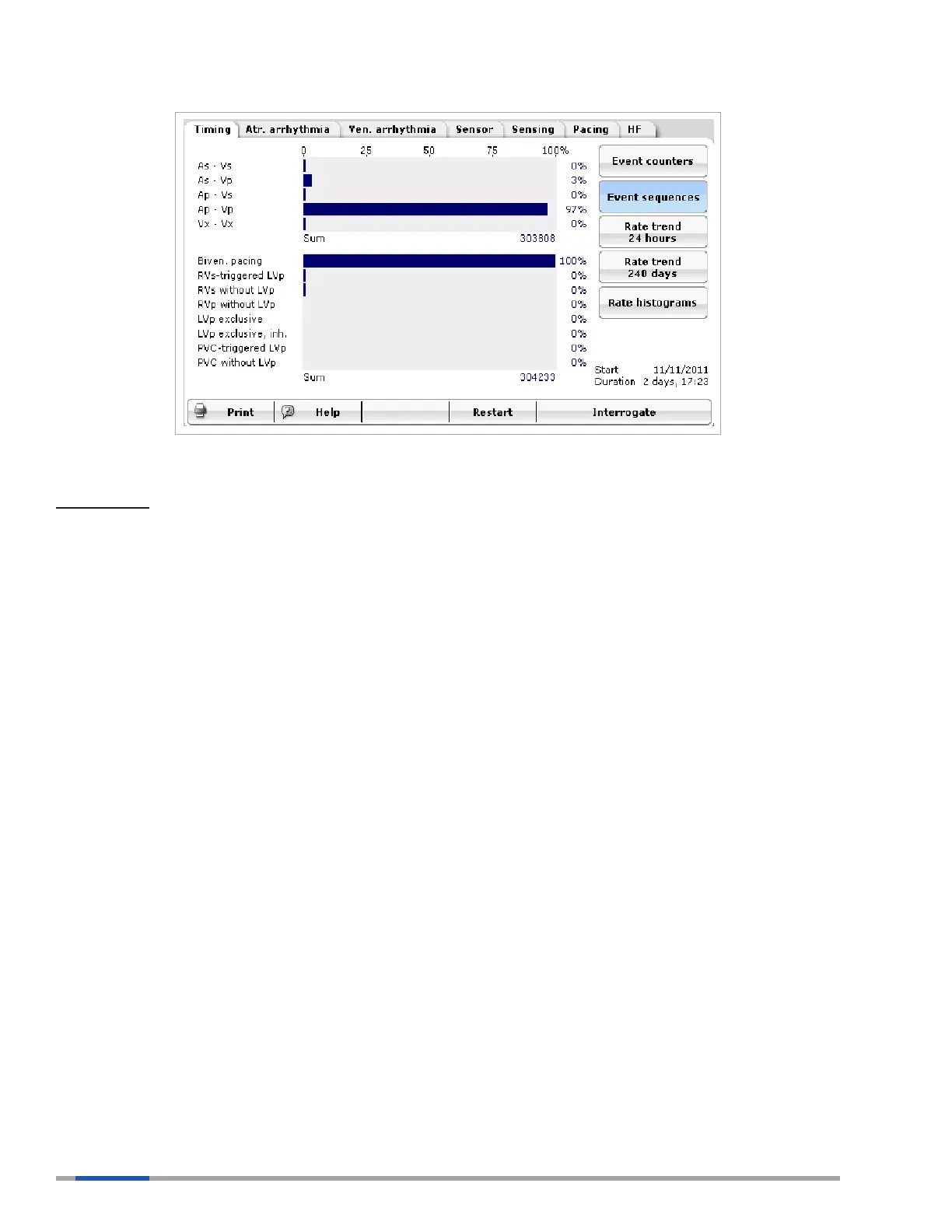
Figure 36: Event Sequences Show the Percentage of Each of the Pacing States
Key points:
Event episodes show the distribution of each state of pacing and, in HF-T devices, the distribution of
resynchronized ventricular events.
The rst graph shows the percentage of each Ax to Vx sequence.
Vx-Vx events must meet the following criteria:
• Two ventricular events with no Ap or As event in between
• An Ars did not occur within 350 ms of the subsequent Vs
The second graph shows the percentage of ventricular events with the potential to be resynchronized
based on device programming.
LVp Exclusive and LVp Exclusive Inhibited are parameters not available in the U.S.
RVs without LVp counter is only active when RVs triggering is turned ON. If RVs triggering is turned
ON, the counter provides the percentage of LV-RV sequences where RVs occurs without an LVp. If the
RVs triggering feature is turned OFF, this counter will display 0%.
PVC-triggered LVp is the percentage of all LV-RV sequences where an LVp was triggered off of a PVC.
If RVES triggering is turned OFF, this sequence will show 0%.
PVC without LVp is only active when RVES triggering is turned ON. If RVES triggering is turned ON,
the counter provides the percentage of LV-RV sequences where a PVC occurs without an LVp. If the
RVES triggering is turned OFF, this will display 0%.
6.2.3 Rate Trend 24 Hours
The rate trend is displayed as a trend chart and consists of the heart rate trend and the pacing rate trend.
The atrial and ventricular events recorded at a set time. In the rate trend, the heart rate in pulses per
minute (ppm) is recorded in the upper rate chart, and the percentage of pacing is shown in the lower
chart. These points represent an average of 11 minutes of collected data. Please note that a gap in the
trend will be displayed for the duration of an asynchronous magnet program or temporary program.



 To Next Page