39n
OverviewNavigation
Entertainment
TelephoneComputerKeywords
Traffic information
Traffic information during destina-
tion guidance
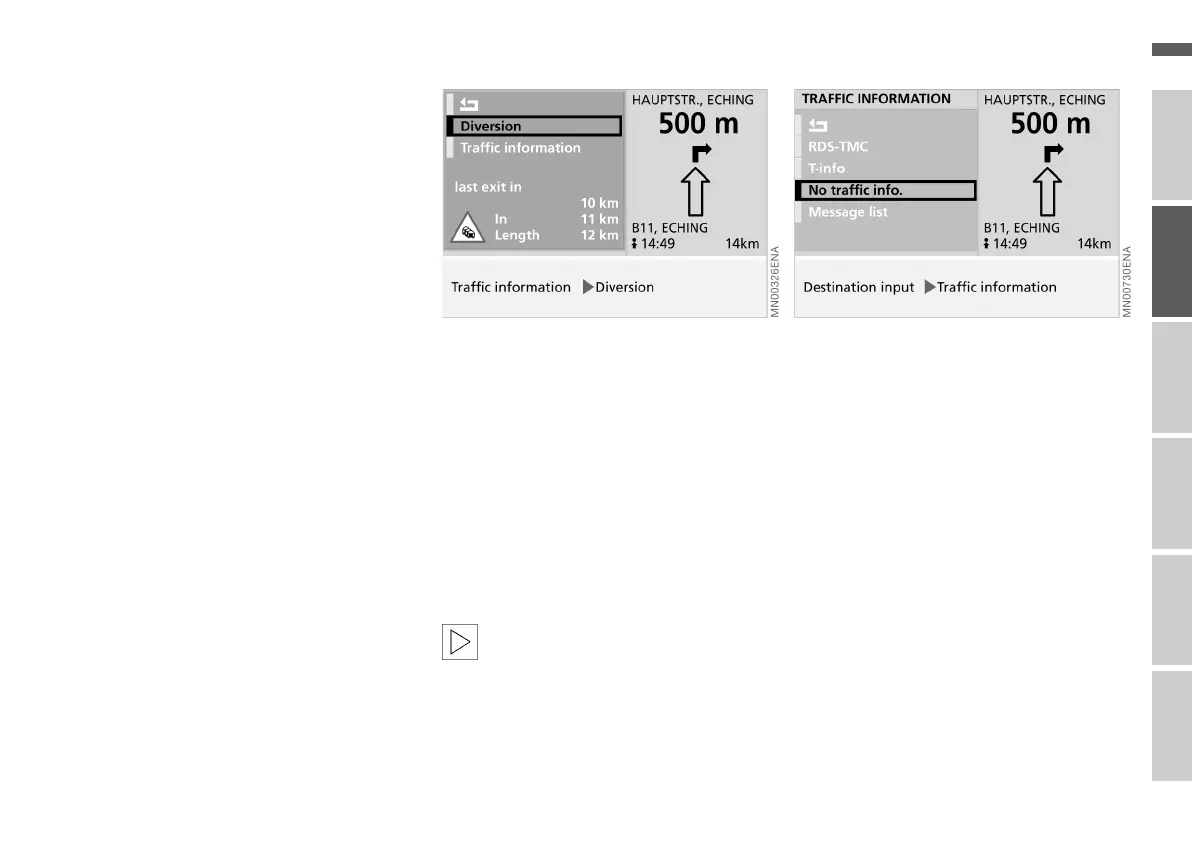
If the navigation system identifies a traf-
fic problem or congestion on the
planned route during destination guid-
ance, once you are less than approx.
50 km (approx. 30 miles) from the prob-
lem you are supplied with information
on
> The distance to the last possible exit
> The cause of the congestion, using
symbols
> The distance until you reach the con-
gestion.
> The length of the congestion.
To obtain further information on the
traffic problem:
Select "Traffic information".
You will receive detailed information on
the problem.
To avoid the congestion:
Select "Diversion".
The navigation system calculates a new
route and then returns to destination
guidance mode.
When you are approximately
50 km (30 miles) from the last
possible exit or if you have selected an-
other on-board computer mode with
the destination guidance mode still ac-
tive, you are automatically prompted to
take a diversion.<
Switching traffic information off
If you do not wish to receive TMC traffic
information, while entering the destina-
tion:
1. Select "Traffic information"
2. Select "No traffic info.".
The letters "TMC" in the lower status
line disappear.
Online Edition for Part No. 01 41 0 156 676 - © 01/02 BMW AG



 To Next Page