Setting up the telephone for your own specific needs
59
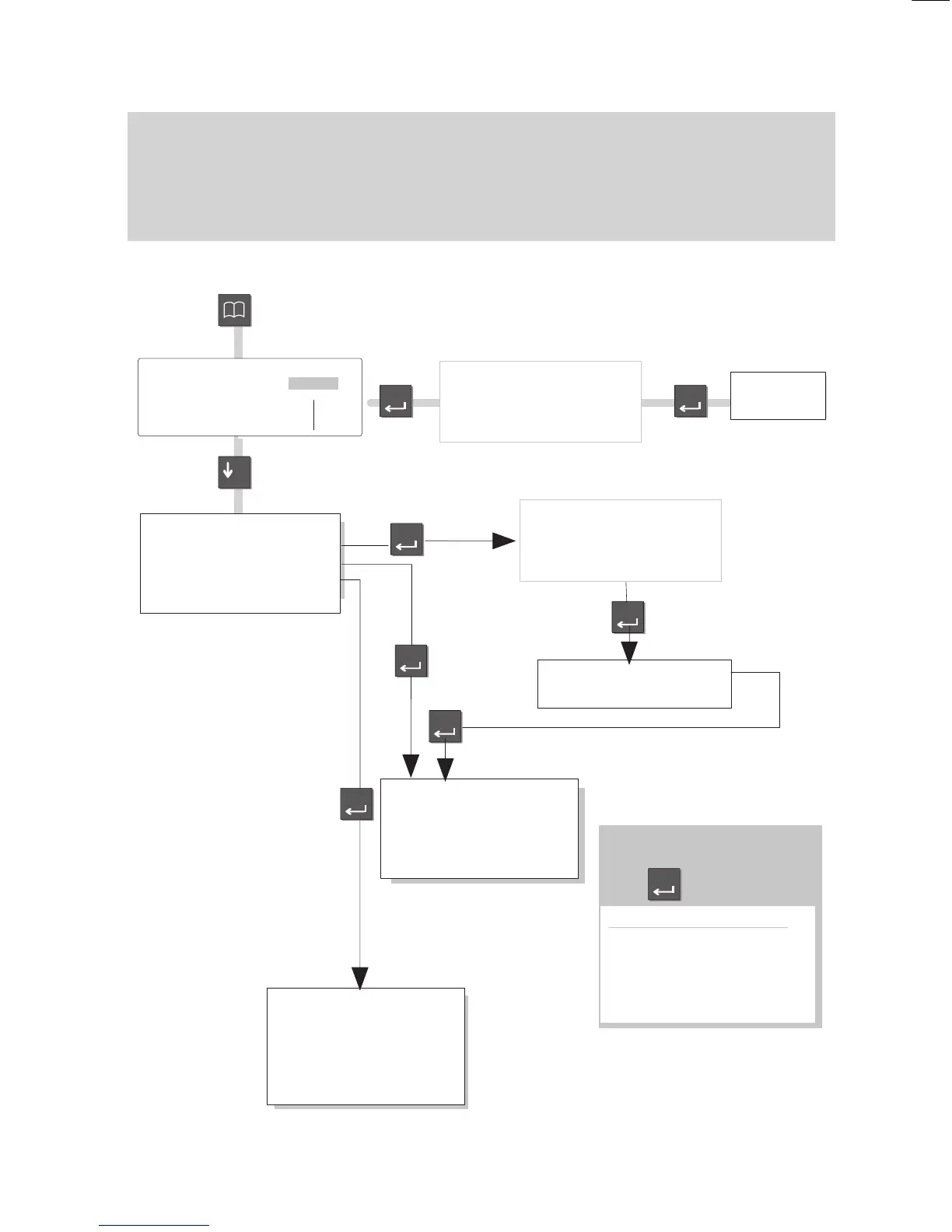
Call numbers in the telephone book – overview
You
can store all call numbers and destination key assignments in your local tele
-
phone book. In addition, you can tag entries, e.g. for data connections or the VIP
function. Use the arrow keys to scroll through the menu items. Press the “Enter” key
to change a particular setting.
A summary of the menus and settings
Press the ”T
elephone book” key to call up
your electronic telephone book.
Allocate: Tel.
book only
Note
Destination 1..20
Own call number
Minitel
Indiv.emerg.dest.
Enter
(Select the desired
allocation using:)
TB
All entries
Partners
Notes
Destination keys
VIP number
Emerg.no. + own no.
–Dial
–Correct
Free 266'Continue main TB
Modify entry
New entry
Display lists
Enter
A list of local telephone book
entries appears.
Select the desired entry
using the arrow keys.
Enter
–
Name:
Call number:
Allocate:
(see box)
Store
Store + continue
Free xxx
'Edit
Delete*
Enter
Enter
Enter
Enter
Enter
* only available for local entries
Local
TB search*
↓
ABCD EFGH IJKL MNOP Corr
QRST UVWX YZ ÄÖÜß
↓
A
list of local telephone book
entries appears.
Select the desired entry
using the arrow keys.



 To Next Page