Wraptor A6200 User Manual 6
Setup
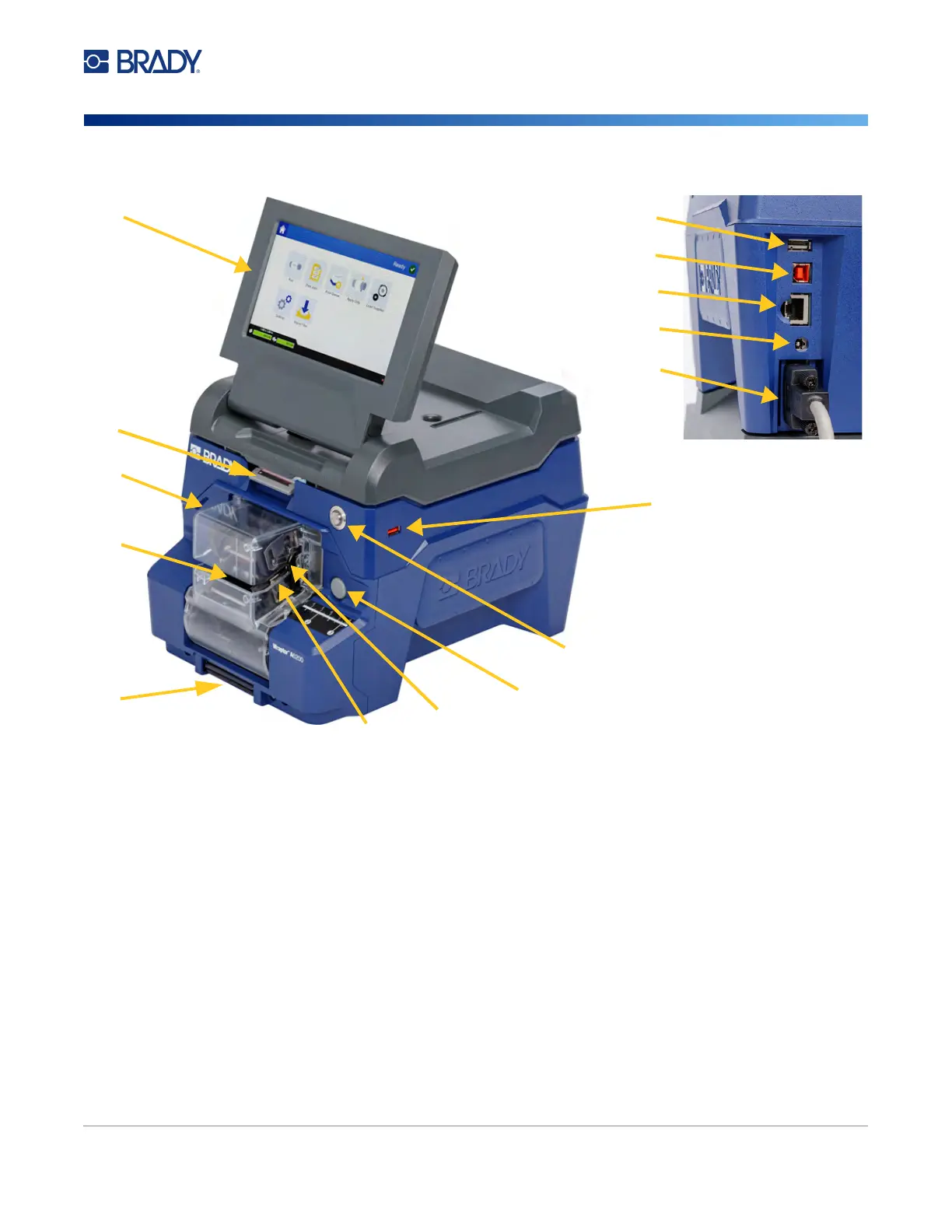
Printer Components
Printer Components
1. Touch screen: Tap with your finger to operate the menus. See “Using the Touch Screen” on
page 25.
2. Cover latch: Lift up to open the top cover.
3. Wrapper module: The clear enclosure and everything within it. The module attaches to the
printer with a hinge and can fold open for loading labels and cleaning. The wrapper
automatically stops when the wrapper module is open.
4. Wrapper: Mechanism that wraps a label around the wire.
5. Tear blade: Use to tear spent liner off the printer.
6. Power button: Push to turn the printer on or off.
7. Trigger bar: One on each side. The trigger bars initiate wrapping. See “Printing and
Wrapping” on page 27.
8. Wrapper module release: Push to release the wrapper module to open it for loading labels or
cleaning.
9. Jaws: Hold the wire in place as the label is applied.
1
2
4
6
8
10
11
12
13
14
9
7
10
3
5



 To Next Page