5-2
PROPER COVER OPERATION
• Never use force to OPEN the cover.
OPEN only when no pressure is present
in the cooking well.
• If cover will not open easily, be sure the
pressure regulating valve is OPEN. If
cover will not OPEN, turn cook/filter
switch OFF.
Keep away from safety
relief valve opening with-
out heat and steam protective apparel.
Escaping steam could cause serious
burns.
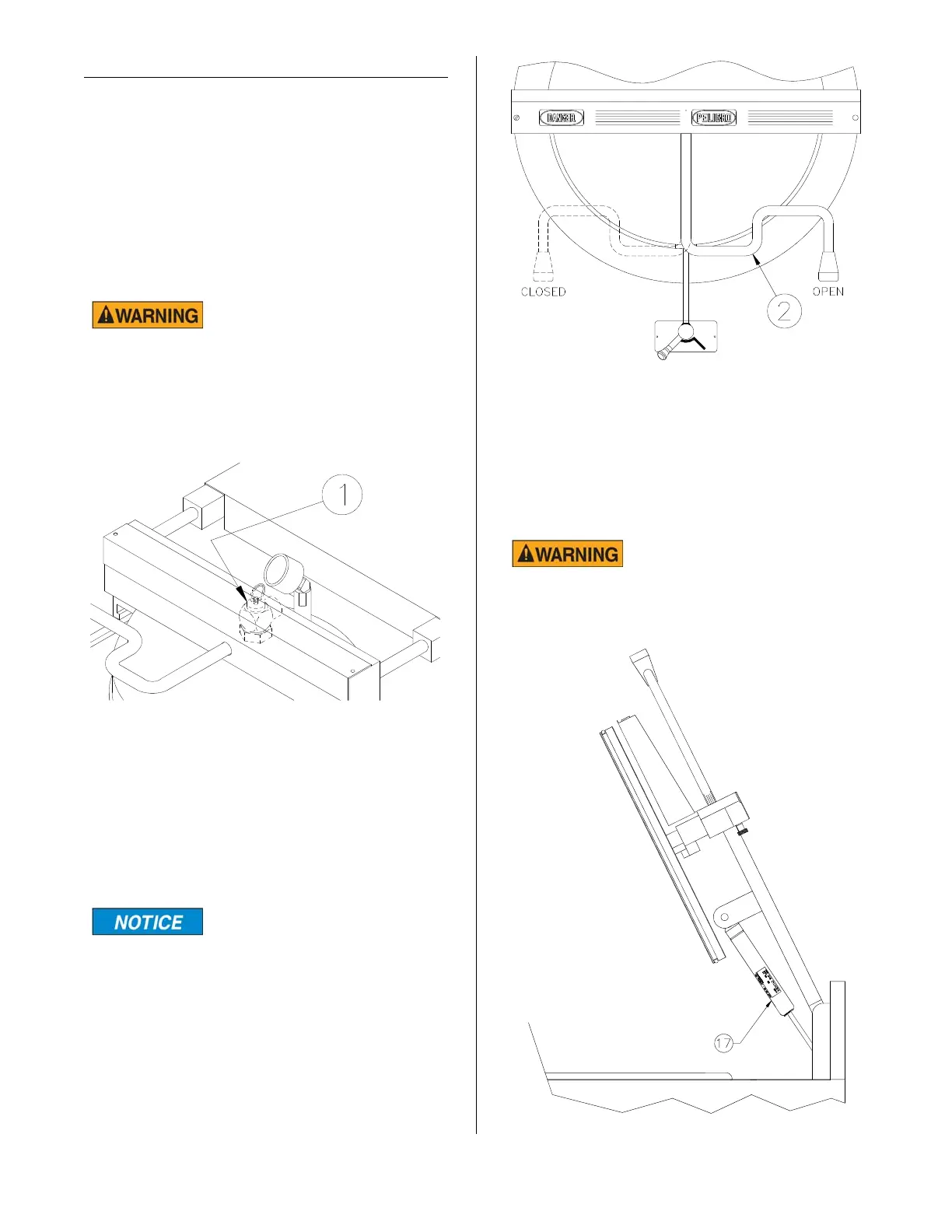
• Using a hot mitt, lift safety relief valve (1)
handle. If pressure is released, do not
attempt to open the cover. Do not
attempt to operate the unit until it has
been serviced.
Always fully rotate cover
handle (2) OPEN or
CLOSED.
To CLOSE cover, lower cover, slide cover
forward then rotate the handle (2) counter-
clockwise. To OPEN cover, push down on
cover handle then slowly rotate the handle
clockwise. Slide cover toward the rear of
the unit and raise cover.
When the cover is raised, the gas springs
(17) compensate for the weight of the cover
and lift assembly. This reduces the force
needed to raise the cover. When the cover
is in the fully raised position the gas springs
hold the cover in position until it is lowered.
DO NOT operate unit if
cover will not remain in
raised position. The hot cover could
cause serious burns.
OPEN SLOWLY
O
P
E
N
C
L
O
S
E
D
PRESSURE
REGULATING VALVE
broaster.com Manual #17280 1/15 Rev 6/15



 To Next Page