7-8
COMBUSTION CHAMBER
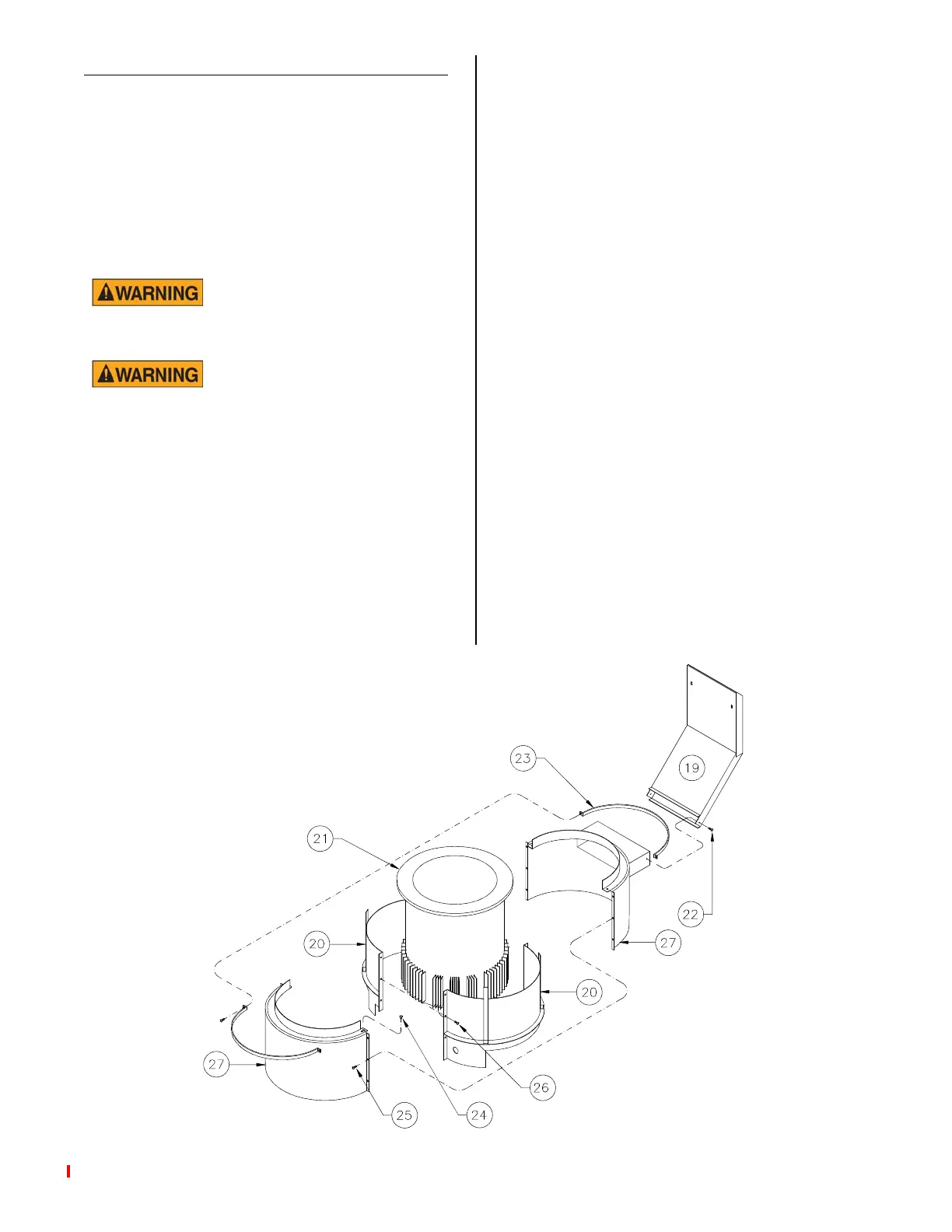
Combustion chamber directs heat from
main burner flame across fins on cooking
well and out the exhaust flue (19). If main
burner flame is not adjusted correctly, soot
deposits can form on the combustion
chamber inner jacket (20), exhaust flue (19)
and cooking well (21). Soot is identified as
black and powdery to the touch.
If soot is present, DO NOT
operate unit until all soot
is removed and corrections made.
Allow combustion cham-
ber parts to cool before
servicing. Hot metal may cause serious
burns.
Cleaning:
1. Turn cook/filter switch, gas valve
switch and manual gas shut off valve
OFF.
2. Turn main gas supply OFF.
3. Disconnect main electric supply.
4. Remove condensate pan.
5. Remove left and right hand side pan-
els.
6. Remove exhaust flue mounting screws
(22) from combustion chamber.
Remove upper mounting nuts inside
upper flue opening and remove flue
(19).
7. Remove outer wall clamp (23).
8. Remove screw (24) on top of outer
walls (27).
9. Remove screws (25) on both sides of
outer walls (27) and remove.
10. Remove screws (26) on both sides of
inner jackets (20) and remove.
11. Clean exhaust flue (19), inner jackets
(20), outer walls (27) and cooking well
(21).
12. Assemble in reverse order.
broaster.com Manuals #17280 1/15 Rev 12/15



 To Next Page