29
EDITING A LABEL
Entering a Serialize Label
Numerically serialized labels can be printed. You can set the increment and count for the
series. In serialize mode, you can create a series of labels by incrementing one numeric
character in the pattern. In advanced serialize mode, you can choose 同時 or 進階 . 同時
mode creates a series of labels by incrementing two different numbers at the same time. 進
階 mode creates a series of labels by allowing you to select two sequences in the pattern and
increment them consecutively.
Serialize
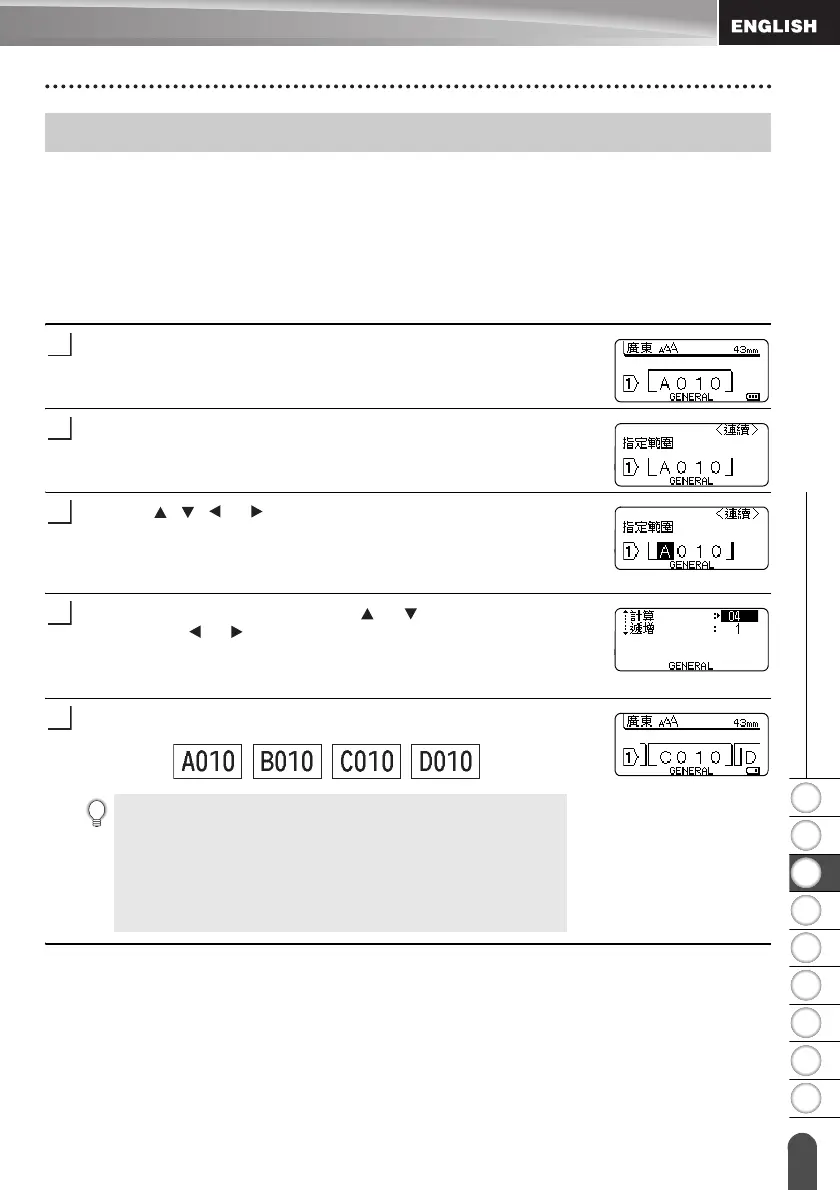
Enter text.
Example: Create a label “B010”, “C010”, “D010” from “A010” by
using this function.
Press the Serialize key and the screen to 指定範圍 is displayed.
Use the , , or keys to position the cursor under the first
character. Then position the cursor under the last character to be
incremented. Press 執行 or 段落更換 key.
Example: Select A and 執行 .
Select 遞增 and 計算 by using the or key and set the value
by using the or key.
Example: When you want to increase the number by one four
times, set 遞增 : 1, 計算 : 4.
Press the 執行 or 段落更換 key to display the screen that you set.
Example:
Entering a Serialize Label
• When you press the Serialize key, you can repeat the setting.
After repeating the setting, the message “ 確認在這個動作
後,覆蓋所有資料 ?” is shown. If it’s ok to overwrite, press
執行 key.
• You can select 全部 / 當前畫面 / 範圍 when printing as
there are multiple pages of labels.
• To print labels refer to “LABEL PRINTING” on page 41.















 To Next Page