EDITING A LABEL
30
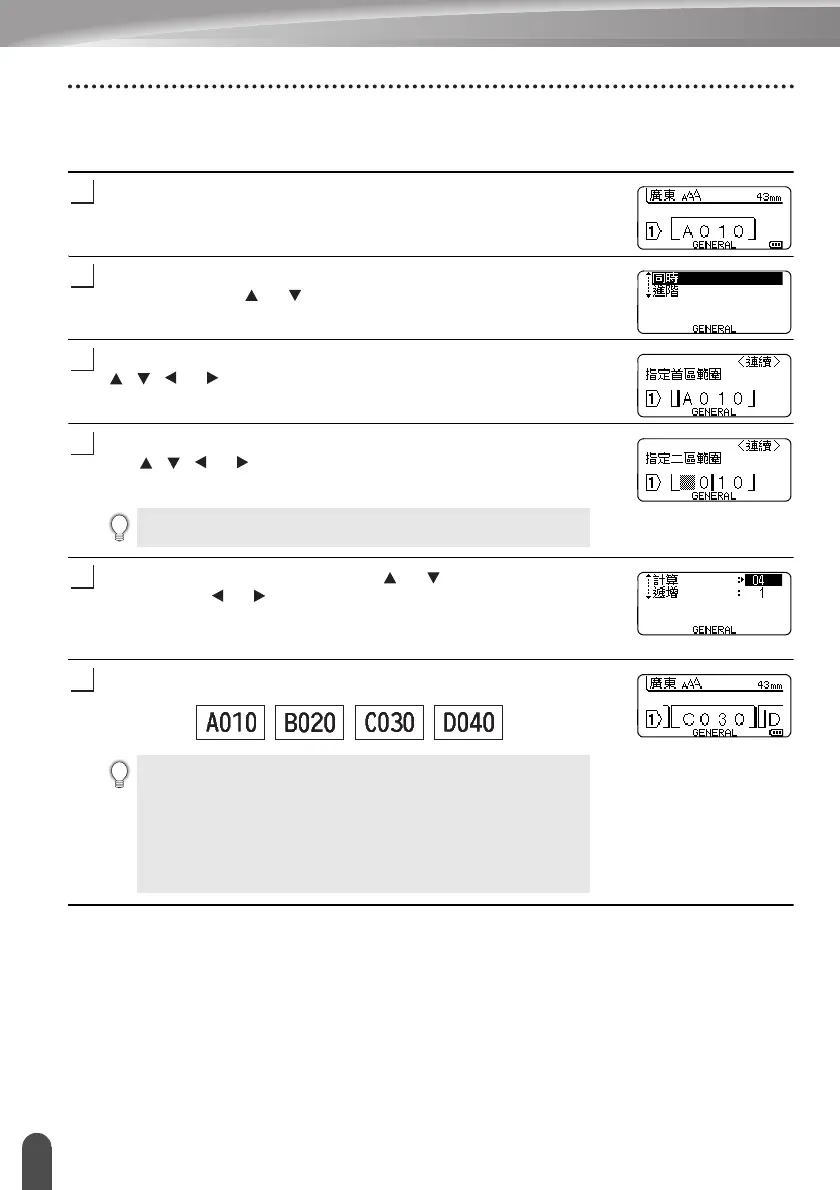
Entering a Serialize Label
Advanced serialize
Simultaneous
Enter text.
Example: Create a label “B020”, “C030”, “D040” from “A010” by
using this function.
Press the Shift key and then press the Serialize key. Select “ 同
時 ” by using the or key and press the 執行 key.
Select the first character(s) that you want to increase by using the
, , or key and press the 執行 or 段落更換 key twice.
Example: Select A.
Select the second character(s) that you want to increase by using
the , , or key and press the 執行 or 段落更換 key twice.
Example: Select 1.
Select 遞增 and 計算 by using the or key and set the value
by using the or key.
Example: When you want to increase the number by one four
times, set Increment: 1, Count: 4.
Press the 執行 or 段落更換 key to display the screen that you set.
Example:
You cannot select the first character(s) as it is greyed out.
• When you press the Shift key and then press the Serialize
key, you can repeat the setting. After repeating the setting,
the message “ 確認在這個動作後,覆蓋所有資料 ?” is
shown. If it’s ok to overwrite, press 執行 key.
• You can select 全部 / 當前畫面 / 範圍 when printing as there
are multiple pages of labels.
• To print labels refer to “LABEL PRINTING” on page 41.















 To Next Page