Style Programming
SMART MATRIX FEEDER 2-31
Parameters for SEAMLESS, SOCKS, PANTYHOSE, JERSEY KNIT and JACQUARD
KNIT
application - ROLLING FEEDER
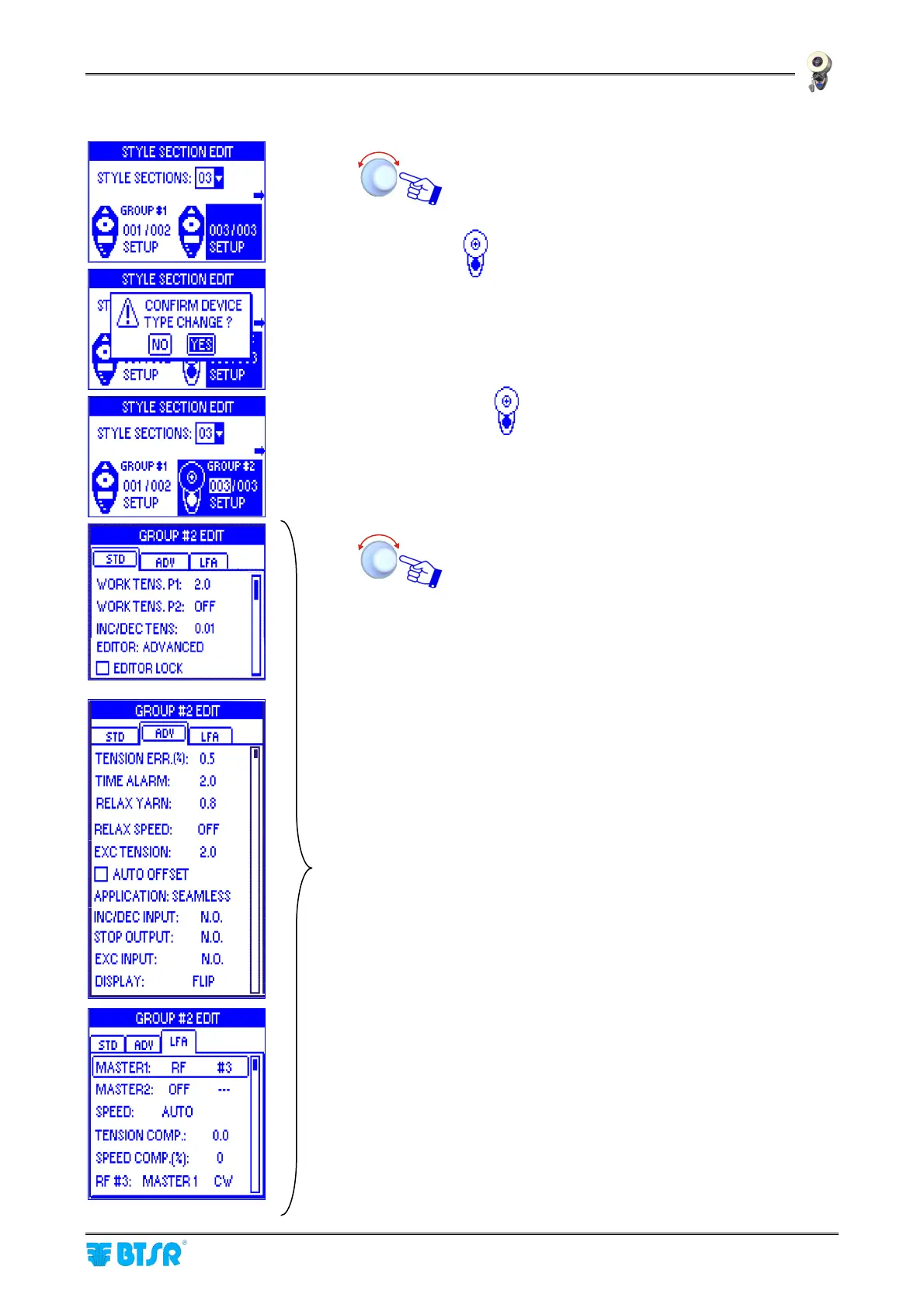
Assuming that the group #2 is composed of
ROLLING FEEDER devices, operate as follows:
highlight the group #2 then turn the selector until the
ROLLING FEEDER symbol appears.
YES to change the group #2 device type.
The
symbol indicates that the group #2 devices
are of the ROLLING FEEDER type.
Set the operation parameter of device Group #2
within the STD, ADV and LFA windows, operating as
described on paragraph – Navigation throughout the
Display windows.
For the meaning of the individual parameters,
please refer to the ROLLING FEEDER Manual
and to the Cross Reference Table shown on
Section 3 of this manual.
The DISPLAY parameter on the ADV window allows
you to set the ROLLING FEEDER device screen
orientation [NORMAL or FLIP (FLIP = turned by
180°)].
On the LFA window you can set the parameters for
MASTER-SLAVE configuration.
The MASTER1 device can be either an
ULTRAFEEDERor UNIFEEDER (UF/UNI) device or
a ROLLING FEEDER (RF, AUTO S, AUTO T )
device.
AUTO S = AUTO LFA
AUTO T = AUTO TENS
+ The MASTER1 device is installed on the first
yarn drop of the section in case of
ULTRAFEEDER and UNIFEEDER. In case of
ROLLING FEEDER it can be any ROLLING
FEEDER device.
The MASTER2 device can be set as UF/UNI, RF or
OFF (not used).



 To Next Page