68
Replacing the Inner Chimney Windows
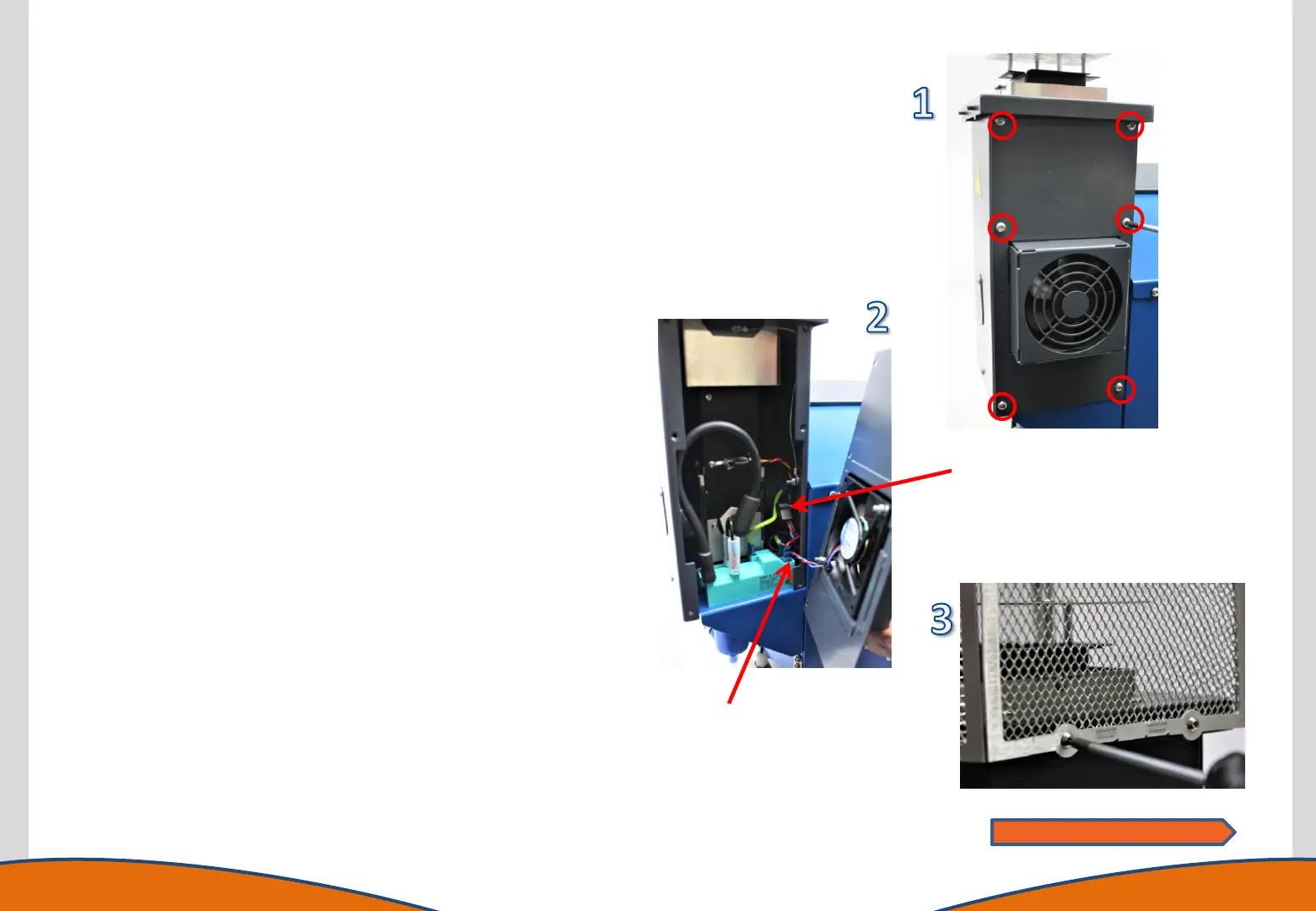
1. Access the rear of the chimney by removing the 6 retaining
screws using a T20 torx driver.
2. Unplug the chimney fan from the connection on the chassis side
wall. Note the cable location (tucked down the side of the
ignition module – it is vital the cable is placed back in this
position). Place the chimney rear plate assembly to one side.
3. Remove the 4 screws retaining the chimney top protection mesh
with a T10 torx driver and place this part to one side.
4. Remove the HT cable boot from igniter and remove the screw
securing the cable using a T20 torx driver.
5. Remove the 2 screws retaining the inner chimney using a T10
torx driver.
6. Disconnect the air tube from the base of the inner chimney.
7. Unclip the temperature sensor from the inner chimney.
8. Carefully raise the inner chimney in an upwards motion out of
the chimney housing.
9. Remove the window retaining screws and bracket using a T20
torx driver.
10. Replace the windows and refasten the bracket windows.
11. Reassemble the instrument in reverse order ensuring the
chimney power cable is tucked down the side of the ignition
module.
Note location of
power cable
routing.
Power connector
socket
Continues on next page



 To Next Page