28
EN
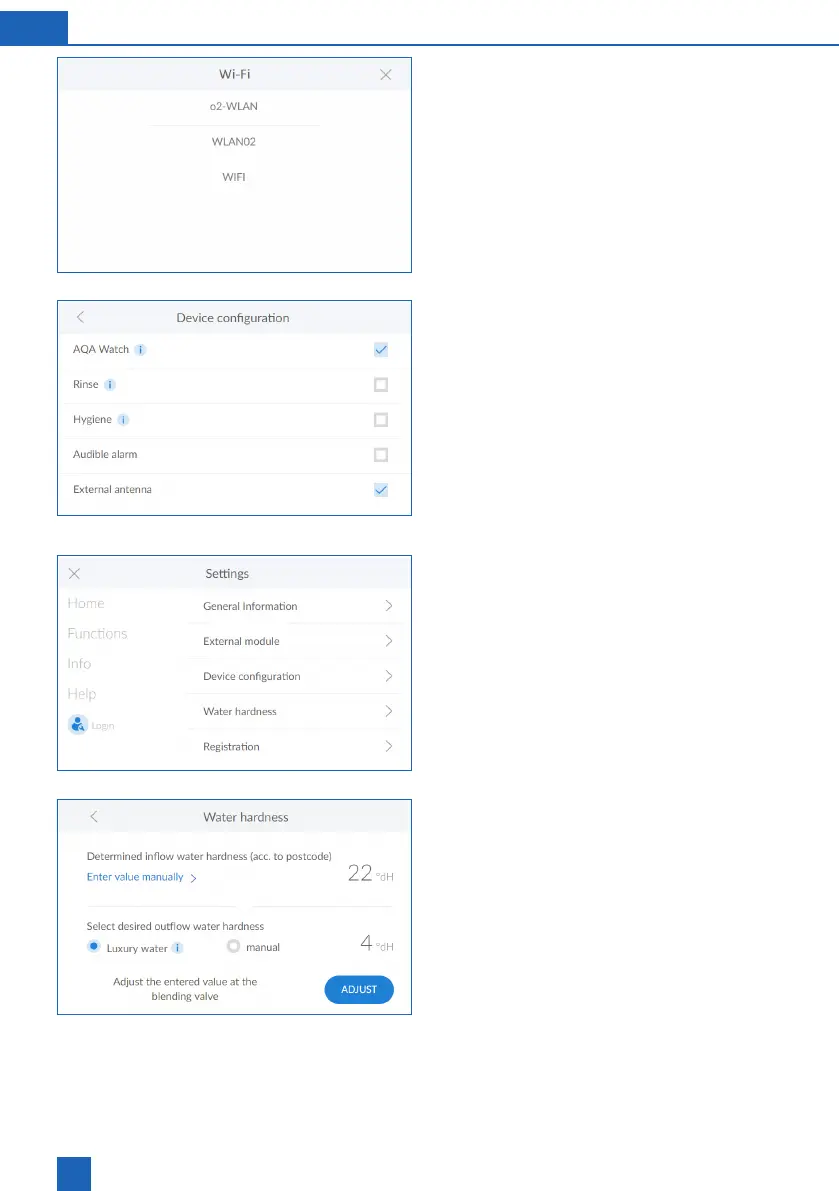
WLAN
The available networks are displayed.
Select the appropriate network and enter the WPA2
key.
Press
CONNECT
.
Device settings
The AQA Watch, Rinse, Hygiene and screensaver
functions can be activated or deactivated here.
AQA Watch
The programmable AQA Watch function monitors
the building’s water supply system for consistently
indicate a problem in the pipeline network.) In the
10 min.), the control unit issues a warning.
Water hardness
To change the water hardness, press
ENTER VALUE
MANUALLY
>
The adjustment of the manual blending of the prod-
of 400 to 600 l/h. First of all, measure the hardness
of the pearl water at the nearest fully opened tap
downstream from the product. Compare this value
with the value in the control unit and, if necessary,
adjust it, i.e. increase or reduce the hardness.



 To Next Page