AVALON GALLERIA Rev. 8 04/2013
www.cafection.com (800) 561-6162
22
INSTALLATION AND SERVICE MANUAL for AVALON Galleria and Quatro
3.13 Filter paper installation
1. Make sure the power of the brewer is
turned ON;
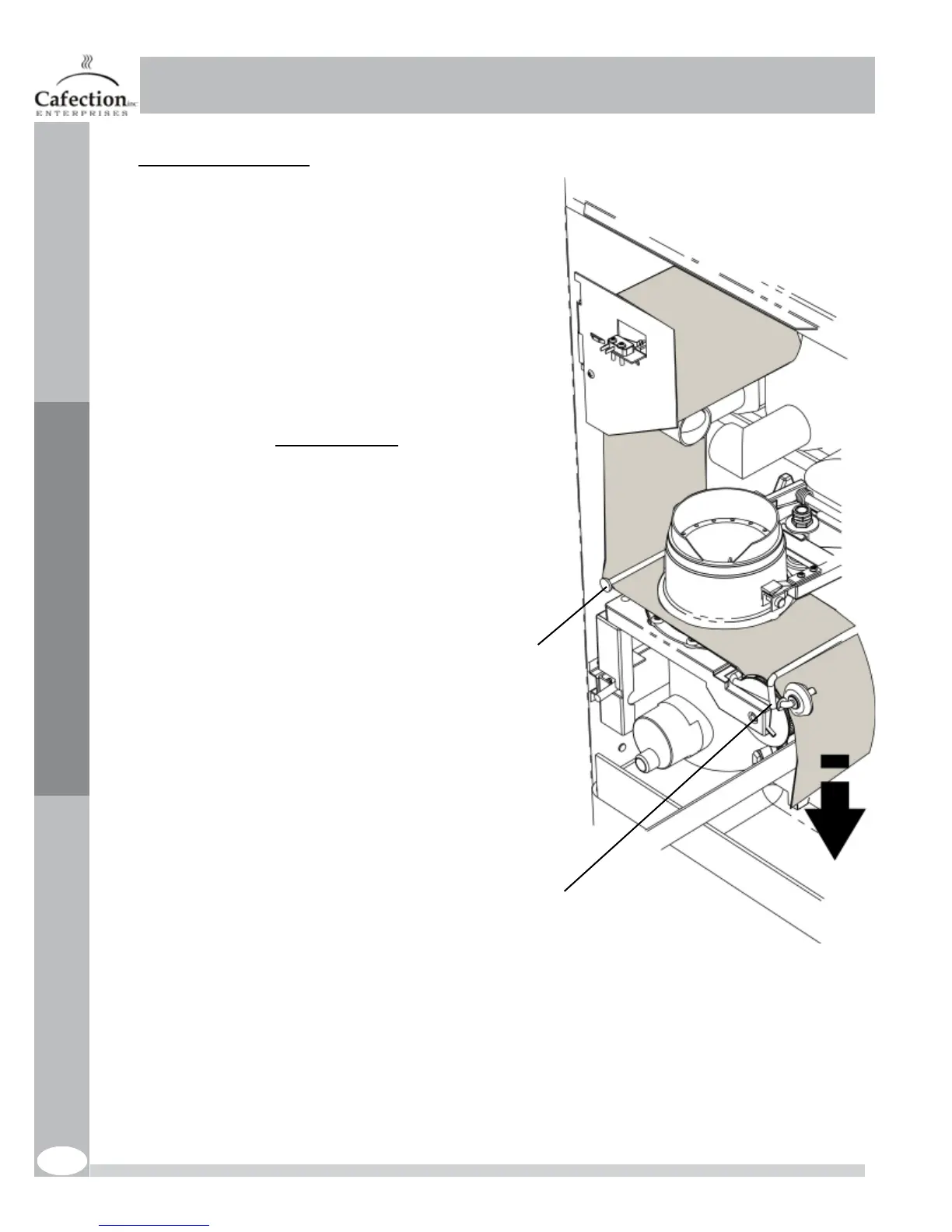
2. Placethelterpaperrollonthesupport
bracket so that it dispenses on the left hand
side; (See the diagram inside the brewer)
3. Toggle the brewer paper switch ON (SW4),
the brew chamber will lift up;
Note: the brew chamber will not lift up if
theswitchdoesnotsenseanylterpaper
4. Pass it under the left guide bracket of the
brew group, under the brew chamber and
under the wheel guides by gently lifting them
using the yoke;
5. Pull on the paper and carry it through the
cabinet chute hole and into the waste bin;
6. Make sure that it is feeding straight. Verify
thatitstayswithintherstguide.Improper
lterpaperfeedingwillcauseavacuumleak
and may cause grounds to spill inside the
equipment.
7. Toggle the brewer paper switch back to
OFF (SW4 on the main board);
8. Thelterpaperwilladvancewhilethe
brewer assembly cycles and the brew
chamber will settle down on the paper, ready
for the next cup.
Initial Setup
Yoke
Guide bracket



 To Next Page