42
DHW (Domestic Hot Water)
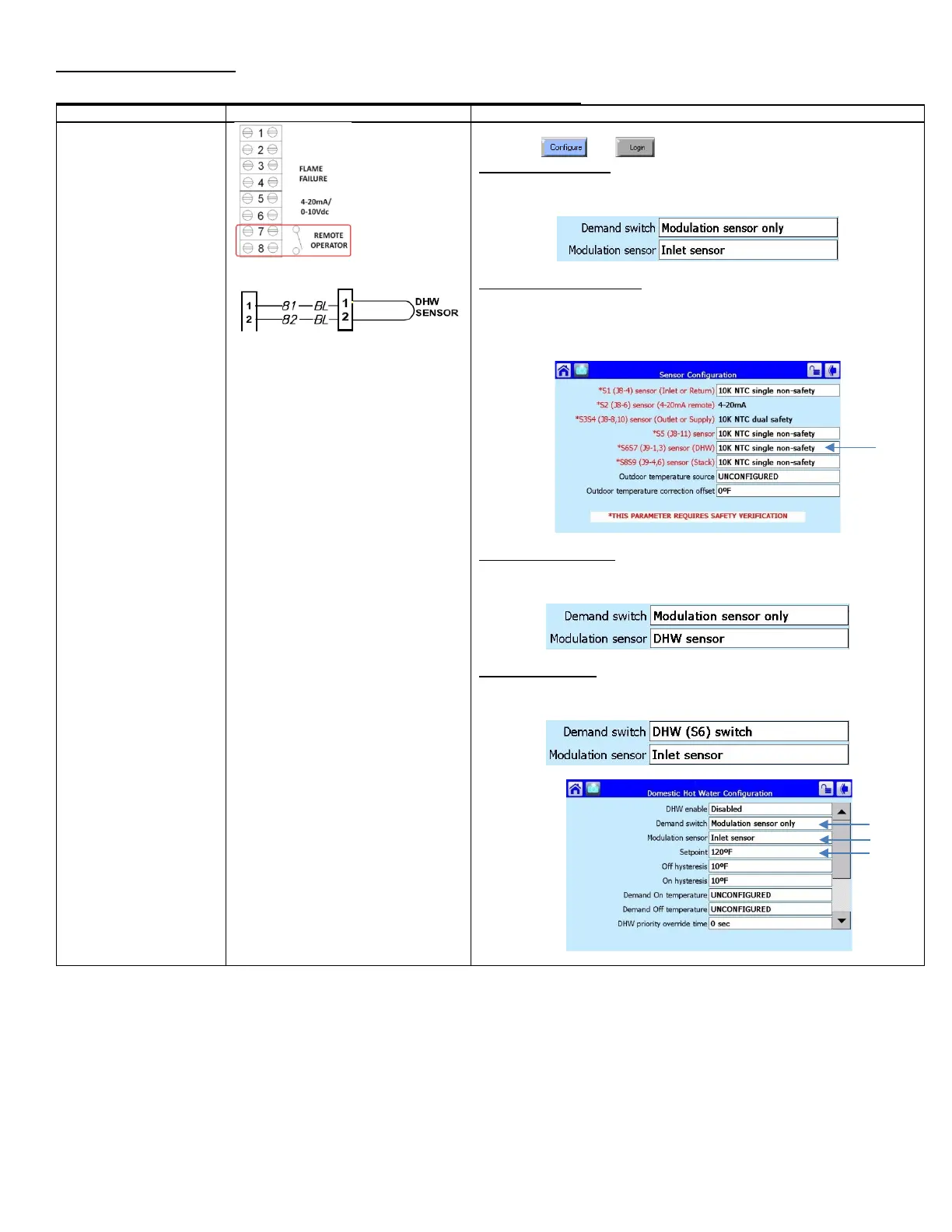
Modulation: Boiler Inlet or DHW Sensor, Fixed Setpoint Operation (Standalone)
fixed DHW setpoint
• Modulates on boiler
inlet sensor (default)
• Heat demand is
generated when inlet
temperature drops
below setpoint minus
on hysteresis.
• For inlet sensor
operation constant
pumping is required
• For DHW
sensor/Aquastat
operation intermittent
pumping is allowed
DHW Sensor/Stat, if required
1) Place toggle switch to LOCAL
2) Press and
Inlet Sensor operation
3) Press [DHW – Domestic Hot Water Configuration]
4) Select Demand Switch: Modulation sensor only
5) Select Modulation sensor: Inlet Sensor. Proceed to Step 17
DHW Sensor/Stat operation
6) Press [Sensor Configuration]
7) Select S6S7 (J9-1,3) Sensor (DHW): 10K NTC Single Non-Safety
8) The control will proceed into a Lockout 2 condition
9) Press [Verify] > [Begin] > [Yes]
10) Press the reset button on the ignition control within the alotted time
DHW Sensor operation
11) Press [DHW – Domestic Hot Water Configuration]
12) Select Demand Switch: Modulation sensor only
13) Select Modulation sensor: DHW Sensor. Proceed to Step 17
DHW Stat operation
14) Press [DHW – Domestic Hot Water Configuration]
15) Select Demand Switch: DHW (S6) switch
16) Select Modulation sensor: Inlet sensor
17) Enter desired Setpoint (Maximum setpoint is Limited to 140
o
F)






 To Next Page