Chapter 3
3-5
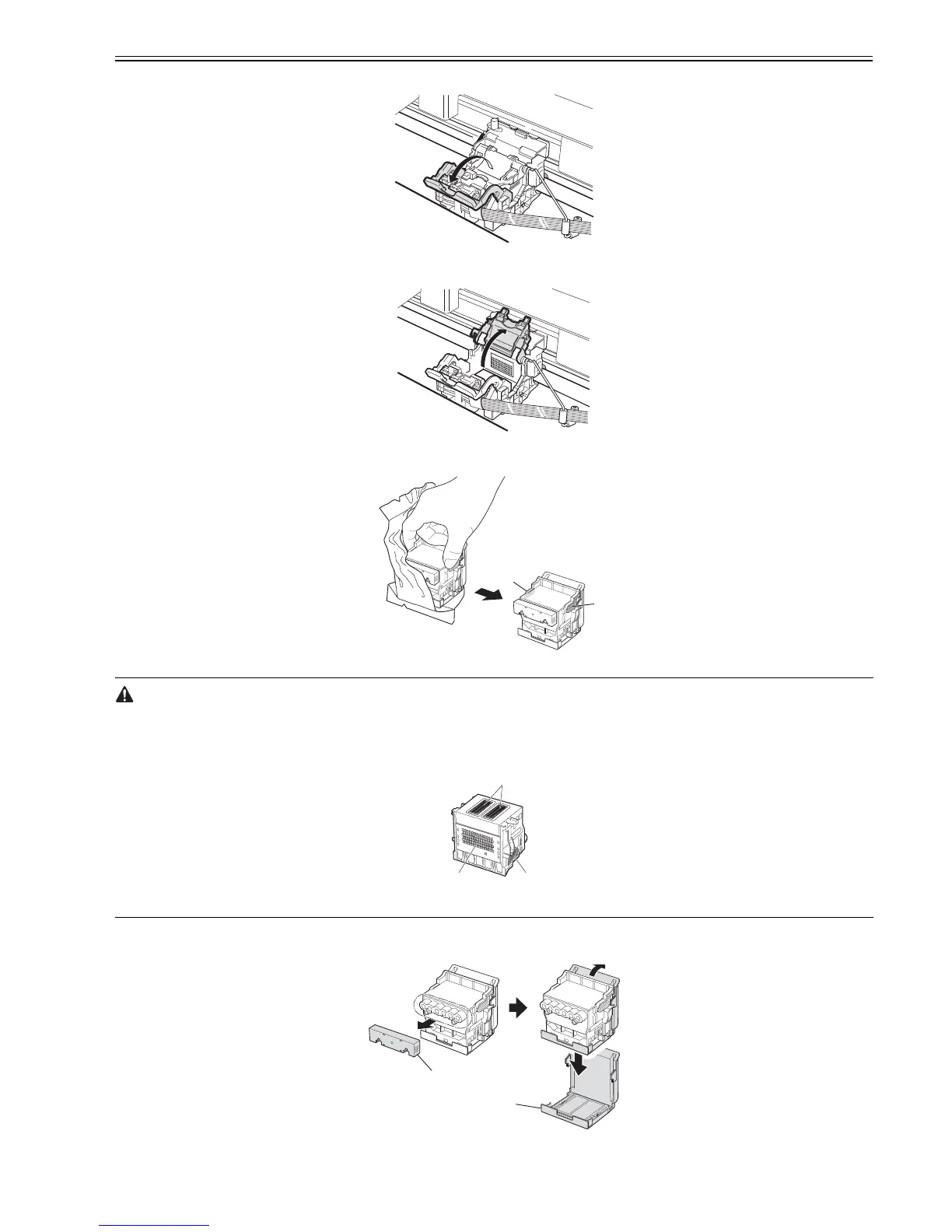
(11) Pull the Printhead Fixer Lever forward to open it completely.
F-3-14
(12) Pull up the Printhead Fixer Cover to open it completely.
F-3-15
(13) Holding the Printhead by the grips [1], remove it from the case.
F-3-16
- When handling the Printhead, always hold it by the grips [1].
- Never touch the printhead nozzles [2] or the metal contacts [3]. The printhead can damage or a printing failure can occur. Do not reattach the removed protective
caps.
- Dispose of these parts following the local regulation.
F-3-17
(14) Remove the orange Safety Cap 1 [1]. While squeezing the grips of Safety Cap 2 [2], pull the cap down to remove it.
F-3-18
[1]
[1]
[1]
[2]
[3]
[1]
[2]














 To Next Page