10
Introduction
E
Program AE
Easy recording
CAMERA
OFF
PLAY(VCR)
NETWORK*
b
Using a memory card
Using a tape
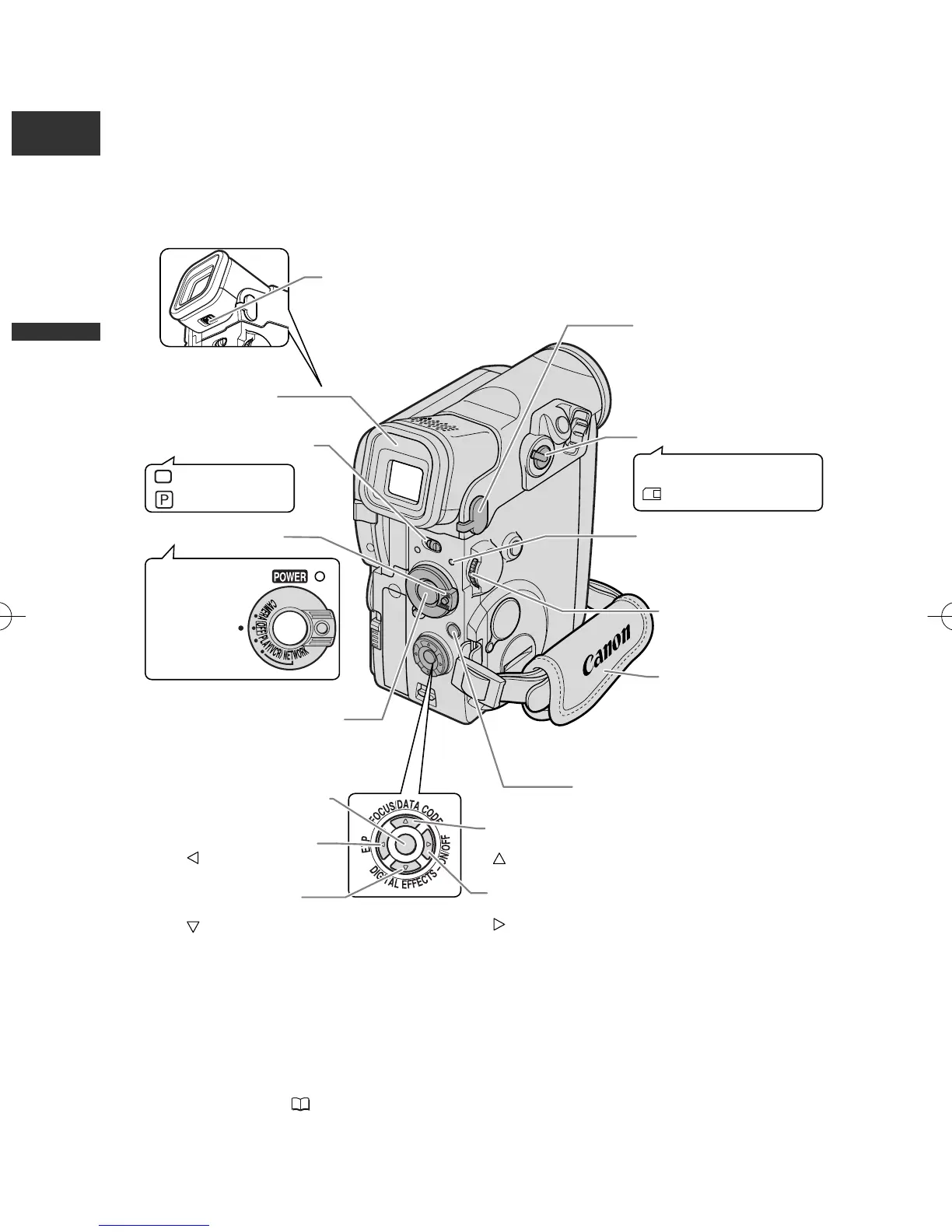
Diopter adjustment
lever (p. 18)
Grip belt (p. 18)
MIC terminal (p. 72)
Selector dial (p. 41)
POWER indicator (p. 25)
Start/Stop button (p. 25, 113)
MENU button (p. 41)
FOCUS button (p. 74) /
DATA CODE button (p. 82) /
button (p. 81, 135)
P.SET button (p. 134)
EXP button (p. 76) /
button (p. 81, 135)
DIGITAL EFFECTS
button (p. 64) /
button (p. 81, 135)
Digital effects ON/OFF
button (p. 64) /
button (p. 81, 135)
TAPE/CARD switch (p. 6)
Viewfinder (p. 18)
Program selector (p. 57)
Power switch (p. 6)
* The NETWORK mode is for use with DV
Messenger (Windows XP users only). Press the
small button below the POWER switch when
switching to NETWORK ( 142).
1_D76PAL_E(03-12) 26/06/03 11:24 Page 10



 To Next Page