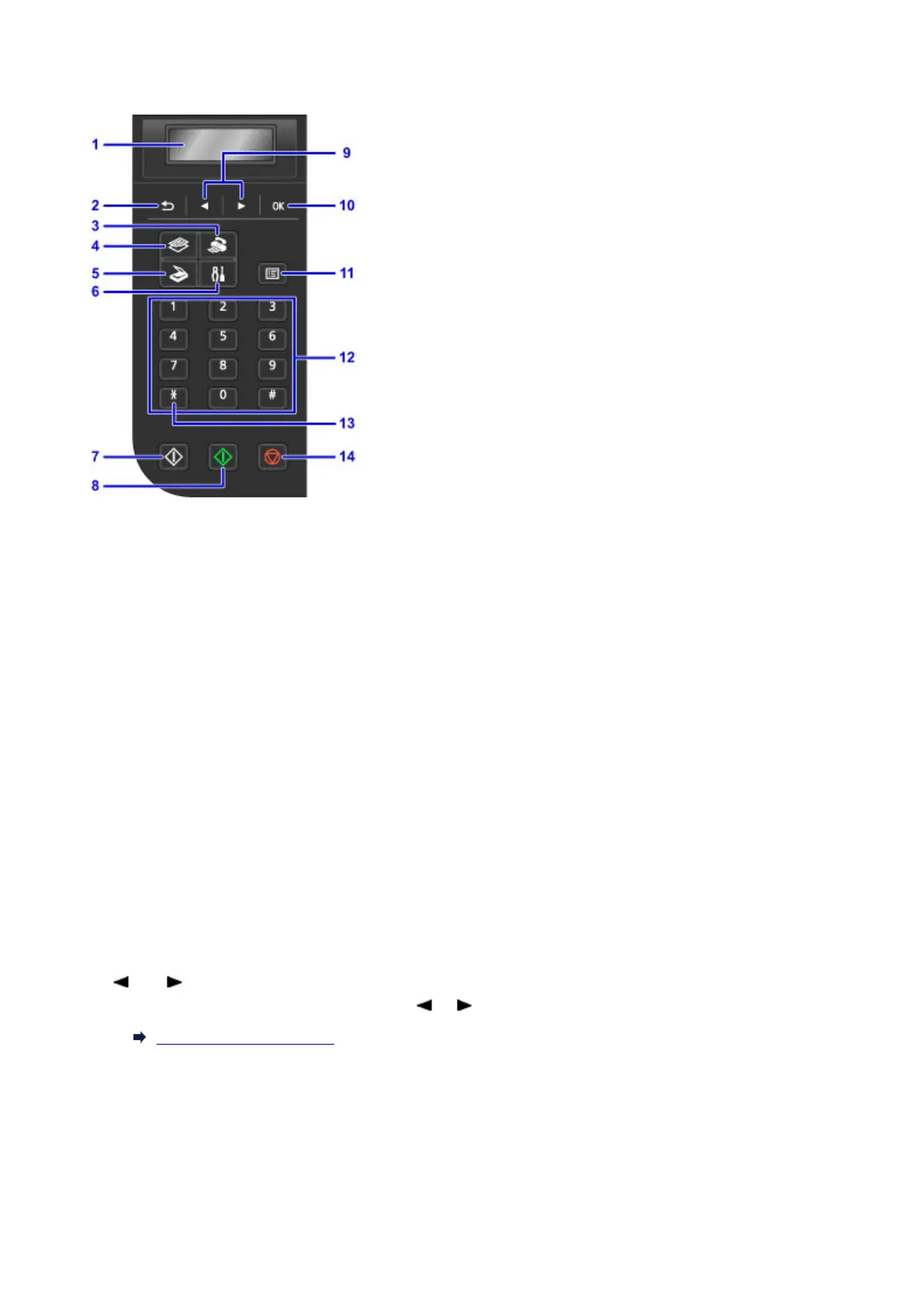
Operation Panel
(1) LCD (Liquid Crystal Display)
Displays messages, menu items, and the operational status.
(2) Back button
Returns the LCD to the previous screen.
(3) FAX button
Switches the machine to the fax mode.
(4) COPY button
Switches the machine to the copy mode.
(5) SCAN button
Switches the machine to the scan mode.
(6) Setup button
Displays the Setup menu screen. With this menu, you can perform machine maintenance and change
machine settings.
(7) Black button
Starts black & white copying, scanning, faxing, etc.
(8) Color button
Starts color copying, scanning, faxing, etc.
(9) and buttons
Used to select a menu or setting item. The or button is also used when entering characters.
LCD and Operation Panel
(10) OK button
Finalizes the selection of a menu or setting item. This button is also used to resolve an error or ejects
documents in the ADF (Auto Document Feeder).
(11) Menu button
Displays the Copy menu, Scan menu, or FAX menu screen.
113














 To Next Page