Chapter 12: Program Application 196
Chapter 12:
Program Application
The Program application comes in handy when you need to perform the same calculation a number of times.
You can create programs that automate graphing and other operations.
The Program application consists of a Program Editor for inputting and editing programs, and a Program
Loader for loading and executing existing programs.
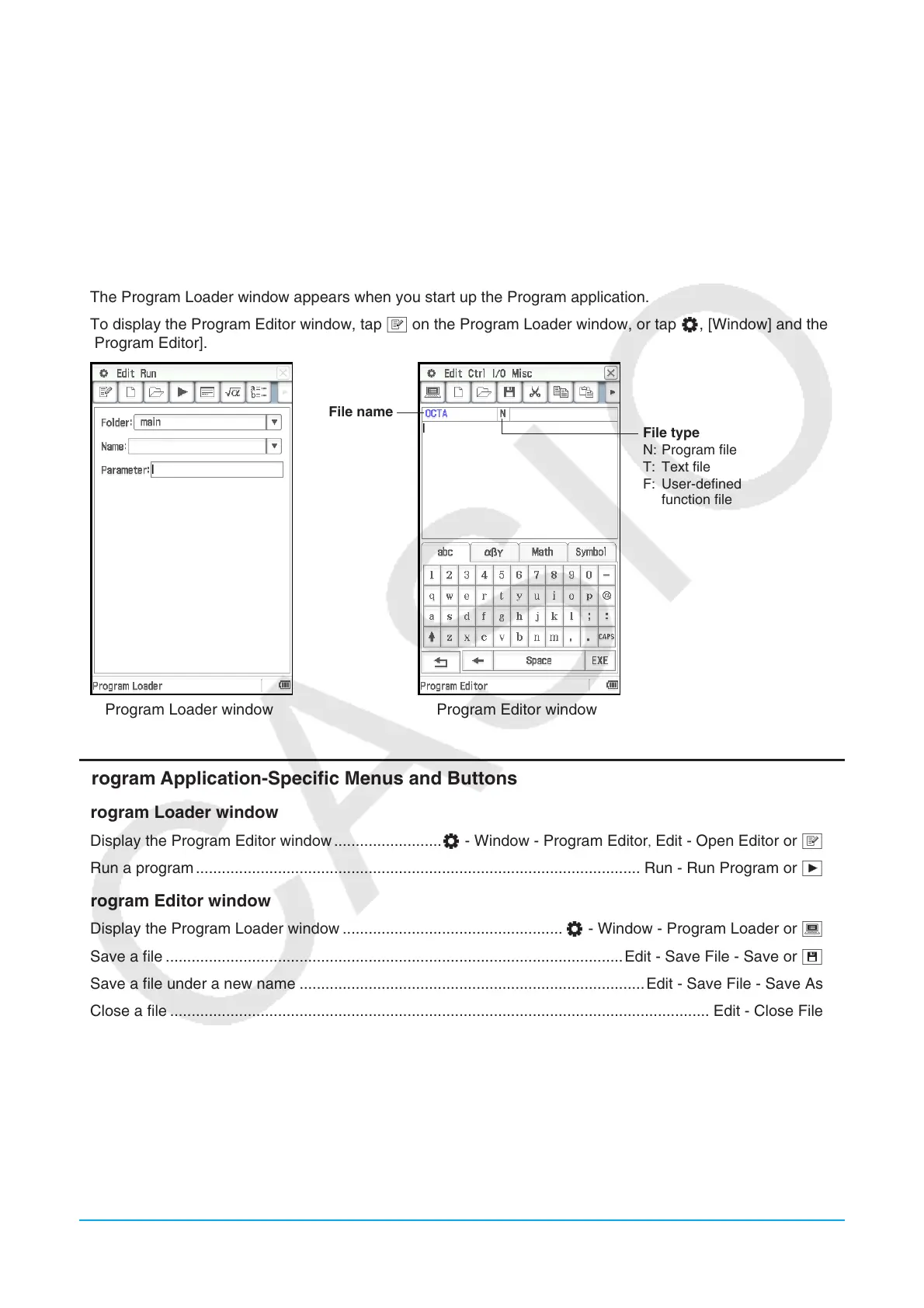
• The Program Loader window appears when you start up the Program application.
• To display the Program Editor window, tap P on the Program Loader window, or tap O, [Window] and then
[Program Editor].
Program Loader window Program Editor window
File name
File type
N: Program file
T: Text file
F: User-defined
function file
Program Application-Specific Menus and Buttons
Program Loader window
• Display the Program Editor window .........................O - Window - Program Editor,Edit - Open Editor or P
• Run a program ....................................................................................................... Run - Run Program or .
Program Editor window
• Display the Program Loader window ................................................... O - Window - Program Loader or )
• Save a file ..........................................................................................................Edit - Save File - Save or {
• Save a file under a new name ................................................................................Edit - Save File - Save As
• Close a file ............................................................................................................................. Edit - Close File
• Convert a file to a program file .......................................................................Edit - Mode Change - 'Normal
• Convert a file to a text file .................................................................................. Edit - Mode Change - 'Text
• Convert a file to an edit prohibited program file ..................................................................... Edit - Compress
• Search for a newly specified text string ..................................................... Edit - Search - New Search or e
• Search again for a previously specified text string .....................................Edit - Search - Search Next or r
• Jump to the beginning/end of a program .................................Edit - Search - Jump to Top / Jump to Bottom












 To Next Page