Chapter 12: Program Application 198
5. After the program is the way you want, tap {, or tap [Edit], [Save File] and then [Save] to save it.
• To run this program see “Running a Program” on page 199.
• If a message appears when you try to save the program, make the necessary corrections and try again.
For details about making corrections to a program, see “12-2 Debugging a Program”.
Tip
• The file name you input in step 2 of the above procedure is subject to the same rules as folder and variable names. For
more information, see “Folder and Variable Name Rules” on page 31.
• To input a program and save it without running it, perform the above procedure up to step 5, and then tap [Edit] and then
[Close File].
• If you want to use the calculation results produced by program execution in another calculation, include a line in the
program that uses the “⇒” command to assign the calculation result to a variable. For example, you could add the line
below to the above example program to assign the calculated surface area to variable S and the volume to variable V.
2 ×
(3) × A^2
⇒
S: (2)/3 × A^3
⇒
V
Note that calculation results produced within programs are not stored in Ans memory.
Pausing Program Execution
You can specify where execution of a program should pause by including either a Pause command or a Wait
command inside the program. For details about each command, see “12-4 Program Command Reference”.
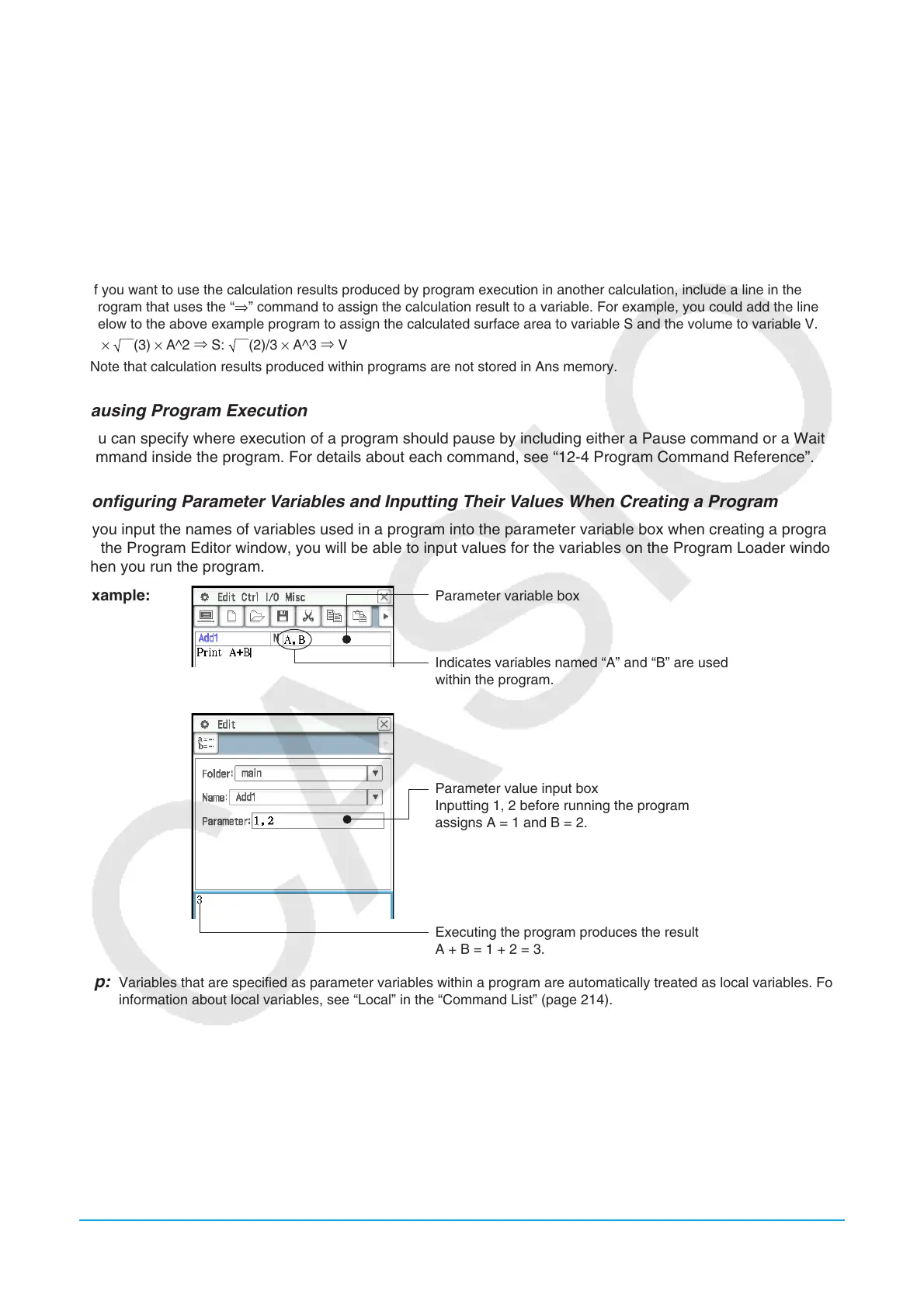
Configuring Parameter Variables and Inputting Their Values When Creating a Program
If you input the names of variables used in a program into the parameter variable box when creating a program
on the Program Editor window, you will be able to input values for the variables on the Program Loader window
when you run the program.
Example:
Parameter variable box
Indicates variables named “A” and “B” are used
within the program.
Parameter value input box
Inputting 1, 2 before running the program
assigns A = 1 and B = 2.
Executing the program produces the result
A + B = 1 + 2 = 3.
Tip: Variables that are specified as parameter variables within a program are automatically treated as local variables. For
information about local variables, see “Local” in the “Command List” (page 214).
Using a Subroutine to Call another Program
Including the name of another program file inside of a program causes execution to jump to the specified
program file.
Syntax: <program name>({<parameter variable name 1>,<parameter variable name 2>, ... })
The program that execution jumps from is called the “main program”, while the program to which execution
jumps is called a “subroutine”.



 To Next Page
 Loading...