15
Quick Start Basics
The camera has a built-in rechargeable lithium ion battery. The battery is not charged
when you purchase the camera, so you will need to charge the camera before using
it.
You can use either of the two following methods to charge the battery.
• USB-AC adaptor
• USB connection to a computer (Using the included micro USB cable.)
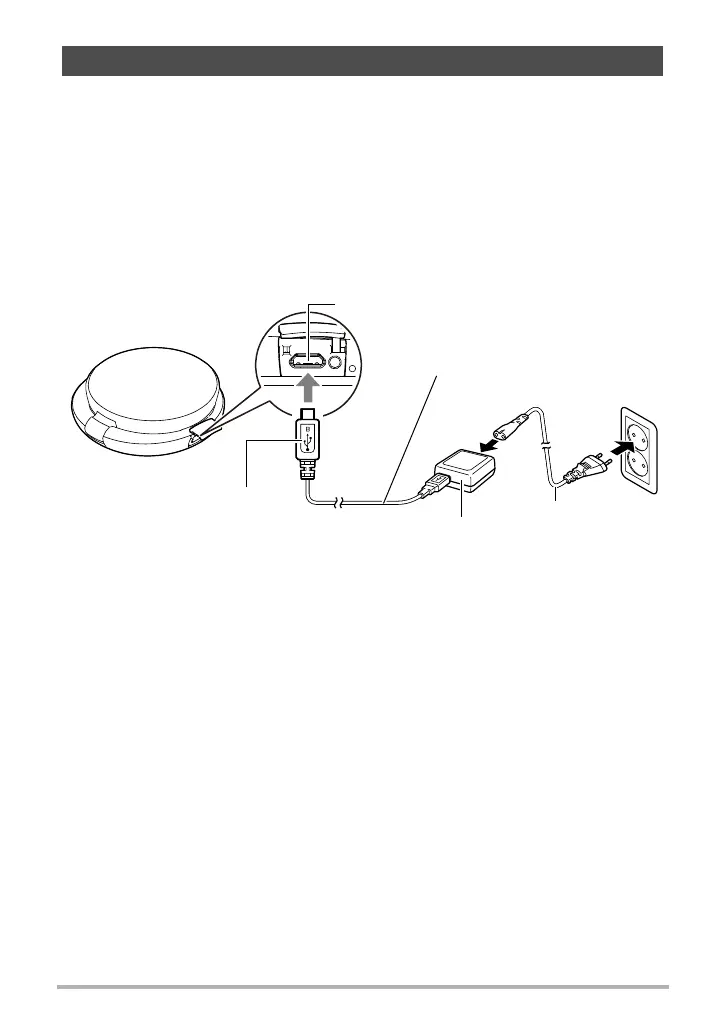
. To charge with the USB-AC adaptor
While the camera is turned off, connect in the sequence shown below.
Charging time: Approximately 2 hours 20 minutes
• When disconnecting the USB-AC adaptor from the camera, be sure to disconnect
from the camera first.
First, charge the battery prior to use.
USB-AC adaptor
(AD-C53U)
Connect the cable so the u
mark on the small (micro USB)
connector is facing upwards.
[USB] port
Micro USB cable
(included with camera)
Power cord










 To Next Page