Appendix E: Configurable MQTT TLS Certificates for Gateway-AC
Communication
1. Overview
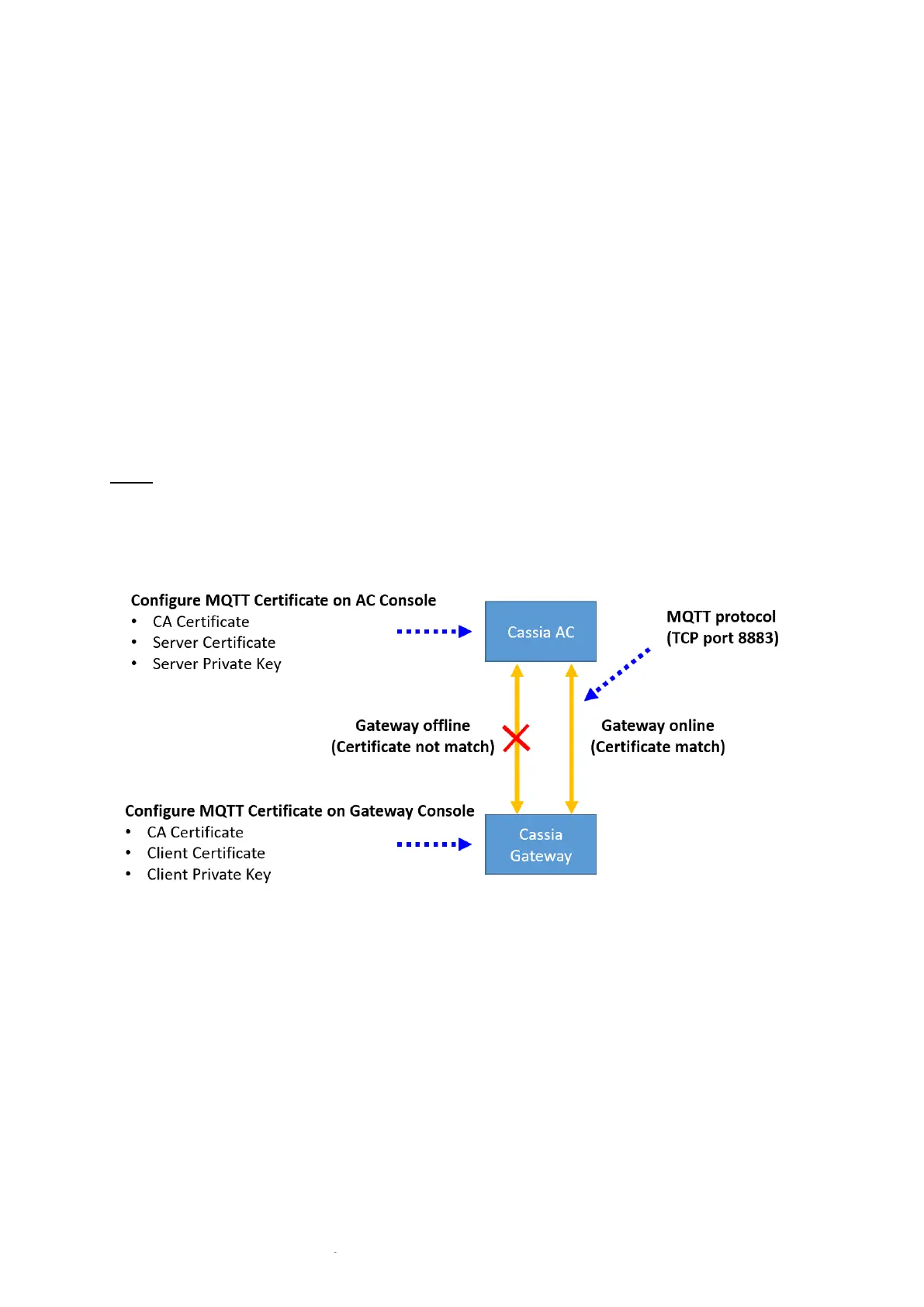
To further improve the communication security between Cassia IoT Access Controller (AC)
and Cassia Bluetooth gateway, Cassia supports configurable MQTT TLS certificates for
gateway and AC communication from firmware 2.0.
The user can generate their MQTT certificate and load it in AC and gateway console. If the
loaded certificate doesn’t match or expired, the gateway can’t connect to the AC. The
certificate can be a CA certificate or a self-signed certificate. Cassia gateway always uses the
secured MQTT to communicate with AC, no matter if the default or custom certificate is used.
NOTE
Only PEM certificate file format is supported
Don’t support private keys with passphrase protected
Don’t support certificate revoke
2. AC Configuration
2.1. Open TCP port 8883 on AC Host
TCP port 8883 is used by MQTT protocol between Cassia AC and Cassia Bluetooth gateway.
The user can use NetCat to check if TCP port 8883 is enabled on AC and reachable from the
gateway. Please login gateway’s local console, select Other page, and run NetCat like below.
TCP port 8883 has been opened on VMware AC. If the user wants to open TCP port 8883 for
Cassia-hosted AC, please contact Cassia support.



 To Next Page