Copyright 2023 Cassia Networks, Inc.
Version: EN-2023039-YJ
•
Zoom 4630 (for AT&T, T-Mobile, and other Cellular operators)
•
ConnectedIO EM1000T-VZ-CAT1 (for Verizon)
•
NXCC UX302NC (for DoCoMo)
•
Soracom Onyx SC-QGLC4-C1
•
Quectel EC20 (for China Mobile)
•
Quectel EG25
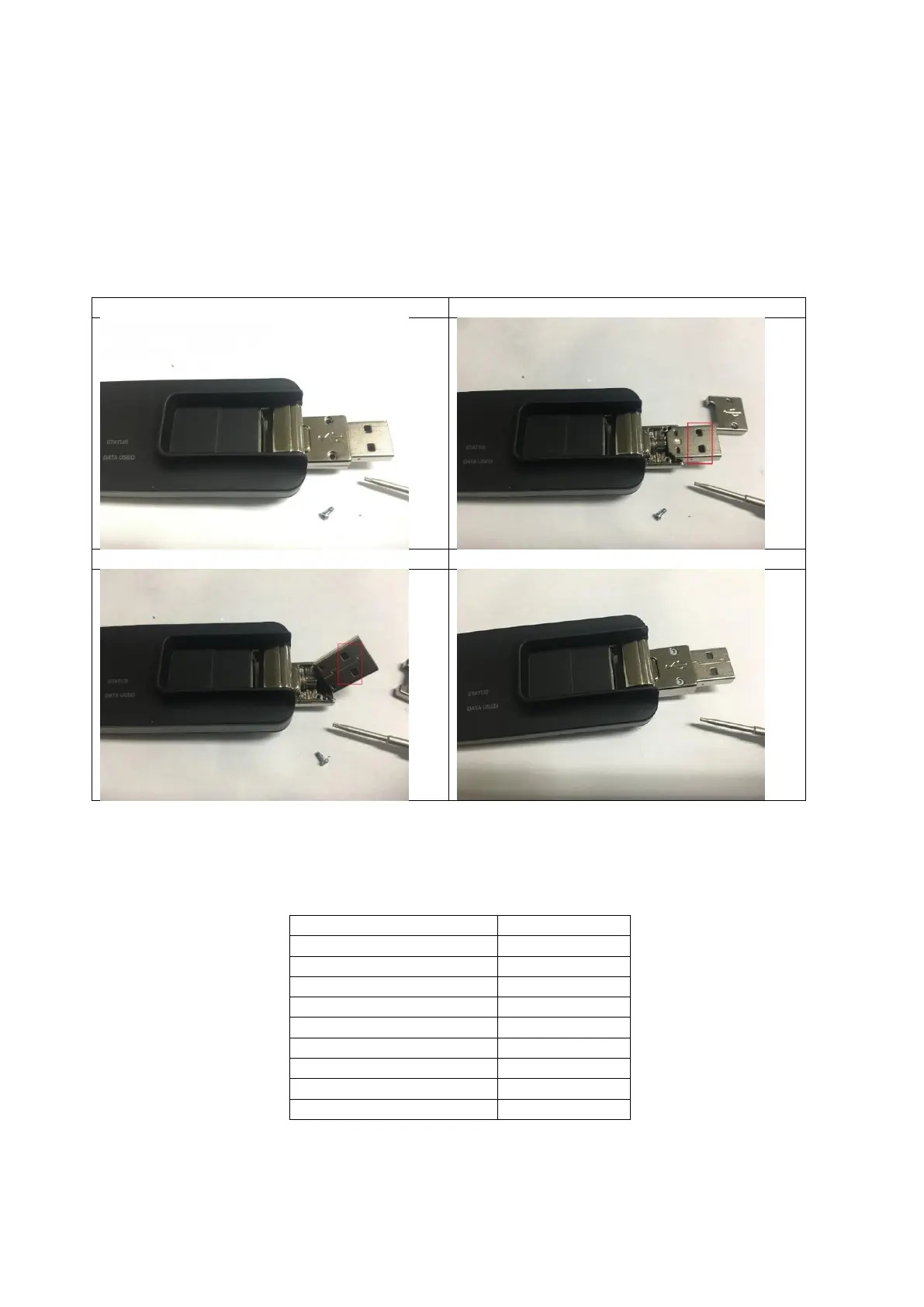
To fit USB730L into the bottom enclosure of the X1000, the USB connector of U730L
should be turned over. Please follow the steps below.
Step 1: Remove the two screws of the USB connector
Step 2: Remove the cover with the USB logo
Step 3: Turn over the USB connector
Step 4: Put the cover and the two screws back
New USB cellular modems may be used by selecting USB Modem Type “Custom”. Below
is the custom configuration example of cellular modem AK-020. For USB cellular modem
and SIM card related information, please contact the cellular carrier.
With a USB cellular modem, the Cassia Bluetooth gateway needs to be in a place where
there is good cellular network coverage. From firmware 2.0, the user can check the
cellular signal strength on AC (AC->Gateway->Details->Uplink) or gateway console



 To Next Page