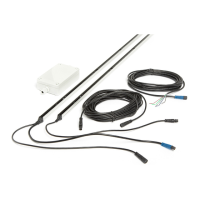
GridScan/Pro English
© CEDES | V 1.0 11
12. Troubleshooting
Tx LED
Green
Rx LED
Green
Rx LED
Red Action
LED off LED off LED off ` Check electrical connections.
` Check supply voltage of the door controller.
LED off LED off LED red ` Check the connection of the synchronization cable.
LED green LED green LED off ` Make sure the sensor edges are not mounted close to any
shiny or reflective surface.
` Restart the system.
LED off/on
(flickering green)
LED off LED off/on
(flickering red)
` Check power supply.
` Check connections.
LED green LED off LED off/on
(slow blinking red)
` Make sure the safeguarded area is clear of interruption.
` Check the alignment of the light curtain.
` Clean elements.
LED green LED on/off
(flickering green)
LED off/on
(flickering red)
` Make sure the safeguarded area is clear of interruption.
` Clean the elements.
` Make sure that the cables and edges are located away from
sources of electromagnetic interference.
` Ensure that the emitter and receiver are correctly aligned
and remain so during door closure (e.g. that vibrations do
not cause edges to become misaligned).
` Restart the system.
LED green LED off LED red ` Make sure the safeguarded area is clear of interruption.
` Reopen door completely.
` Clean the elements.
` Check the alignment of the light curtain.
` Check that the test input is connected to the test output
signal of the door control unit and that the signal level and
logic (HIGH/LOW) are correct. If the test input is not used,
connect it permanently to U
SP.
` Measure the U
SP voltage.
` Restart the system.
LED off LED off LED off/on
(slow blinking red)
` Check the connection of the synchronization cable.
LED green LED off LED off/on (red,
fast blinking, 5 Hz)
Internal error occurred
` Restart the system.
` Replace Rx edge.
Important: Whenever a parameter is changed, the system must be restarted.
If a problem persists, please contact your local CEDES representative. Visit www.cedes.com for contact data.
13. Maintenance
Although the GridScan/Pro does not need regular
maintenance, a periodic functional check is strongly
recommended:
` Make sure the optical elements are clear of dirt and dust.
If necessary, clean the front surface with a soft towel.
` Make sure the edges are securely fastened.
` Check the mounting position, cable routing and
connection of the sensor.
14. Disposal
The GridScan/Pro should only be replaced if a similar
protection device is installed. Disposal should be done
using the most up-to-date recycling technology according
to local regulations and laws. There are no harmful materials
used in the design and manufacture of the sensor. Traces
of such dangerous materials may be found in the electronic
components but not in quantities that are harmful.
NOTICE
Damage to the optical elements
Never use any solvents, cleaners or mechanically
abrasive towels or high-pressure water to clean
the sensor.
Avoid scratching the optical elements while
cleaning.


 To Next Page
 Loading...