GridScan/Pro English
© CEDES | V 1.0 7
6.1 Door blanking
The GridScan/Pro can differentiate between a light beam interruption caused by an object and a light beam interruption
caused by the closing door. The GridScan/Pro does this by analyzing the different interruption patterns.
Closing door interruption pattern:
The light beam interruption of a closing door starts at the topmost beam going downwards. There are two ways to achieve
blanking:
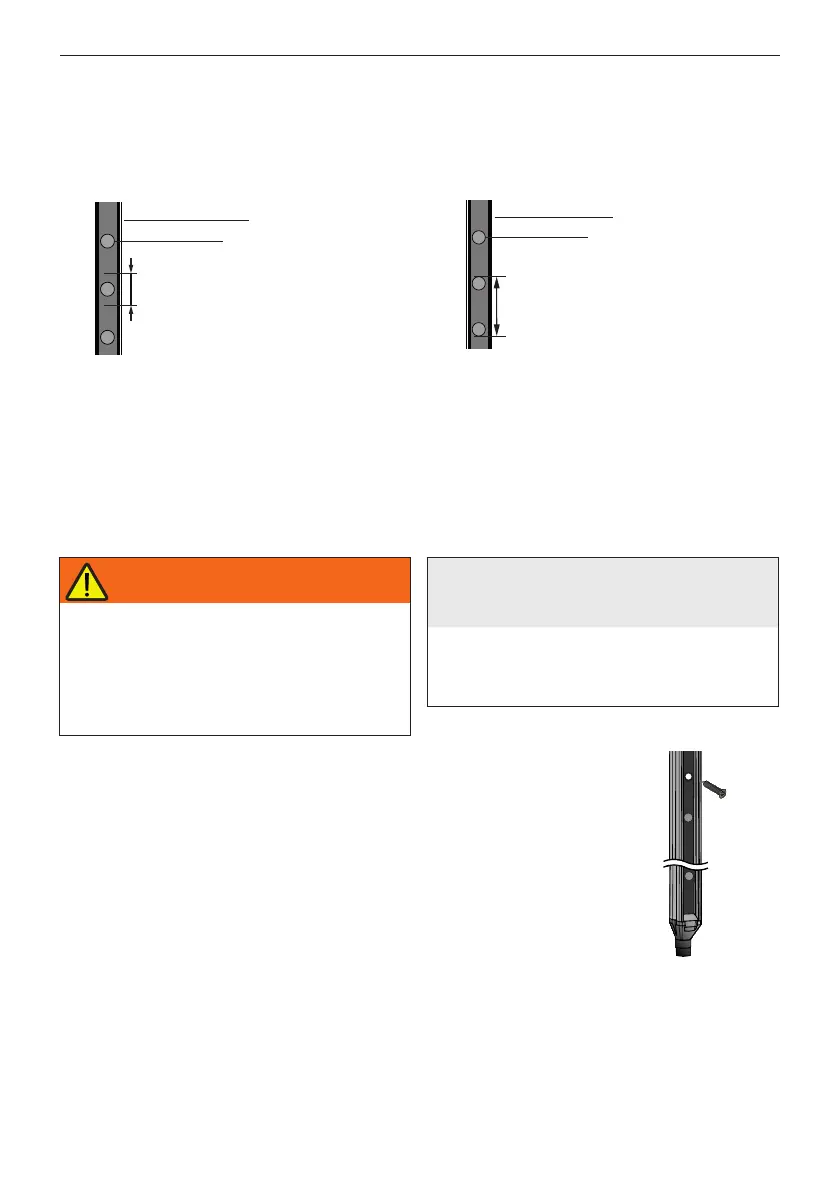
Min. height of
the lower end
of the door
Optical element
GridScan/Pro edge
Figure 9.1 Door blanking through door edge
7. Installation
1. Switch off main power to the door control unit and mark clearly that this system is out
of service before performing any work on the system.
2. Mount the receiver edge on one side of the door.
Important for standard types:
Mount the receiver edge into the guiding rail next to the door control unit
(Figure 7).
In order to fulfill EN 12978:2009 the lower end of the edges have to be at the level of
the door closed position.
Important for ST types:
When the GridScan/Pro is statically mounted (Figure 8) the door must not interrupt
the beams (no door blanking).
Figure 10: Front mounting
When the GridScan/Pro is integrated into the guide rail, the
door moves directly in front of the light curtain. This means
the lowest section of the door needs to be at least 30 mm
in height to ensure that at least one element is completely
covered. It is also essential that the door's leading edge
extends the full distance between the light curtain's emitter
and receiver (Figure 9.1).
If the light curtain is located either in front of or behind the
guide rail, the descending door will not interrupt the active
beams. However, blanking may still be required if any part
of the door (e.g. cable) interrupts the light curtain. A beam
blocker can be used but it must be mounted so that at least
one element is continuously covered during door closure
(Figure 9.2).
Optical element
GridScan/Pro edge
Min. distance always
covered by the
beamblocker
Figure 9.2 Door blanking through beam blocker
WARNING
Electrical and mechanical hazards
Electrical shock and unexpected door
movement can cause serious injury or
death.
Follow all applicable safety measures.
Use only specific and approved tools.
If the GridScan/Pro has to be adjusted, the
main power supply must be switched off
and marked as out of service.
NOTICE
Mechanical damage to the
GridScan/Pro
Do not drill additional holes into the light
curtain.
Do not overtighten the mounting screws.
Mount the edges on a flat surface.


 To Next Page
 Loading...