CENTRALINE I/O MODULES – INSTALLATION & COMMISSIONING INSTRUCTIONS
EN1Z-0973GE51 R0119
42
Terminals
REMOVABLE CROSS CONNECTOR (FACTORY-MOUNTED)
NO
NC
COM
11
12
13
NO
NC
COM
21
22
23
31
32
33
NO
NC
COM
41
42
43
NO
NC
COM
51
52
53
NO
NC
COM
61
62
63
NO
NC
COM
25
71
75
72
76
73 77
74
78
COM
A
COM
A
COM
B
COM
B
24
V~
24
V~
24
V~0
24
V~0
ACTUATOR 1
CTUATOR 2
CTUATOR 3
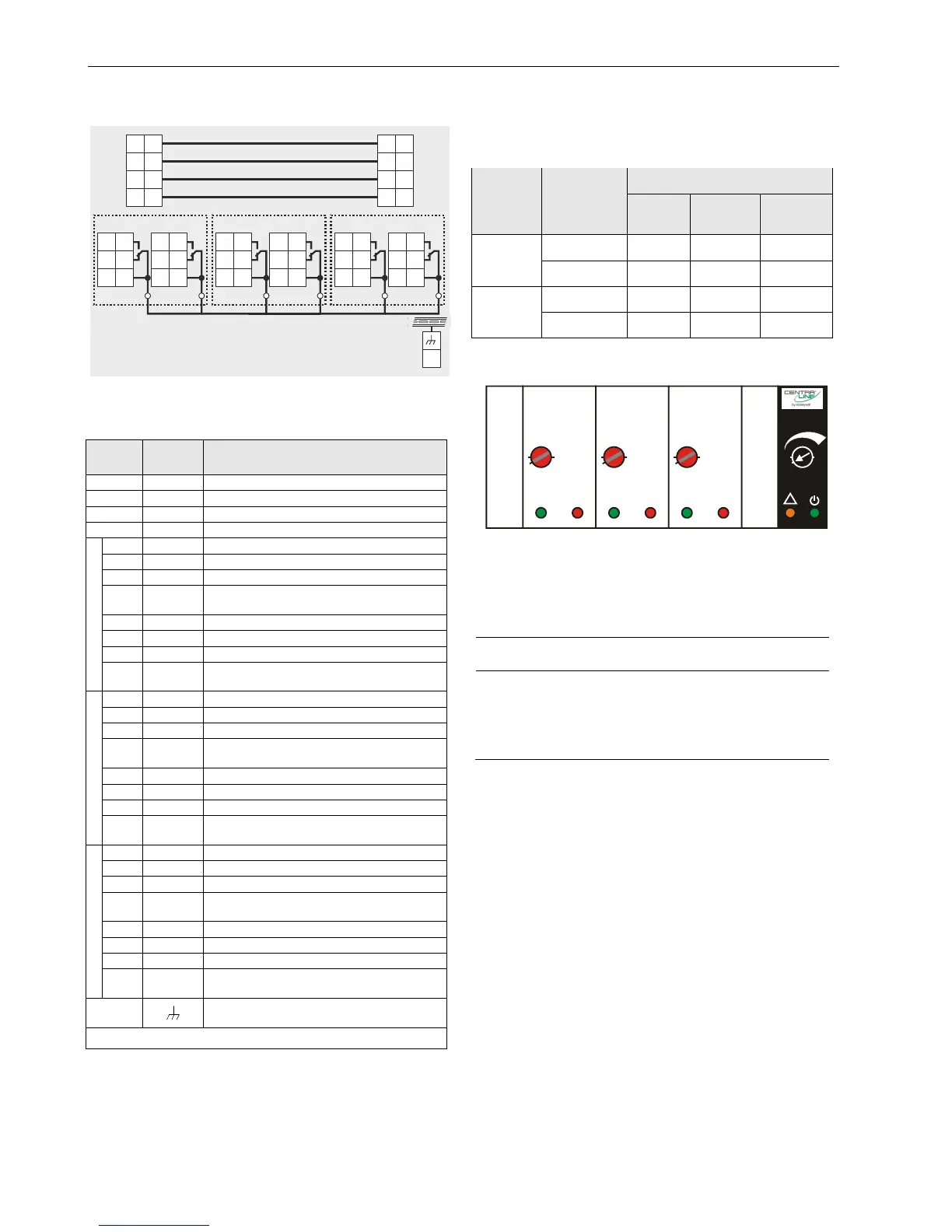
Fig. 51. Terminal assignment and internal connections
Table 44. Description of floating output module terminals
Ter-
minal
Signal Comment
71, 75
COM a
2-wire communication bus (LON/Panel Bus)
72, 76
COM b
2-wire communication bus (LON/Panel Bus)
73, 77
24 V~
Power supply
74, 78
24 V~0
Power supply
ACTUATOR 1
11
REL1 N.O.
Floating relay 1 N.O. contact
12
REL1 N.C.
Floating relay 1 N.C. contact
13
R1 COM
Floating relay 1 common contact
14
R1 COM
For connection of floating relay 1 common
via cross connector*
21
REL2 N.O.
Floating relay 2 N.O. contact
22
REL2 N.C.
Floating relay 2 N.C. contact
23
R2 COM
Floating relay 2 common contact
24
R2 COM
For connection of floating relay 2 common
via cross connector*
ACTUATOR 2
31
REL3 N.O.
Floating relay 3 N.O. contact
32
REL3 N.C.
Floating relay 3 N.C. contact
33
R3 COM
Floating relay 3 common contact
34
R3 COM
For connection of floating relay 3 common
via cross connector*
41
REL4 N.O.
Floating relay 4 N.O. contact
42
REL4 N.C.
Floating relay 4 N.C. contact
43
R4 COM
Floating relay 4 common contact
44
R4 COM
For connection of floating relay 4 common
via cross connector*
ACTUATOR 3
51
REL5 N.O.
Floating relay 5 N.O. contact
52
REL5 N.C.
Floating relay 5 N.C. contact
53
R5 COM
Floating relay 5 common contact
54
R5 COM
For connection of floating relay 5 common
via cross connector*
61
REL6 N.O.
Floating relay 6 N.O. contact
62
REL6 N.C.
Floating relay 6 N.C. contact
63
R6 COM
Floating relay 6 common contact
64
R6 COM
For connection of floating relay 6 common
via cross connector*
25
Shield connection (functional earth),
internally connected to the DIN rail
* Do not connect by wire!
Status LED Behavior
The respective pair of status LEDs will display the following:
Table 45. LED behavior (for e.g., floating output 1)
Mode LED
Actuator 1
Closing Opening
Not
moving
Auto
Green LED ON OFF OFF
Red LED OFF ON OFF
Override
Green LED Flashing OFF Flashing
Red LED OFF Flashing Flashing
Status LEDs with Manual Overrides
1
2
3
UTO
0
!
100
Fig. 52. Manual overrides (rotary knobs)
The floating output module is equipped with manual
overrides: one for each floating output. These rotary knobs
can be manually set to either "AUTO" or "0 … 100%"
(infinitely adjustable).
NOTICE
Damage to the electronic module!
► Do not use a tool to adjust the rotary knobs.
► Do not use excessive force. Adjust only by hand.
Manual Override in the AUTO Position
When a manual override of the CLIOPR825A is set to AUTO,
the following applies:
The output signal of the respective floating output (R1 +
R2 or R3 + R4 or R5 + R6) will be as commanded.
The respective pair of status LEDs will be ON/OFF as
commanded.
Manual Override in the Override Position (0…100%)
When a manual override of the CLIOPR825A is set to
0…100%, the respective floating output will drive to the set
position. The runtime depends upon the actuator runtime
configured using the engineering tool and on the actual
position.



 To Next Page