CENTRALINE I/O MODULES – INSTALLATION & COMMISSIONING INSTRUCTIONS
57 EN1Z-0973GE51 R0119
Service LED of CentraLine I/O Modules
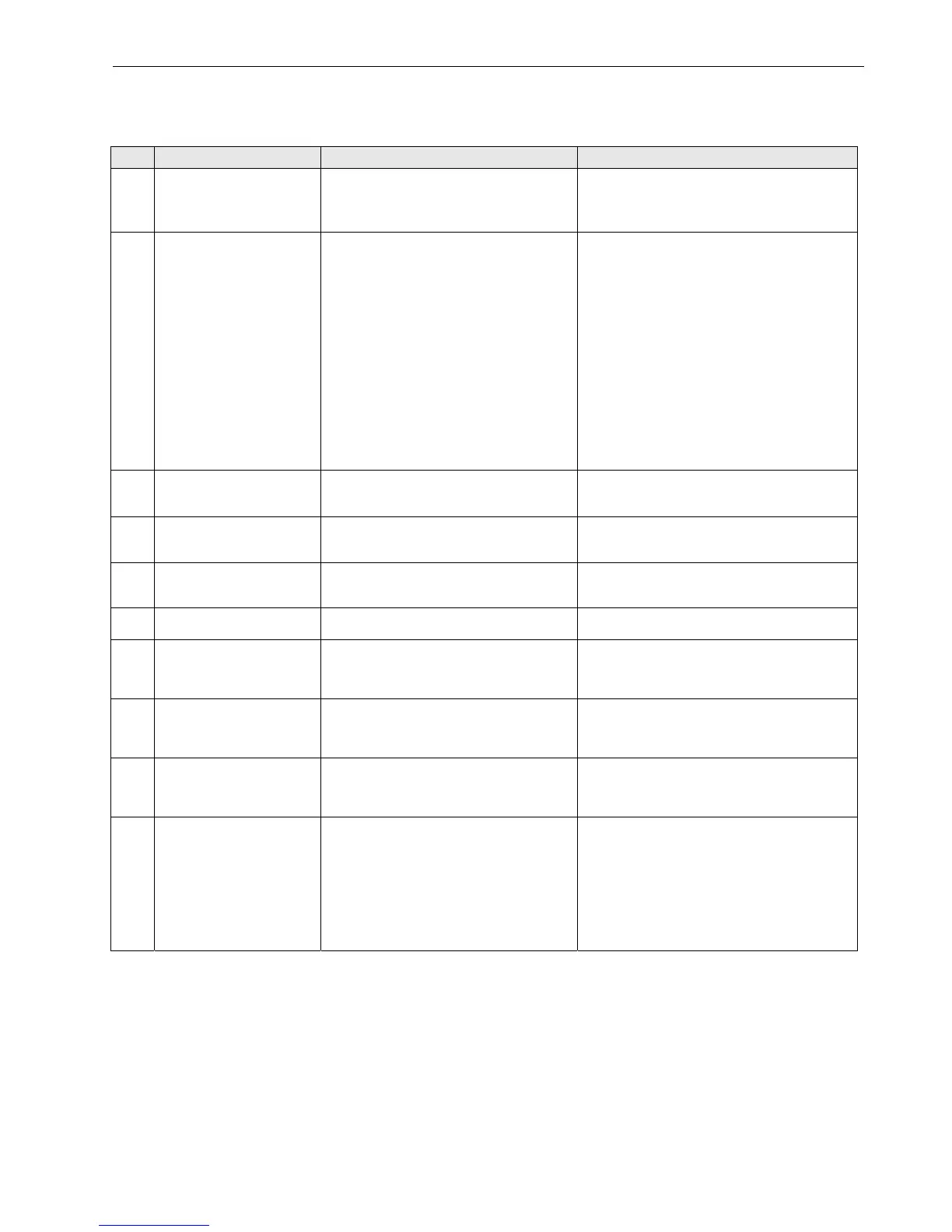
Table 58. Service LED of CentraLine I/O modules
case Service LED Meaning Remedy
1
LED remains OFF after
power-up
If the power LED is also OFF, then
– Defective device hardware
– Possible power supply problems, clock
problems, or defective processor
► Replace hardware
2
LED is lit continuously after
first power-up
L
ONWORKS Bus I/O modules:
– Defective hardware
Panel Bus I/O modules:
– I/O module has not yet been configured
by the controller
– Boot loader is active
– Failure during last firmware download
– Checksum error
L
ONWORKS Bus I/O modules:
► Replace hardware
Panel Bus I/O modules:
► Set the hex address to the position configured
with CARE
► Check the Panel Bus wiring:
- Check for cable breaks
- Check for cable short-circuits
- If using separate transformers: Check ground
connection
► Eliminate any mixture of Panel Bus I/Os and
LonWorks I/Os on same wire
► Allow controller to configure I/O module
► Unplug and replug the module
► If problem persists, replace hardware
3
Alternating flash between
service LED and power LED
Panel Bus I/O modules, only:
Download error or application checksum error.
Boot loader is running
► Panel Bus I/O modules, only:
Wait until rebooting (firmware download) has
been completed
4
LED flashes at power up,
goes OFF, and then is lit
continuously
L
ONWORKS Bus I/O modules, only:
The L
ONWORKS Bus I/O module lacks
application
► Download application
5
LED repeatedly blinks
ON for 1 sec and
OFF for 1 sec
L
ONWORKS Bus I/O modules, only:
The L
ONWORKS Bus I/O module is
unconfigured, but has an application
► Set module to configured mode
6
LED remains OFF after a
short ON duration
I/O module is configured and running normally
No action necessary
7
LED flashes continuously in
following pattern:
4 x ON/OFF followed by
pause
Sensor failure of analog input module
(in the case of L
ONWORKS Bus I/O modules,
this behavior can occur only if the appropriate
NV has been bound)
► Check sensor or connection
► Check sensor configuration
8
LED flashes continuously in
following pattern:
5 x ON/OFF followed by
pause
L
ONWORKS Bus I/O modules, only:
L
ONWORKS I/O Bus module has received the
wink command from network, physical outputs
are unaffected
No action necessary
9
LED flashes continuously in
following pattern:
6 x ON/OFF followed by
pause
Boot loader problem or hardware defect
► Replace hardware
10
LED flashes continuously in
following pattern:
7 x ON/OFF followed by
pause
Communications failure
► Check bus wiring
► Ensure that L
ONWORKS Bus I/O modules and
Panel Bus I/O modules are not sharing the same
bus
► In case of Panel Bus I/O modules, only:
Check for incorrect HEX addresses (2 Panel Bus
I/O modules using the same HEX address)
► In case of L
ONWORKS Bus I/O modules, only:
Check heartbeat



 To Next Page