page 42 www.centsys.com
8. Commissioning
8.1. Control Card Setup
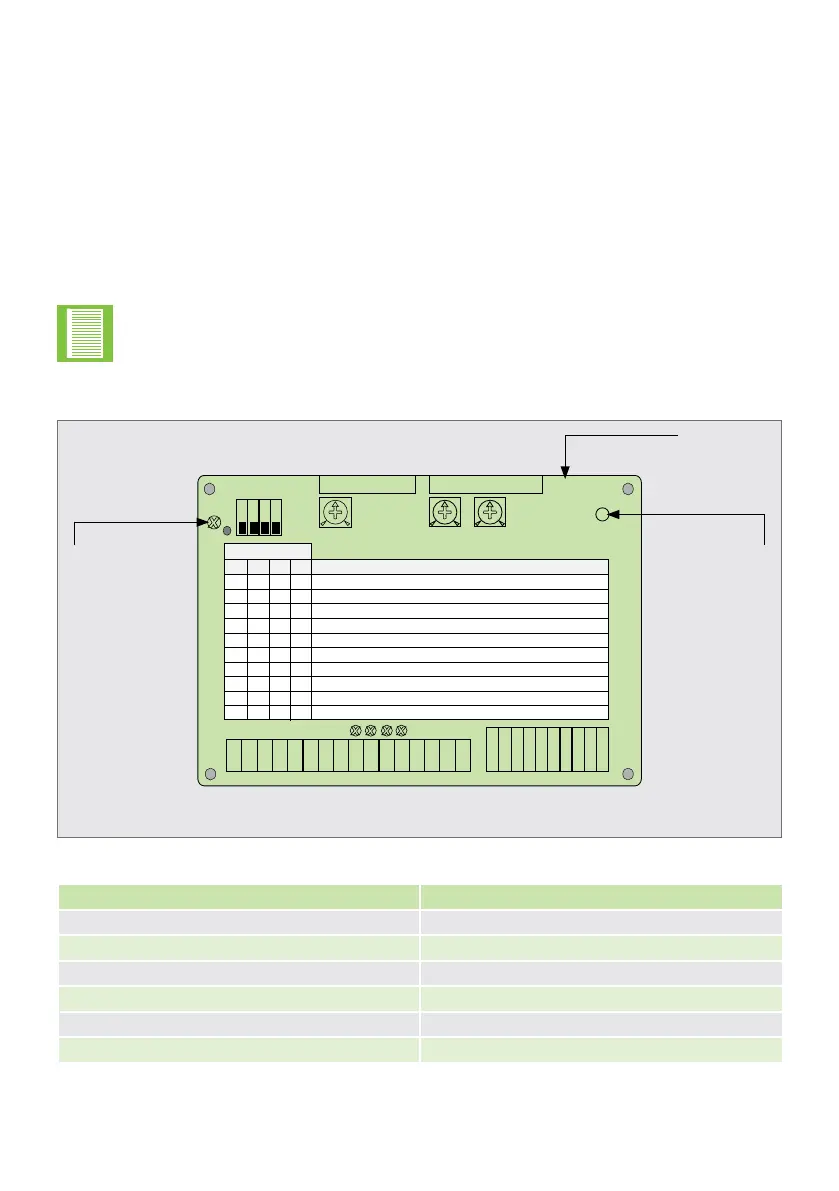
Identify status LED which will give information on gate status (e.g. whether gate
should be open or closed)
Selectdipswitchsettingstogiverequiredmodeofoperation(CP77only)
Select“autoclose”ifrequired(e.g.usingsw1onCP77)
Set autoclose timer potentiometers to minimum initially and adjust time to suit after
commissioning
Setcollisionsensitivitypotentiometerstomid-position(seepage45forcorrectnal
adjustment)
Limit switch LEDs only on version 1.1 cards and above.
8.1.1. CP77 Controller
FIGURE 52. CP77
TABLE 8
1
1
1
2 3 4
0
0
0
0
0
1
1
1
1
1
16
1
0
0
0
1
1
0
0
1
0
1
0
0
1
0
1
1
0
0
0
1
0
1
0
0
0
0
0
0
1
0
2
SWITCH NO
3
4 DESCRIPTION OF OPERATION (MODE)
SINGLE MOTOR SYSTEM WITHOUT AUTOCLOSE
SINGLE MOTOR SYSTEM WITH AUTOCLOSE
DOUBLE MOTOR SYSTEM WITHOUT AUTOCLOSE
DOUBLE MOTOR SYSTEM WITH AUTOCLOSE
CONDOMINIUM MODE (SINGLE MOTOR)
PIRAC MODE (SINGLE MOTOR)
CONDOMINIUM MODE (DOUBLE MOTOR)
PIRAC MODE (DOUBLE MOTOR)
LINEAR MOTOR(S) WITHOUT AUTOCLOSE
LINEAR MOTOR(S) WITH
AUTOCLOSE
5 SECS
OPEN
45 SECS
CLOSE
AUTOCLOSE TIMER
COLLISION SENSITIVITY
(SEE NOTE)
x
x
x
x x x
CP77 V1.X
CP87
AUTOCLOSE
SELECT
X
1 9
COLLISION SENSITIVITY
MINMAX
AUTOCLOSE
"OFF"
AUTOCLOSE
"ON"
x
CP77 Control
Card
Green
Power On LED
(on with mains
power present)
Gate Status LED
(Red)
LED GATE STATUS
LEDO Gate Closed
LED On Gate Open
Fast Flash Closing
Slow Flash Opening
2 Flash/2 Secs Mains Failure
3 Flash/2 Secs Battery Low
COMMISSIONINGSECTION 8
•
•
•
•
•


 To Next Page