page 43 www.centsys.com
COMMISSIONINGSECTION 8
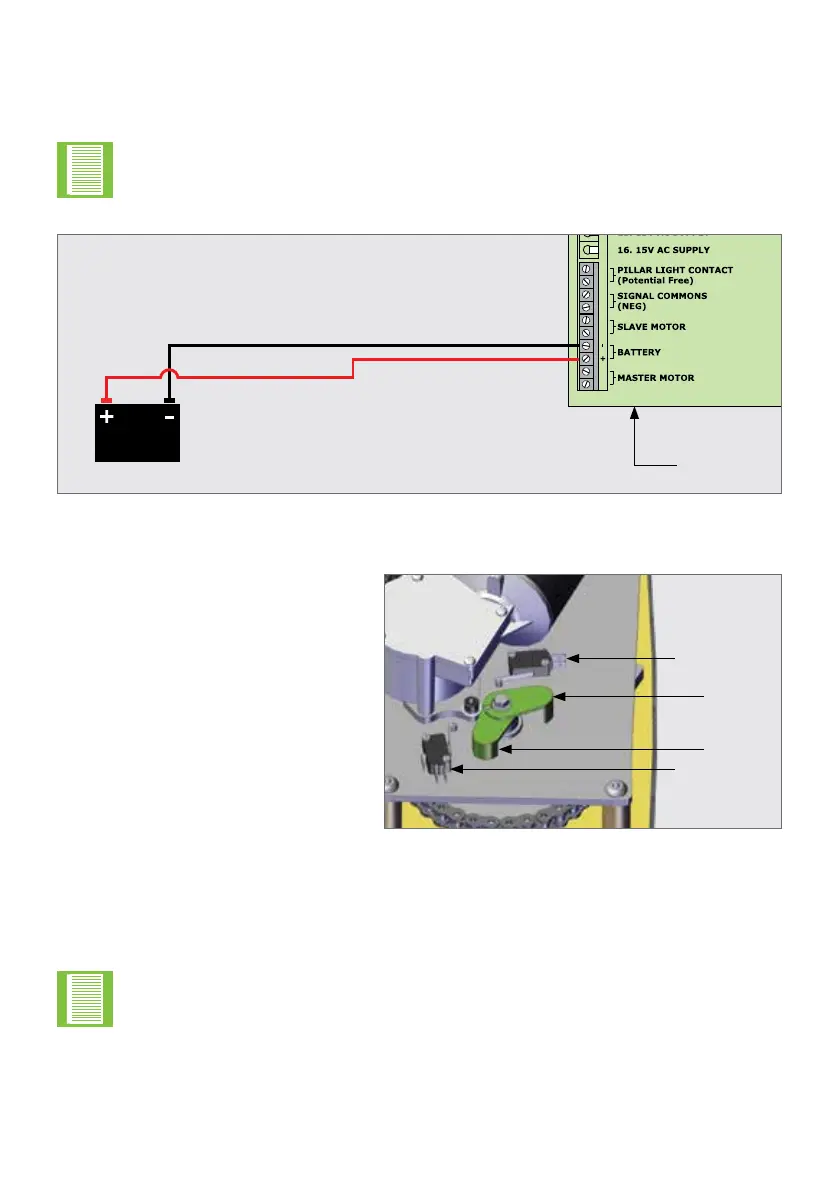
FIGURE 53
CP77 Control
Card
If a large battery is used, the cables connecting the battery to the CP77
card should be between 6 & 10 mm² for cable lengths less than 5 metres.
Centurion Systems (Pty) Ltdoersaspeciallymade2mlongcableforthis
instance(Partnumber:WH1215M730).
Loosen or remove the Drive Arms then connect the Battery.
Battery 12V
8.2. Connecting the Battery
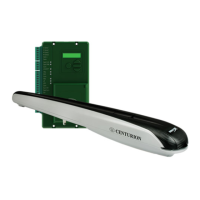
The open and closed limit system for
the R6 Swing operator is comprised
of two plastic limit arms and two
limit switches. One Limit Arm and
switch will be used for the gate open
limit and one Limit Arm and switch
will be used for the gate closed limit.
Which switch will be the open limit
and which will be the closed limit will
depend on the orientation in which
the operator is installed.
For maximum security when using an R6 Swing operator, the Drive Arm and Connecting
Arm must be collinear (in a straight line) when the gate is in the closed position with the
Connecting Arm attached to the gate. To ensure that this condition is met, the position of
the Drive Arm will need to be rotated by connecting the motor directly to a battery.
FIGURE 54
8.3. R6 Limit Setup
Limit Arm
Limit Switch 1
Limit Switch 2
Limit Arm
Care must be taken when connecting the motor directly to a battery that the
plastic arms do not come into contact with other components and break.
Ensure the gate is closed with the Connecting arm securely attached and with the Drive
Arm and Connecting Arm collinear. With reference to Figure 55 and in an instance where
the Drive Arm rotates anti-clockwise when the gate closes, Limit Switch 1 will be the
closed limit.


 To Next Page