Connecting Cables to MHO-170
Quantum Maestro Getting Started Guide|109
Connecting Cables to MHO-170
In This Section:
Connecting to the Management Ports with DAC or Fiber Cables
109
Connecting to the Management Ports with Breakout Cables
111
Connecting to the Uplink Ports with DAC or Fiber Cables
112
Connecting to the Uplink Ports with Breakout Cables
115
Connecting to the Downlink Ports with DAC or Fiber Cables
118
Notes:
n
The different diagrams below show connections to different ports on the Quantum Maestro
Orchestrators.
n
It is possible to connect to the Quantum Maestro Orchestrator ports with a DAC cable, Fiber cable
(with transceivers), or Breakout cable.
n
The sections below provide a high-level description.
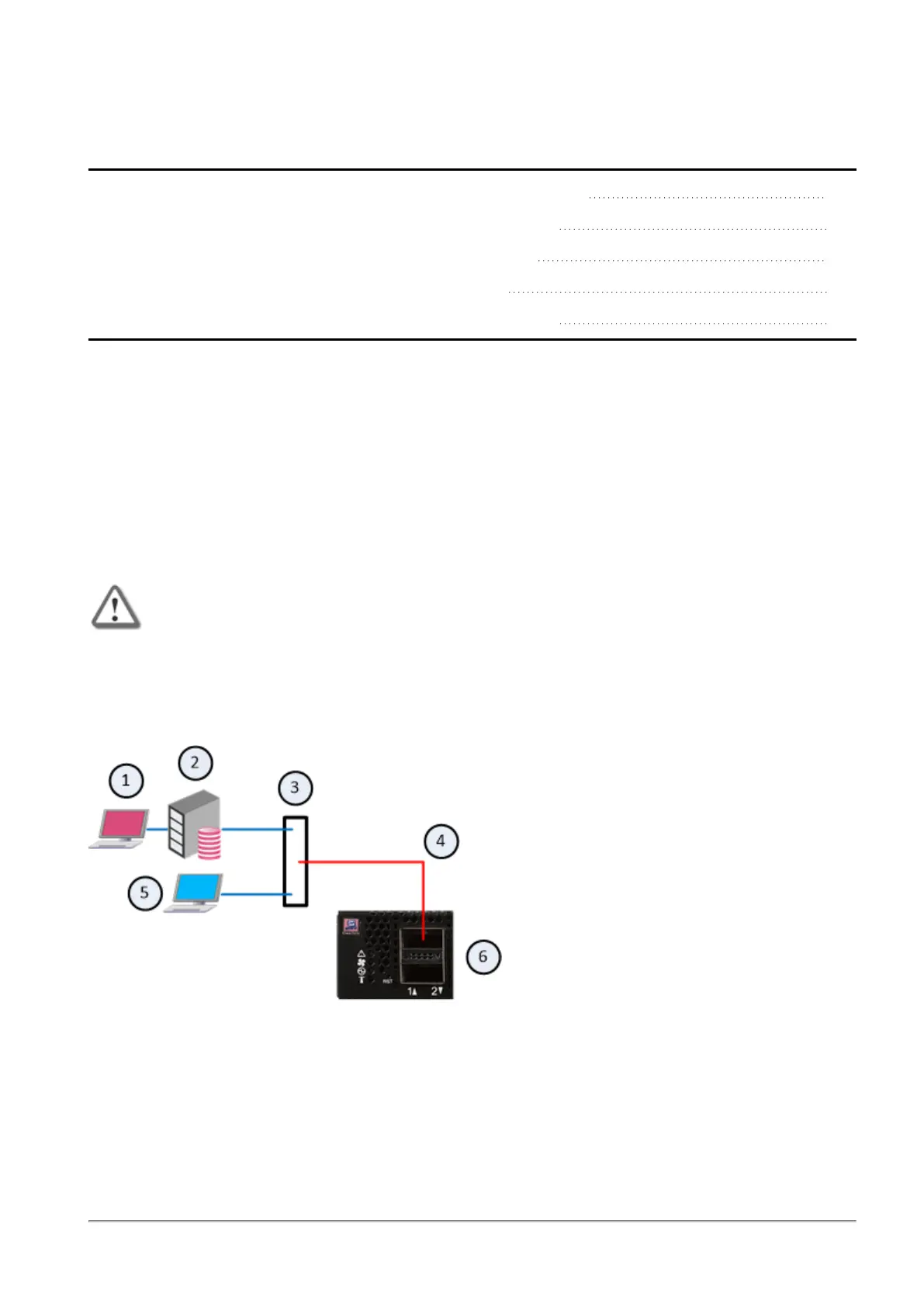
Connecting to the Management Ports with DAC or Fiber Cables
Important - When you connect two Quantum Maestro Orchestrators for redundancy, the
Check Point Management Server connects only to one of the Quantum Maestro
Orchestrators.
Example:
Note - The default Management ports are Port 1 and Port 2. This diagram shows the connection to the
Management port 1. The same applies to the Management port 2.









 To Next Page