LEDs
Quantum Maestro Getting Started Guide|39
Bad Port LED
The Bad Port LED in MHO-170 and MHO-140 models shows errors in one or more ports:
Bad Port LED Behavior
LED
Configuration
Instructions Action Required
Off No errors were received in the last
few seconds (normal condition).
None.
Flashing amber Error. One or more ports received
errors.
Possible causes are:
n
Bad cable
n
Bad connection
n
Bad connector
Check error counters to identify the ports.
For more information, see the
Maestro
Administration Guide for your version
.
Replace the cables connected to these
ports.
Port LEDs
Port LEDs on are located on the front panel.
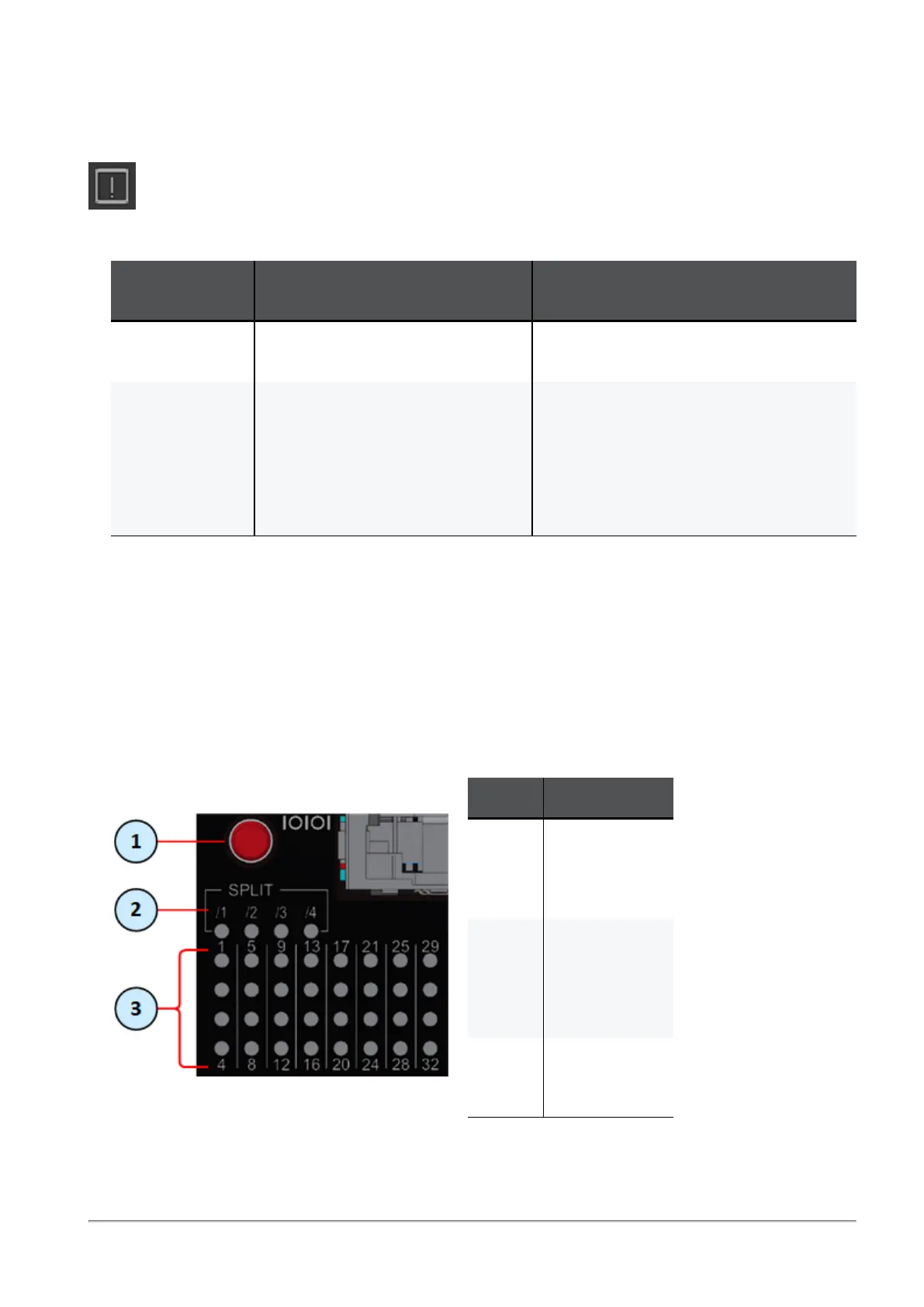
Port LEDs on MHO-175
In MHO-175 all port LEDs are located on the right side.
There are 32 LEDs that correspond to the 32 physical ports.
You can connect 1-to-4 breakout cables to physical ports and get a maximum of 128 ports.
Item Description
1 Button to
select the LED
indication
mode.
2 LEDs that
show the
selected LED
indication
mode.
3 LEDs that
show the port
states.









 To Next Page