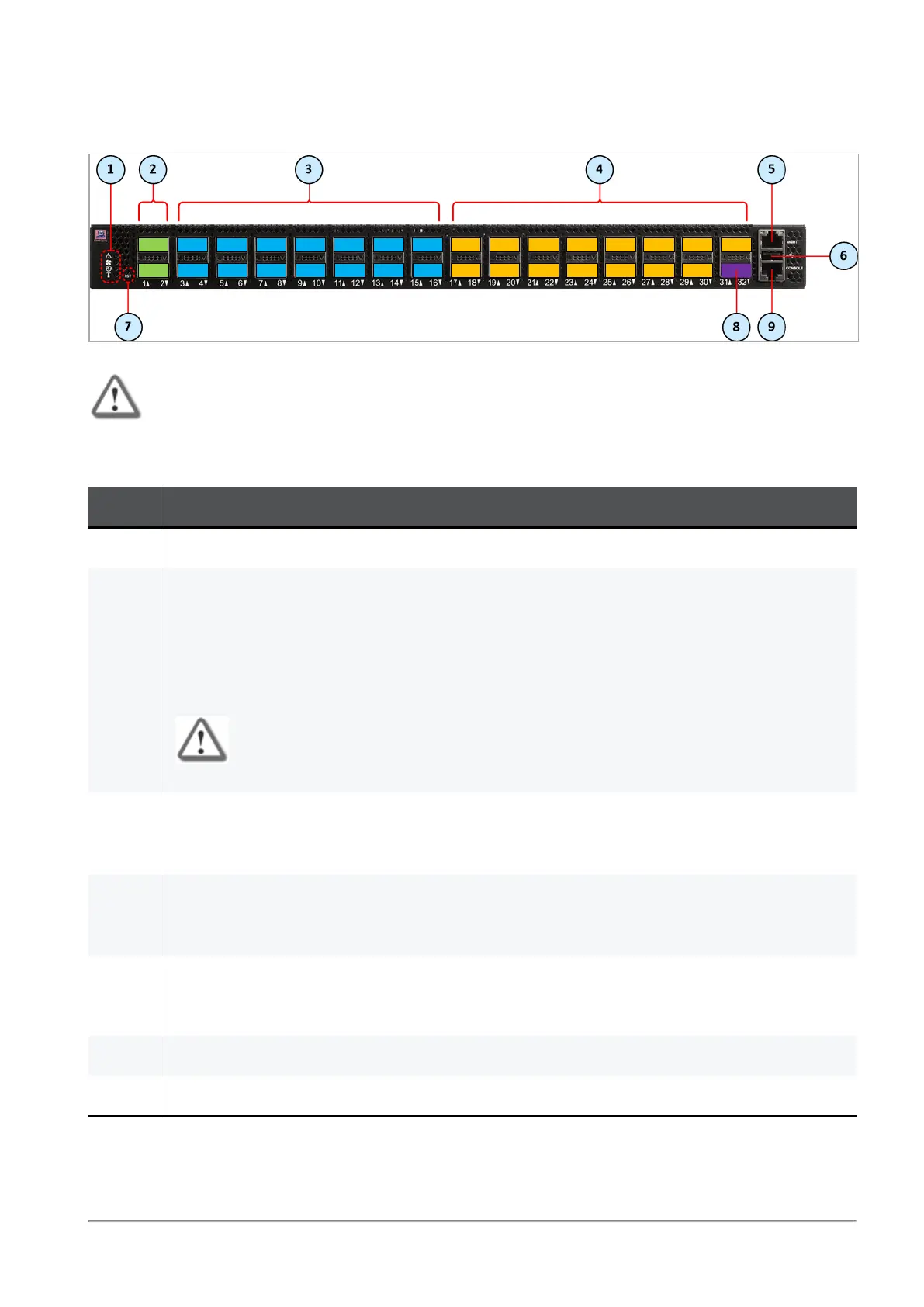
MHO-170 Front Panel
Quantum Maestro Getting Started Guide|26
MHO-170 Front Panel
Important - This section describes the default configuration. It is possible to change the
port type (Management, Uplink, and Downlink) in the Gaia Operating System on the
Quantum Maestro Orchestrator. See the
Maestro Administration Guide for your
version
> Chapter
Configuring Security Groups
> Section
Configuration Procedure
>
Section
Configuring Security Groups in Gaia Clish
> Section
Configuring the Port
Settings
.
Item Description
1 LEDs. See
"LEDs" on page31
.
2 Ports 1 and 2 (colored green), through which you manage the Security Groups.
To these ports you connect:
n
Check Point Management Servers.
n
Clients, from which you configure the Gaia Operating System (Gaia Portal and Gaia
Clish) on the Security Appliances connected to the Downlink ports (4).
Important - It is possible to use only these ports.
3 40 Gbps / 100 Gbps Uplink ports 3 to 16 (colored blue).
To these ports you connect your external traffic and internal traffic networks.
You use DACor Fiber cables (with transceivers).
4 Downlink ports 17 to 31 (colored orange).
To these ports you connect your Check Point Security Appliances.
You use DACor Fiber cables (with transceivers).
5 RJ45 port with the label MGMT. See
"MGMT Ports" on page45
.
To this port you connect a client, from which you configure the Gaia Operating System on the
Quantum Maestro Orchestrator (in Gaia Portal, or Gaia Clish).
6 USB 2.0 port. See
"USB Port" on page47
.
7 Reset button with the label RST. See
"Reset Button" on page49
.









 To Next Page