Connecting Two Quantum Maestro Orchestrators for Redundancy
Quantum Maestro Getting Started Guide|92
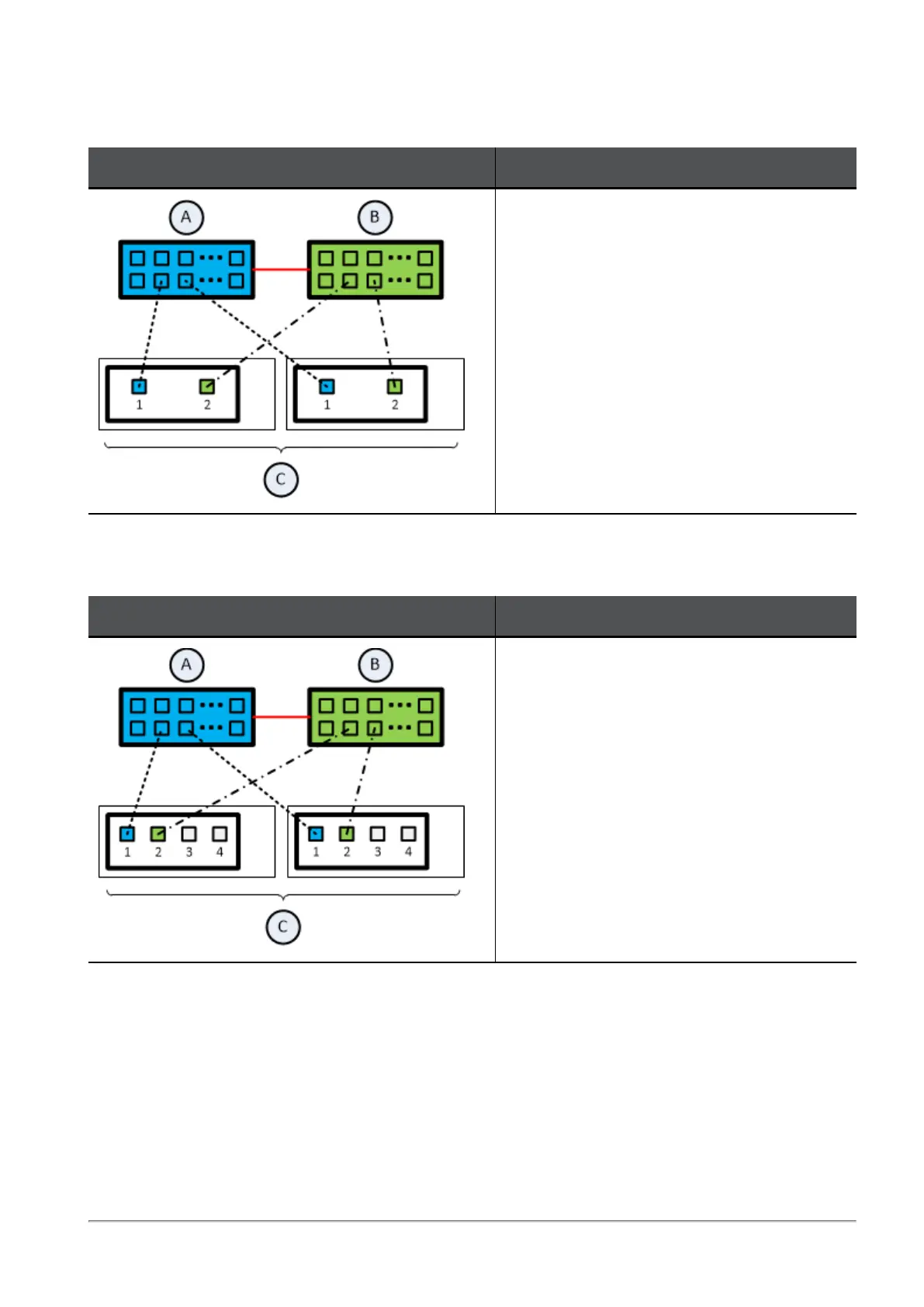
Connecting cables between each Quantum Maestro Orchestrator and ports on the Dual Port Card on
each Security Appliance
Illustration Instructions
On each Security Appliance (C) in the Security
Group:
1. Connect a cable from Port 1 on the Dual
Port Card to a Downlink port on the first
Quantum Maestro Orchestrator (A).
2. Connect a cable from Port 2 on the Dual
Port Card to a Downlink port on the
second Quantum Maestro Orchestrator
(B).
Connecting cables between each Quantum Maestro Orchestrator and 1 out of 4 ports on the Quad Port
Card on each Security Appliance
Illustration Instructions
On each Security Appliance (C) in the Security
Group:
1. Connect a cable from Port 1 on the Quad
Port Card to a Downlink port on the first
Quantum Maestro Orchestrator (A).
2. Connect a cable from Port 2 on the Quad
Port Card to a Downlink port on the
second Quantum Maestro Orchestrator
(B).









 To Next Page