EasyManua.ls Logo

cineVision DVR2000 - Antenna;Basic Cable Connections

Default Icon
48 pages
Print Icon
To Next Page IconTo Next Page
To Previous Page IconTo Previous Page
Loading...
13
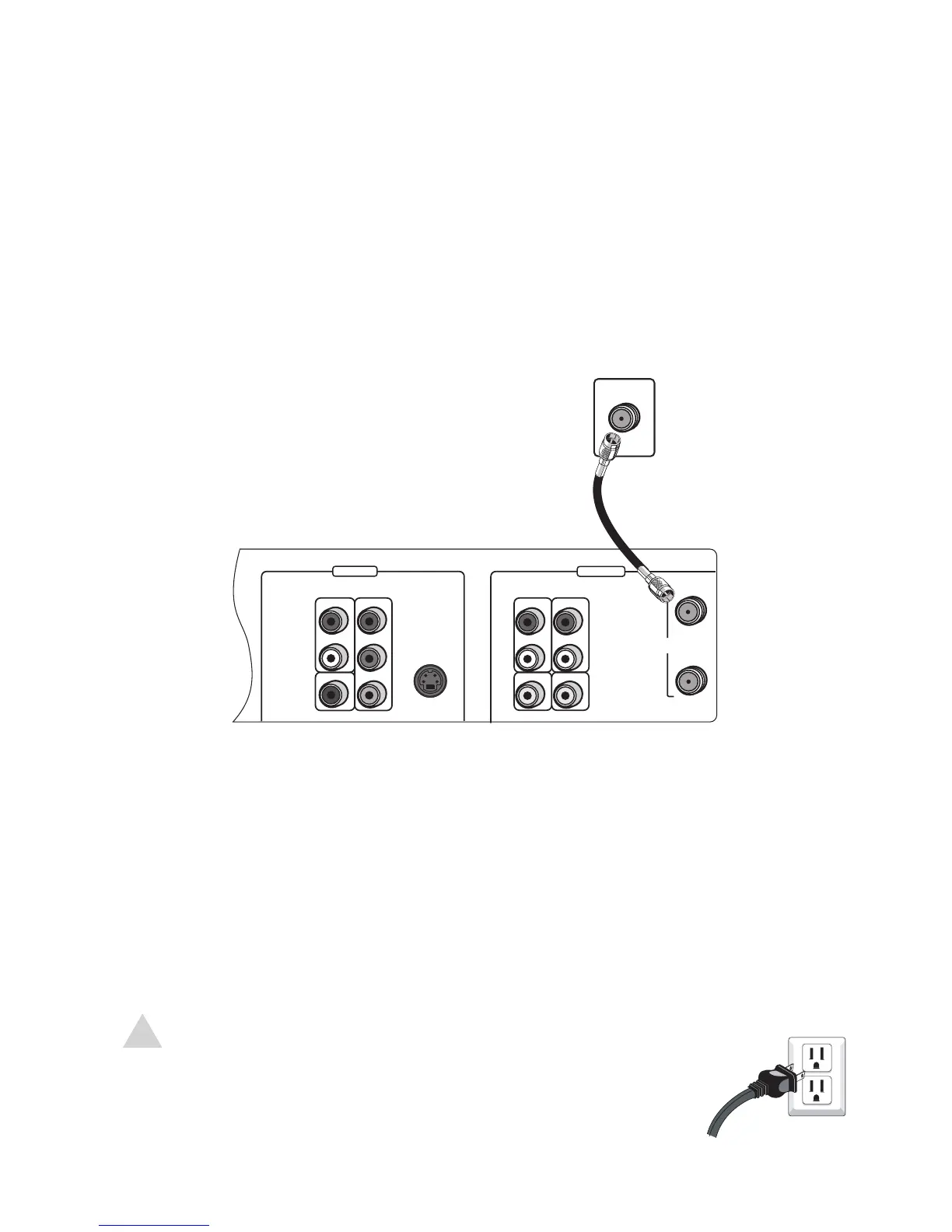
Antenna/Basic Cable Connections
DVD ONLY DVD + VCR
AUDIO
OUT
R
L
R
L
Pr
Pb
Y
DIGITAL
AUDIO OUT
COAXIAL
COMPONENT
VIDEO OUT
VIDEO
OUT
VIDEO 1
IN
IN
(FROM ANT.)
OUT
(TO TV)
RF
S-VIDEO OUT
AUDIO
VIDEO




If you are using an antenna or basic cable TV service:
1 Connect the RF coaxial cable from the antenna or cable wall outlet to the rear
panel of the DVD+VCR as shown.
2 Connect the DVD+VCR to your TV; see page 15.
2 - Connections
NOTE:
Do not connect the AC power cord until all other connections have
been made.
The DVD+VCR receives broadcast channels 2-69 and cable TV
channels 1-125.

Related product manuals