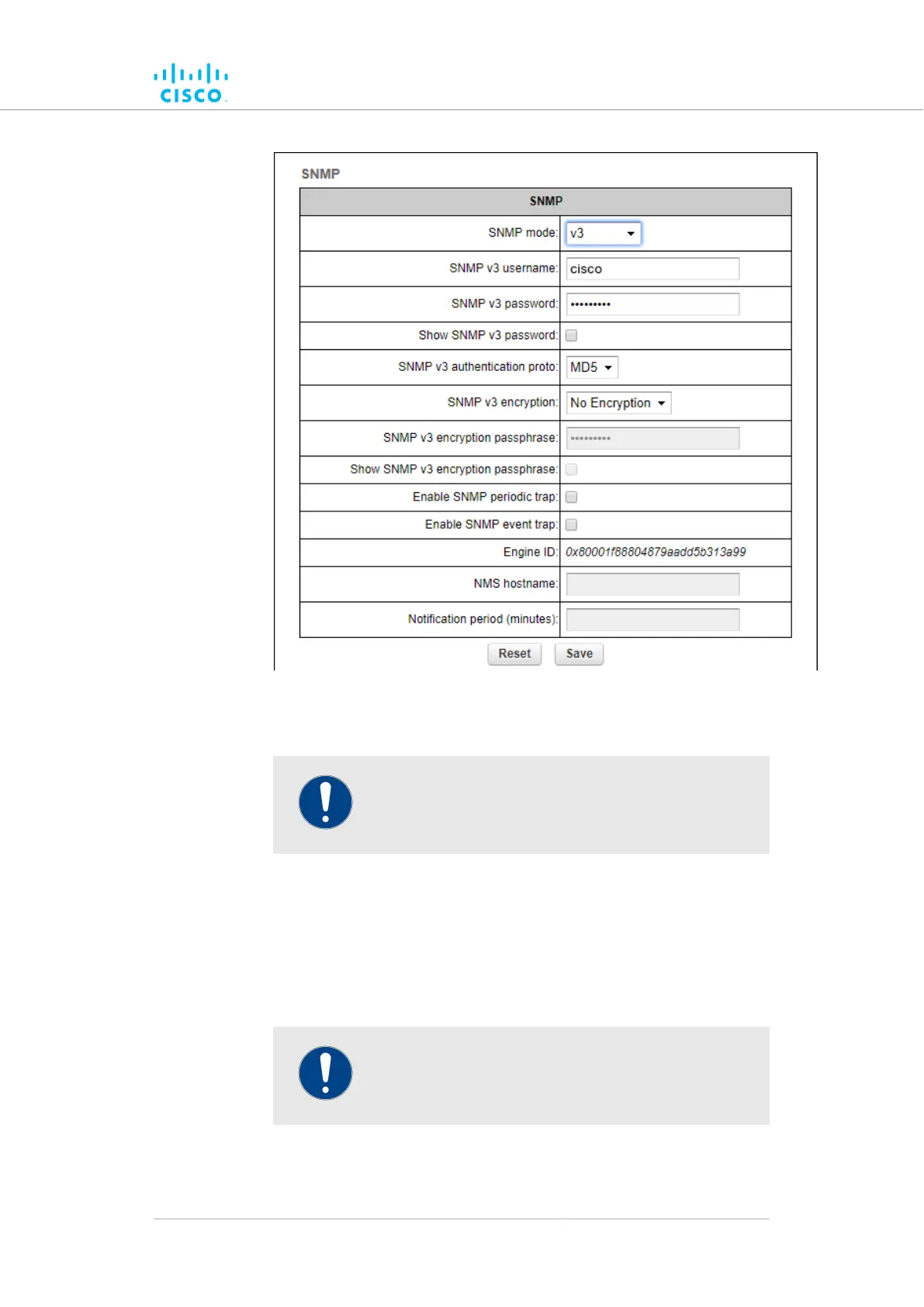
Figure 46. SNMP dialog (v3 selected)
Enter an SNMP v3 user name in the2. SNMP v3 username: field.
IMPORTANT
The same SNMP v3 user name must be set for all
Cisco units in the wireless network.
3. To change the current SNMP v3 password, enter a new password
in the SNMP v3 password: field. The default password
is cisco. To show the password as it is being typed, checkthe
Show SNMP v3 password: check-box.
4. Choose the correct authentication protocol from the SNMP v3
authentication proto: drop-down. The available options are
MD5 and SHA.
IMPORTANT
The same SNMP authentication protocol must be set
for all Cisco units in the wireless network.
5. If needed, choose the correct encryption protocol from the SNMP
v3 encryption: drop-down. The available options are No
Device configuration using the configurator interface
© 2021 Cisco and/or its affiliates. All rights reserved. Page 119 of 189



 To Next Page