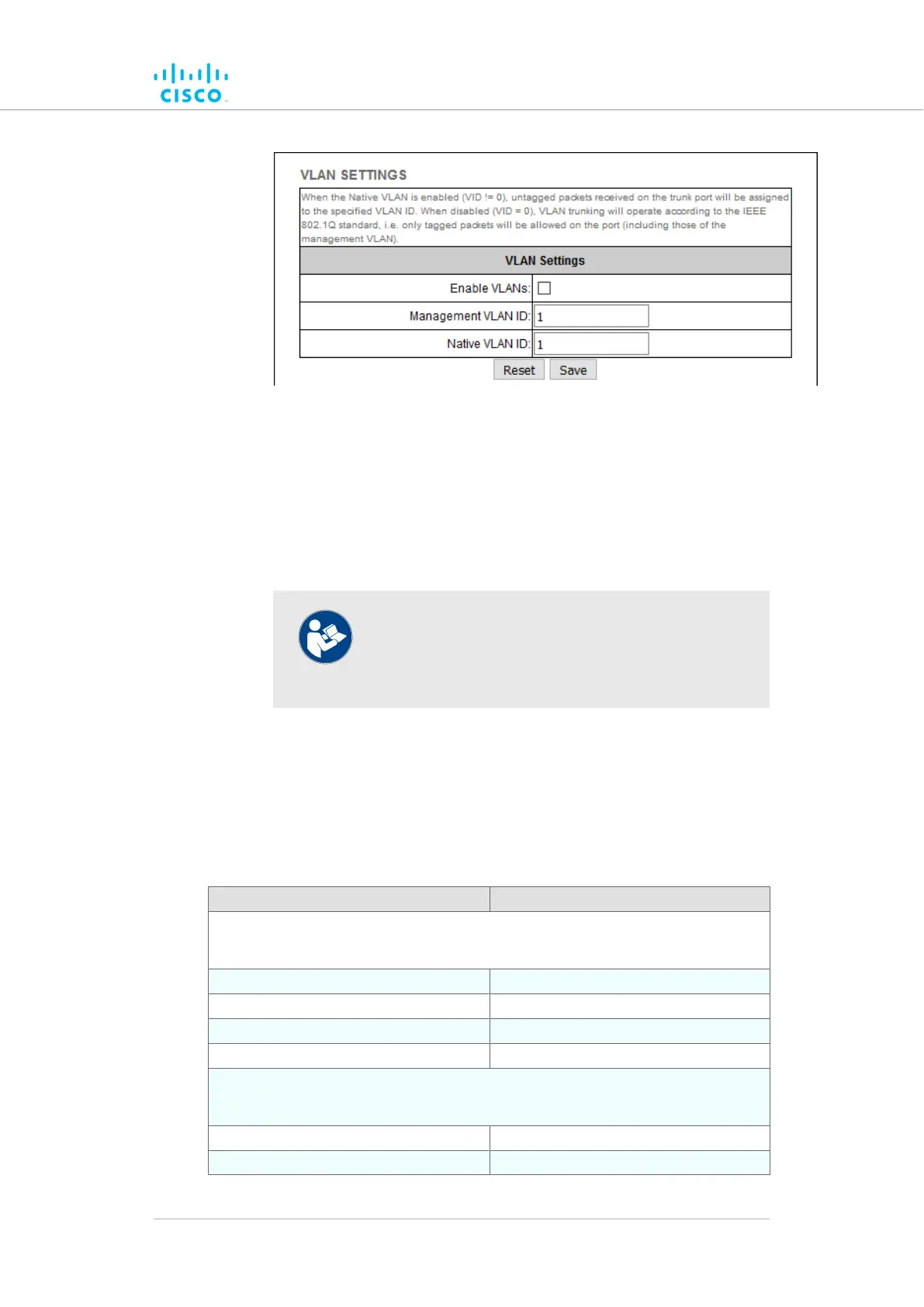
Figure 50. Configurator GUI (VLAN SETTINGS dialog)
2. Connect the unit to a VLAN that is part of the local wireless
network by checking the Enable VLANs check-box.
Check the3. Enable VLANs check-box.
4. Enter the management identification number of the VLAN (used
to communicate with the device's operating system) in the
Management VLAN ID: field.
NOTE
The same Management VLAN ID must be used on all
Cisco devices that are part of the same mesh
network.
5. Enter the native identification number (the VLAN ID implicitly
assigned to untagged packets received on trunk ports) in the
Native VLAN ID: field.
6. Save the VLAN settings by clicking the Save button. Alternatively,
clear the settings by clicking the Reset button.
Rules for packet management
Parameter Default value
Default VLAN configuration
The factory-set VLAN parameters for the unit are as follows:
Management VLAN ID (MVID) 1
Native VLAN ID (NVID) 1
Native VLAN processing Enabled
Port mode (all Ethernet ports) Smart
Traffic classes
The system classifies incoming data packets according to the following definitions:
Signaling Ethernet protocol type $8847 or $09xx
User All other traffic
Device configuration using the configurator interface
© 2021 Cisco and/or its affiliates. All rights reserved. Page 131 of 189



 To Next Page