IMPORTANT
A different DHCP IP address class must be
assigned to every FM1200 Volo, Cisco 3200-
series and Cisco 4200-series radio in the
network. This will help avoid IP conflicts
between different access points.
To configure the radio unit as a DHCP or static-protocol wireless station
(STA), do the following steps:
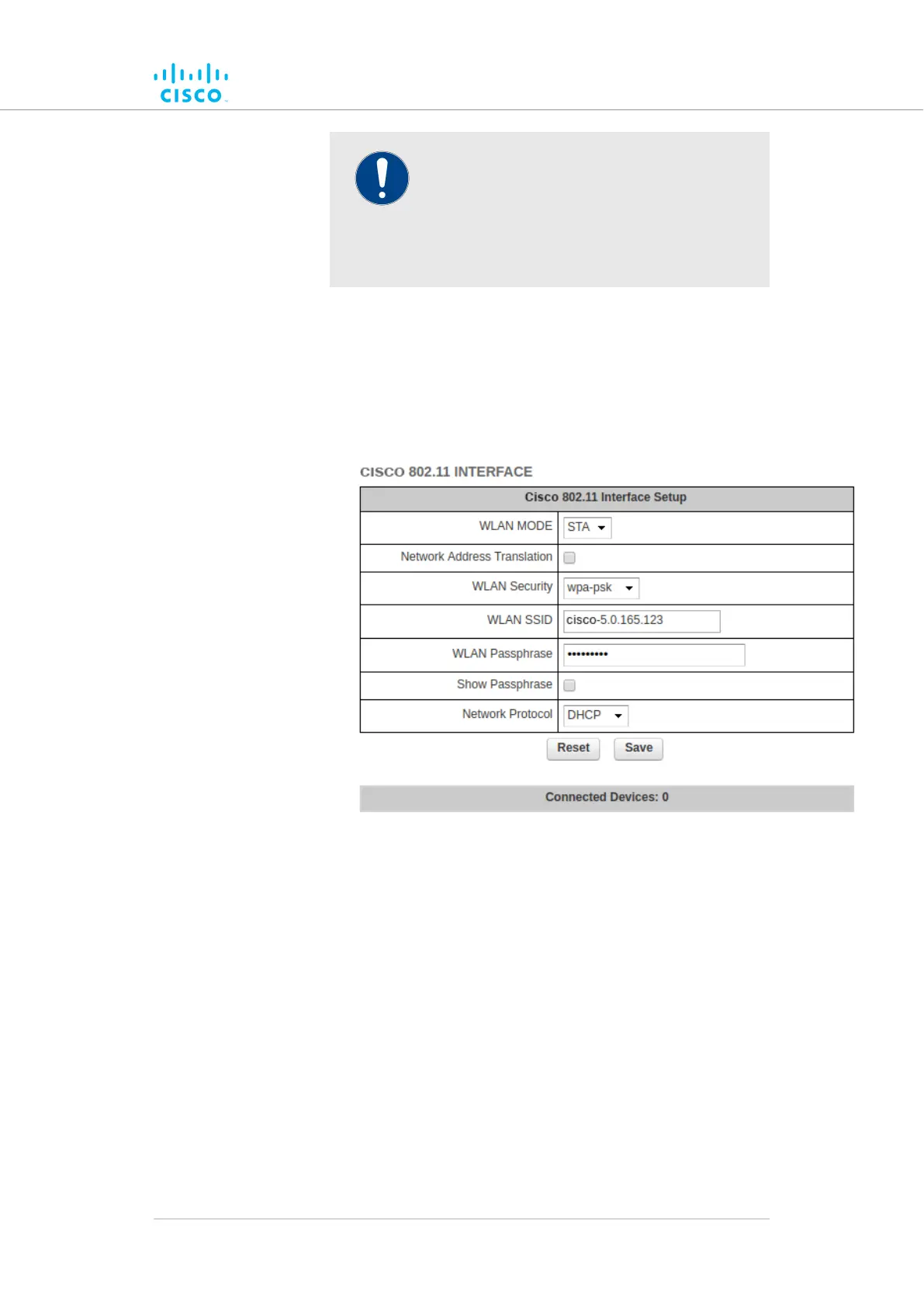
1. Configure the radio unit as a wireless station by clicking the
WLAN MODE drop-down menu and selecting the STA option.
• The CISCO 802.11 INTERFACE dialog will show
additional options (below):
2. To enable network address translation, check the Network
Address Translation check-box.
3. Choose the encryption protocol that will be used to encrypt
communication to and from connected clients by clicking the
WLAN Security drop-down, and choosing a suitable security
option.
4. The radio unit will broadcast the SSID shown in the WLAN SSID
field. If needed, change the SSID manually.
5. When maintenance personnel connect to the unit using the AP,
they will be prompted to enter a secret passphrase. Type a
chosen passphrase in the WLAN Passphrase entry field.
6. To show the WLAN passphrase in plain text as it is being entered,
check the Show Passphrase check-box.
Device configuration using the configurator interface
© 2021 Cisco and/or its affiliates. All rights reserved. Page 123 of 189



 To Next Page