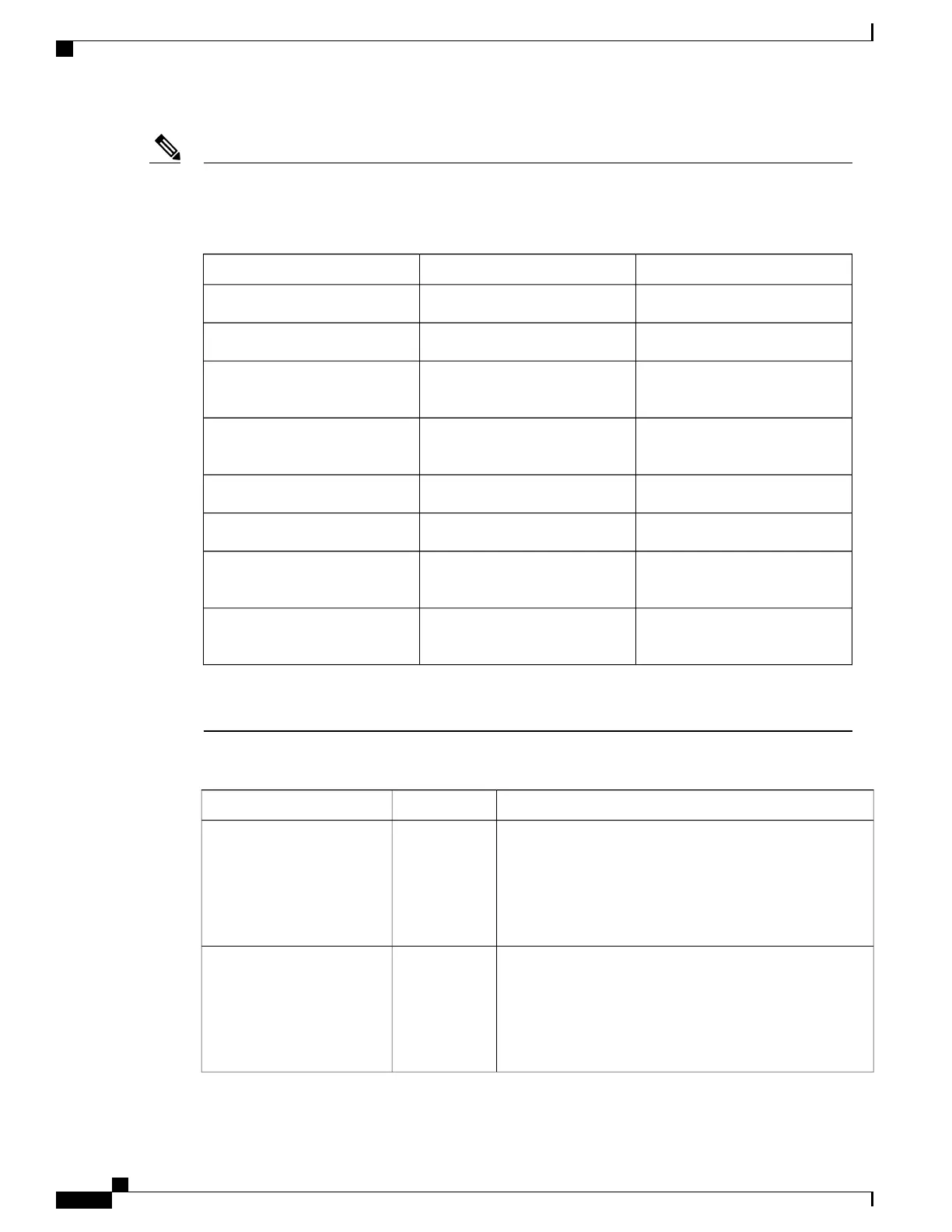
If there are two supervisors installed in the chassis, both must be the same type or you can mix types as
shown in the following table:
Table 1:
Is Combination Allowed?Standby SupervisorActive Supervisor
Note
YesSupervisor ASupervisor A
YesSupervisor BSupervisor B
No--allowed only if Supervisor A
can failover to Supervisor B.
Supervisor BSupervisor A
No--allowed only if Supervisor A
can failover to Supervisor B.
Supervisor ASupervisor B
YesSupervisor A+Supervisor A
YesSupervisor B+Supervisor B
No--allowed only if Supervisor
A+ can failover to Supervisor B+.
Supervisor B+Supervisor A+
No--allowed only if Supervisor
A+ can failover to Supervisor B+.
Supervisor B+Supervisor B+
A Cisco Nexus 9508 chassis with -R line cards requires supervisor B modules.
Supervisor modules are automatically powered up and started with the switch.
To understand the terms used for the supervisors, see the following table.
DescriptionUsageModule Terms
•
Module-27 refers to the supervisor module in chassis
slot 27 (labeled as SUP 1 on the chassis).
•
Module-28 refers to the supervisor module in chassis
slot 28 (labeled as SUP 2 on the chassis).
Fixedmodule-27 and module-28
•
sup-1 refers to the supervisor module in the SUP 1 slot
(slot 27 in the CLI output).
•
sup-2 refers to the supervisor module in the SUP 2 slot
(slot 28 in the CLI output.
Fixedsup-1 and sup-2
Cisco Nexus 9508 NX-OS Mode Switch Hardware Installation Guide
64
Managing the Switch
Overview of Supervisor Modules



 To Next Page