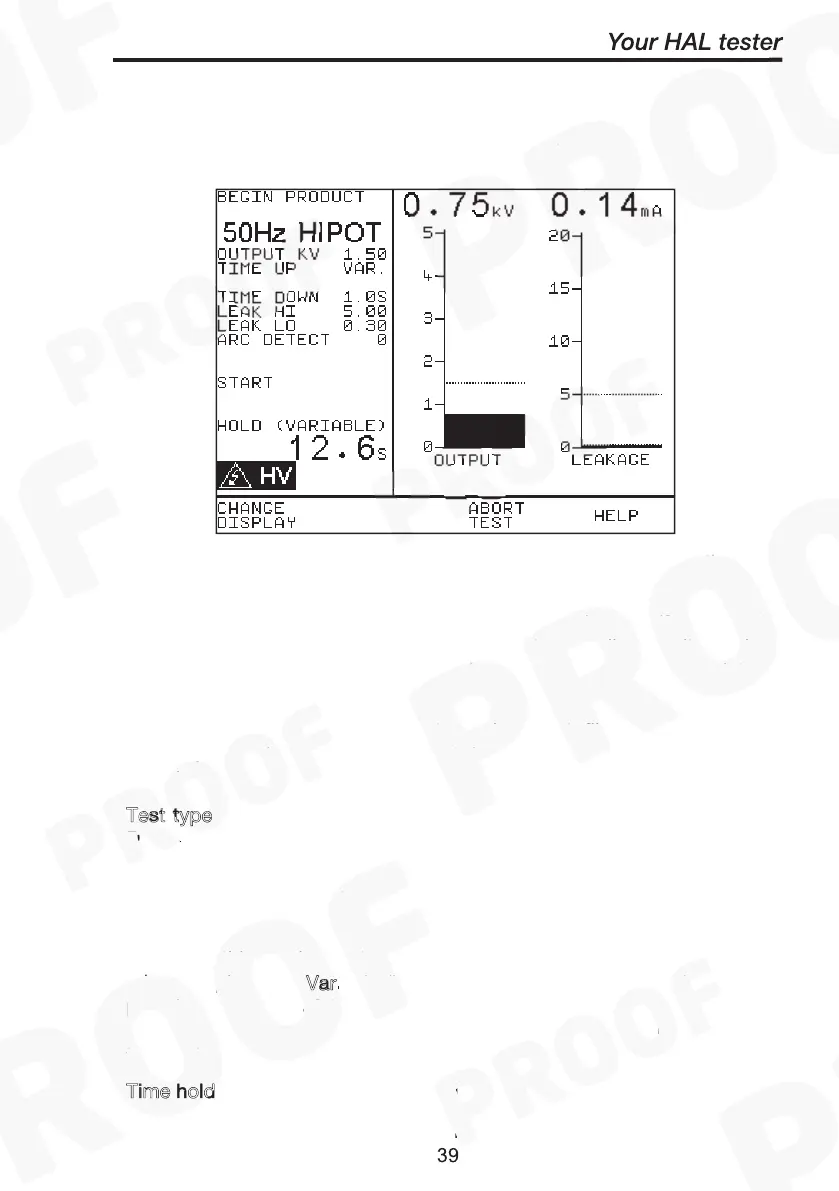
How to use the Meter Display
The Meter screen is displayed prior to tests commencing in both
Automatic Mode and Manual Mode (shown here): -
Begin product
Test type
Output kV
Time up
Var
Time hold
Time down
How to use the Meter Display
The screen can be considered as two panels, left and right. In the left
panel the information is from top to bottom, as follows:
– this is displayed for manual mode only, if a product
number entry is required select this to enter details and it will be
displayed above this line. Note: Only tests results with associated
product details will be stored in memory.
For automatic mode the product number, test filename, test code
sequence number and test repeat loops are displayed here. See
sample
T
est
type, in this case 50Hz AC Hipot. This could be 60Hz AC Hipot,
DC Hipot, DC IR Ground Bond tests (50Hz EBond or 60Hz EBond)
Load / Power Leakage Test or Load / Power Touch Leakage.
– this is the target output voltage value to be reached after
the ramp up period.
– this can be set to a specific value using the encoder, or as in
this example to be V
ariable (i.e. no time limit set – test terminated by
pressing Green or safety guard being released). When variable mode is
selected, turn encoder to achieve the output voltage, then press Green
to stop test.
T
ime hold - this can be set to a specific value using the encoder.
- this can be set to a specific value using the encoder.
How to use the Meter Display
Begin product
Test type
Output kV
Time up
Var
Time hold
Time down
specific value using the encoder.
How to use the Meter Display
Begin product
Test type
Output kV
Time up
Var
Time hold
Time down



 To Next Page