Service Manual-CA60 24-Electrical System 34
Setting the Installed Battery
According to the type of batteries (WET OR GEL/AGM)
,set the machine as follows.
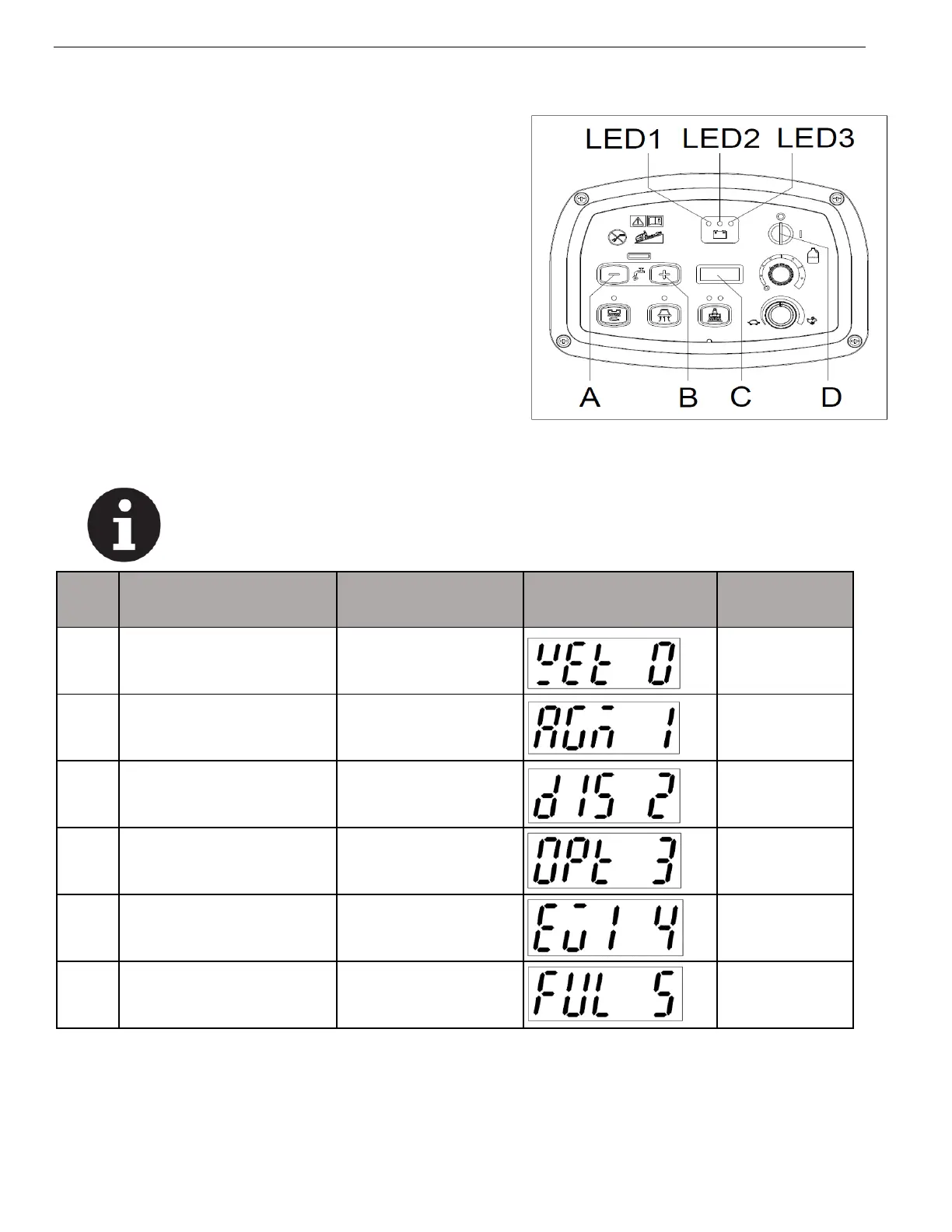
1. Press both the buttons (A, Figure. 2) and (B) at the same. Insert
the ignition key (D) and turn on the power,
after 0.5 second, the LED display (C) ,will show the current
battery type saved in memory to confirm that you are in the
battery setting mode. Then release the buttons.
2. The setting can be changed from 0 to 5 by pressing button(B),
or from 5 to 0 by pressing button(A). After the battery mode
setting is completed, turn off the power(D) and the new setting
of battery mode can be saved automatically.
3. The battery type setting is completed.
Note
Regarding the factory setting, determine the battery type from boot time display according to the
table below.



 To Next Page